


{{ secondMenu.name }}






A node is a physical machine that has installed Sangfor HCI software and connected to Sangfor HCI platform. Its resources are pooled and managed together with other clustered nodes to improve resource utilization.
To add a node, click Add New Node to enter the following page. To change a physical machine to a node managed via Sangfor HCI platform, download and install the Sangfor HCI software and add that node to the Sangfor HCI platform. Then click Next. 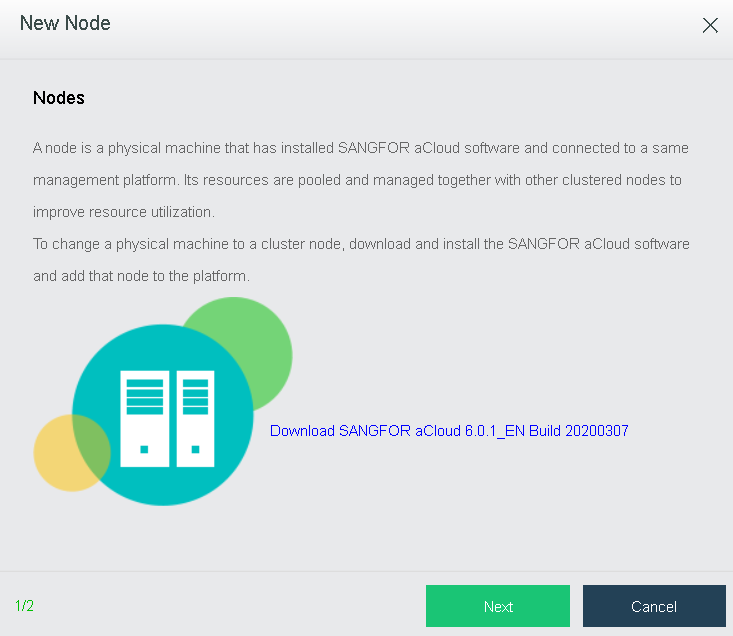
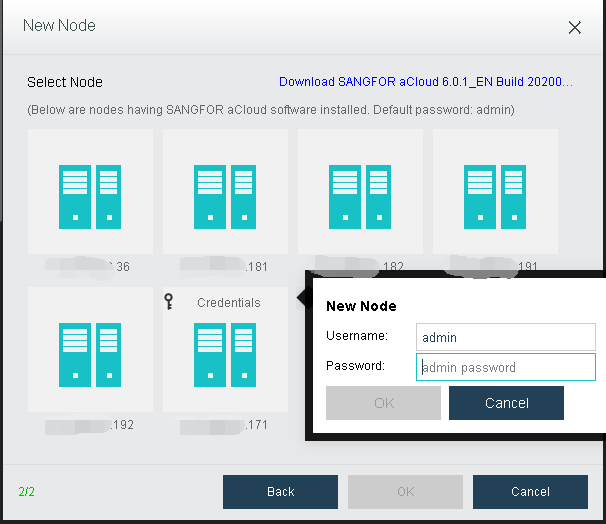
IP Address: Specifies the IP address of the node which has installed Sangfor HCI software.
Username: Specifies administrator’s username of that node.
Password: Specifies administrator’s password of that node.
Finally, click OK.

-A node can be added to one cluster only. If a node has been added to a cluster and you want to add it to another cluster, it must be removed from that cluster first.
-Versions of Sangfor HCI software installed on the nodes to be added to a same cluster must be consistent.
-Management interface IP addresses of the nodes to be added to a same cluster must reside on a same network segment.
-On the New Node page, it lists the automatically-discovered nodes which reside on a same subnet but have not been added to the cluster.
-You may add a new node by clicking the + icon and then input the its IP address, username and password.
-If a node with default password admin is selected, there is no need to specify password again.
-If a node whose password is not admin is selected, you need to specify its password


 {{ $t('index.defaultHeader.chromeBrowserTip') }}