


{{ secondMenu.name }}






An iSCSI server should be configured before you create iSCSI virtual disk. You con configure iSCSI server for different virtual datastores. The configuration process involves configuring iSCSI authentication and target portal(only available for cluster with 3 nodes and above). 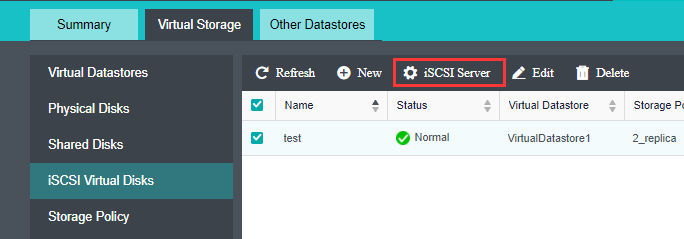
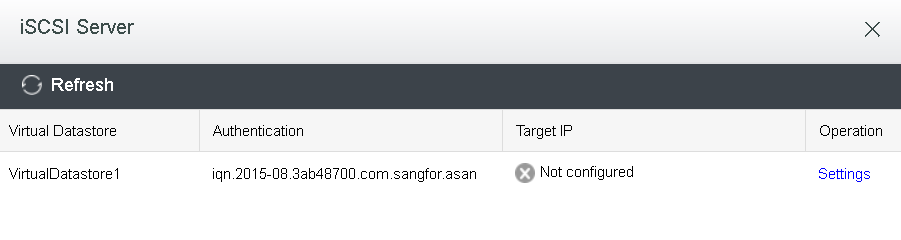
Target Name Prefix, CHAP Username, CHAP Password, and Retype Password fields should be specified, as shown below: 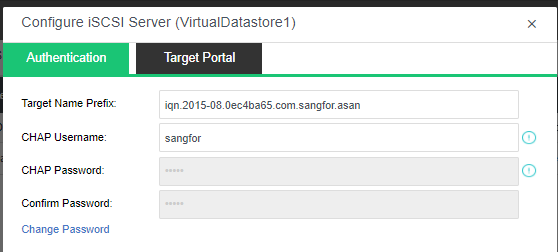
Target Name Prefix: Specifies prefix of target name. Default format is
iqn.date.com.sangfor.asan. The default is recommended.
CHAP Username: Specifies CHAP username used by iSCSI initiator to connect to iSCSI server.
CHAP Password: Specifies CHAP password used by iSCSI initiator to connect to iSCSI server.
Retype Password: Retype the CHAP password.
Change Password: To change password, click Change Password.
On the Target Portal tab, configure the following fields: Network Interface, Target IP Address, Netmask and Virtual IP Pool :
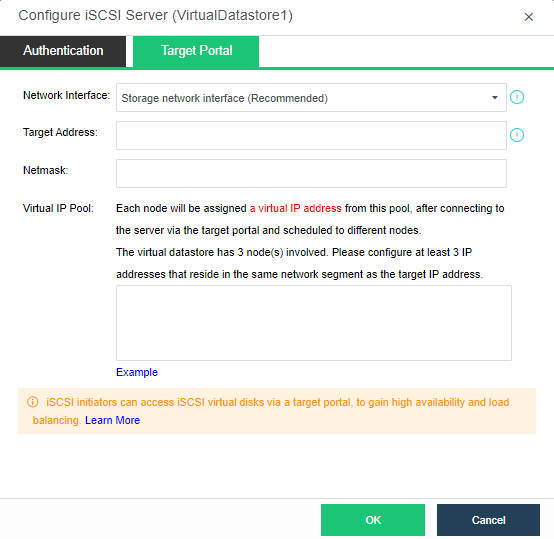
Network Interface: Specifies the interface for iSCSI initiator to access iSCSI server. Options are Storage Network Interface and Management Interface. Management interface cannot be used in the following situations: 1) It is reused as overlay network interface; 2) It is reused as the edge; 3) It applies link aggregation.
Target IP Address: Specifies target IP address. iSCSI initiator connects to iSCSI server through this IP address. Make sure that the target IP address is reachable for iSCSI initiators.
Netmask: Specifies the netmask of the target IP address.
Virtual IP Pool: Each clustered node will be assigned an IP address from virtual IP pool. Thus, initiators will be scheduled to to different nodes after connecting to iSCSI server.

iSCSI initiators can access virtual iSCSI disk via target IP address, to gain high availability and load balancing. Each clustered node will be assigned an IP address from virtual IP pool. Thus, initiator connections to a specified target IP address will be scheduled to different nodes.
Click OK to save the changes. Changes to target portal should also be made at iSCSI initiator side, and if there is any change made to network interface, the iSCSI network should be reconfigured correspondingly.
If the iSCSI connections to nodes are not balanced, click Perform Again to re-schedule initiator connections to different nodes so as to ensure iSCSI connections evenly assigned to each clustered node. iSCSI connections will be preferentially scheduled to the node which has LUN replicas, which helps to enhance IO performance and reduce network load.
Rebalancing load will make some iSCSI connections disconnected and requires administrator to enter password of the username to confirm operation.


 {{ $t('index.defaultHeader.chromeBrowserTip') }}