


{{ secondMenu.name }}






To create a shared disk, you may click New in Storage > Virtual Storage > Shared Disks and configure the related fields on the pop-up page, as shown below: 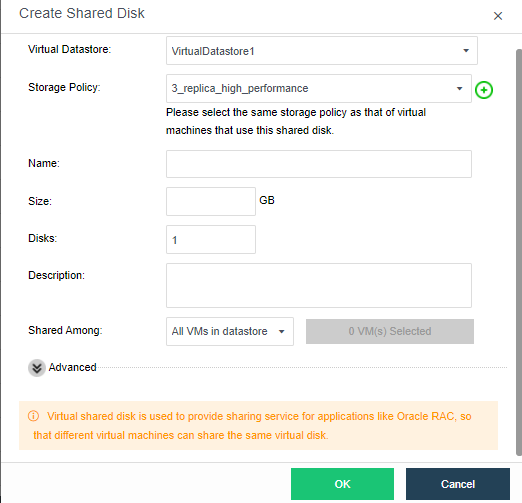
Virtual Datastore: Specifies where the shared disk is stored.
Name: Specifies a distinguishable name of the shared disk. It can only contain Chinese characters, digits, letters, space and the following special characters: ()[]{}()[ ]{ } @|._- +
Storage Policy: Select the number of replication for the disk.
Disks: Specifies the number of shared disks.
Description: It is optional.
Size: Specifies size of shared disk. The maximum is 1TB(1024GB).
Shared Among: You may select Any virtual machine in this virtual datastore or Specified virtual machines.
Any virtual machine in this virtual machine: If it is selected, it indicates that shared disk can be accessed by any virtual machine in the specified virtual datastore.
Specified virtual machines: If it is selected, you need to specify virtual machines. Only the selected virtual machines can access shared disk.


 {{ $t('index.defaultHeader.chromeBrowserTip') }}