Hyper Converged Infrastructure (HCI/aSV)

Sangfor HCI and aSV provide a unified infrastructure combining compute, storage, networking, and built-in security to simplify deployment, operations, and services.
{{ $t('productDocDetail.guideClickSwitch') }}
{{ $t('productDocDetail.know') }}
{{ $t('productDocDetail.dontRemind') }}
{{sendMatomoQuery("Hyper Converged Infrastructure (HCI/aSV)","PaaS Correlated")}}

PaaS Correlated

{{ $t('productDocDetail.updateTime') }}: 2026-01-09

Function Description
The KubeManager platform supports docking to virtual storage aSAN or file storage NFS for data persistence storage, so that users can store business data outside the application Pod and protect the application data from being affected when the application Pod fails. To interface KubeManager platform with aSAN storage, you need to use PAAS correlated function in Correlated Security Service.

Precaution
No

Prerequisites

  1. aSI license is required for HCI platform.
  2. The KubeManager platform and HCI platform can communicate normally

Operation steps

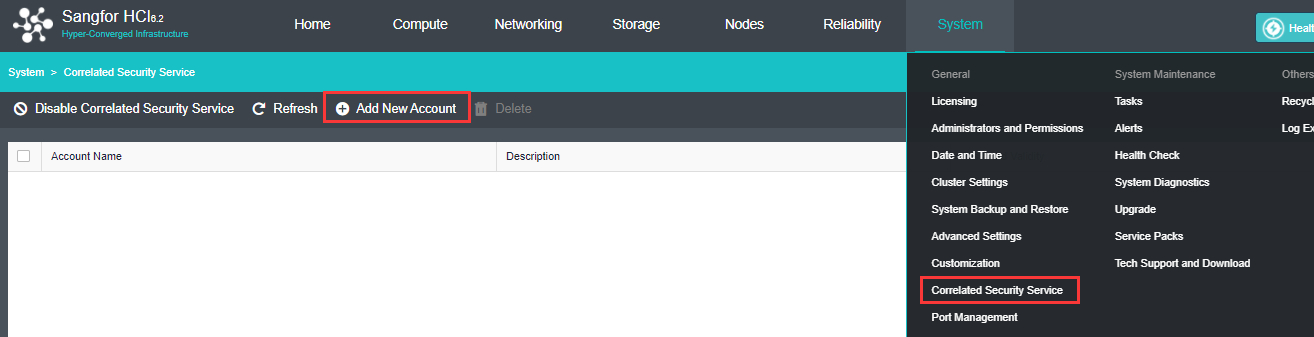
  1. Login to the HCI web console, navigate to System > Correlated Security Services, and click Add New Account.

  1. Customize the account information.

Account name: Name of the account, for example: simon.

Description: Account description, for example: simon-paas.

Password: Password of the account.

Correlated Platform: PaaS.

Permission: Check Virtual Storage (checked by default).
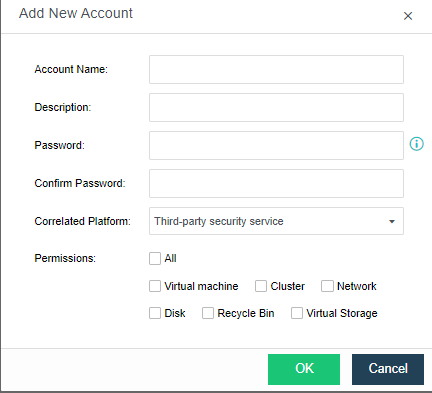

  1. Click OK and the service account is added.

  1. Login to KubeManager platform, switch to the cluster where you want to add storage server,navigate to Storage > Storage Servers, and click Add Storage Server.
  2. Enter the name of the storage server, select the corresponding storage type, and configure the basic information of the server.
    1. Name: Customize the server name.
    2. Type: Support Sangfor NFS and Sangfor aSAN storage servers; Sangfor aSAN is recommended, with high reliability and stable performance.
    3. NFS server information.

Server address: the address of the NFS server.

Storage path: The path where the NFS server is stored.

Version: The version of the NFS server.

  1.  aSAN Server Information.

Gateway address: https:// HCI cluster IP:4433.

Authenticated Account: The name of the service account added in step 2.

Authenticated Password: The password of the service account added in step 2.

  1. Click Save to finish adding the storage server.