


{{ secondMenu.name }}






Distributed firewall is supported starting from Sangor HCI 5.2 version, which can achieve control over access to any node based on virtual machine IP address, virtual machine, VM group or VM tag. 

To configure a firewall rule, click Distributed Firewall in Networking and then click New to enter the following page. 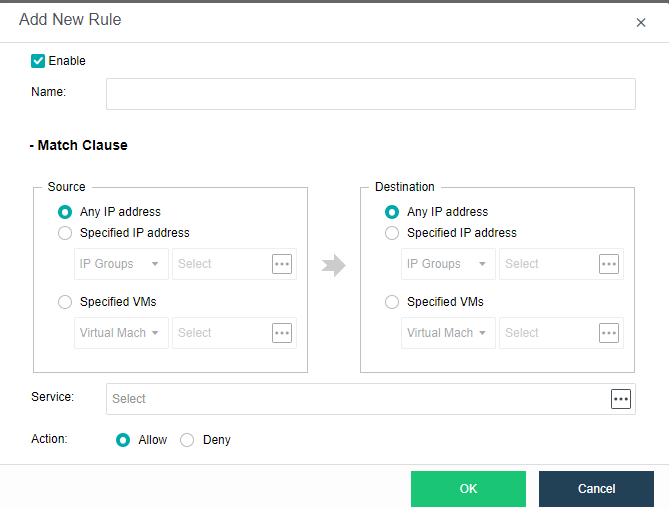
To enable firewall rule, select Enabled.
Name: Specifies a distinguishable name for the firewall rule.
Match Clause: For Source and Destination, options are Any IP address, Specified IP address, Specified virtual machine. If Specified IP address is selected, you may select IP Groups or IP Addresses. If Specified virtual machine is selected, you may select Virtual Machine, VM Group, or Tags.
Service: Specifies service(s) to which the firewall rule applies.
Action: Specifies action to matching service, Allow or Deny.


 {{ $t('index.defaultHeader.chromeBrowserTip') }}