


{{ secondMenu.name }}






After a cluster is created, you need to configure overlay network interface for each node. Overlay network interface must be a Gigabit or 10-Gigabit interface and connected to a Gigabit or 10-Gigabit switch (If there are only two nodes, connect two overlay network interfaces directly without using any switch). To improve bandwidth and redundancy of overlay network interface, you can use an aggregate interface as a overlay network interface.
By default, management interface and overlay network interface are set to a same interface. To improve data transmission efficiency, configure the management interface and overlay network interface(VXLAN) to reside on different physical NICs. To configure overlay network interface, go to Nodes > Communication Interface > Overlay Network Interface(vxLAN). Specify an overlay network interface for each node and configure a corresponding IP address and netmask. 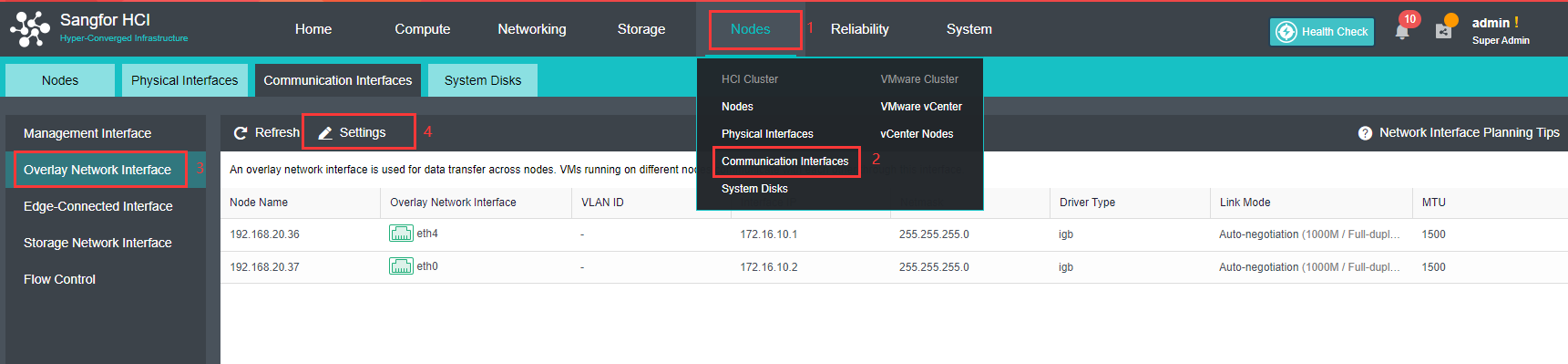
To improve data transmission efficiency, high performance mode should be enable. In that mode, MTU will be changed to 1600 and therefore VXLAN encapsulated data will not be fragmented when being forwarded to physical network, but Jumbo Frame must be enabled on the physical switch connected to a host installed Sangfor HCI software. 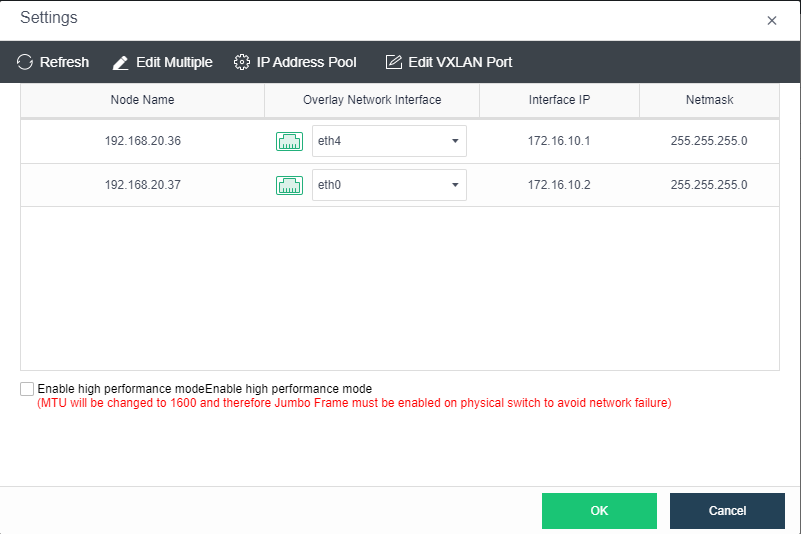


 {{ $t('index.defaultHeader.chromeBrowserTip') }}