


{{ secondMenu.name }}






Features
Elastic IP is an independent Public IP resource, which can be bound to the virtual machine, routers, ADC, SSL VPN, and other devices of the VPC. It can be dynamically unbound to achieve the decoupling of public IP and these devices, meeting the requirements of flexible management and dynamic provisioning.
Precautions:
SCP Version 6.7.0 and below, the elastic IP is associated with the resource pool. SCP version 6.7.0 and above, the elastic IP is associated with VPC.
Prerequisite
Tenants have sufficient elastic IP resources.
Steps:
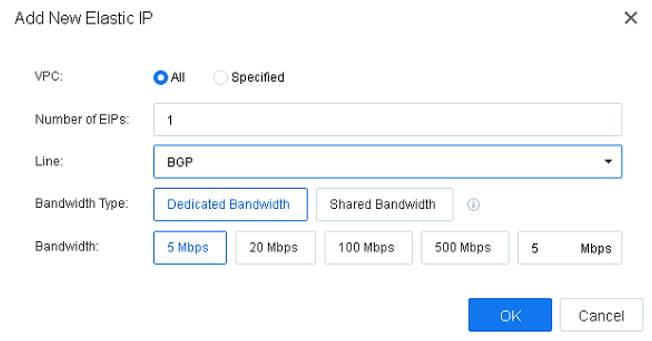
Navigate to Networking > IP and Bandwidth, click the New button, select All or Specified the VPC, fill in the Number of IPs, select the type of Line, and the Bandwidth Type can select either Dedicated Bandwidth or Shared Bandwidth. When selecting Shared Bandwidth, you can use the existing shared bandwidth or create a new shared bandwidth.
Features:
Dedicated bandwidth means that a single elastic IP uses the allocated bandwidth and does not affect other elastic IPs. Shared bandwidth can be shared by multiple elastic IPs. For instance, three elastic IPs can share a total bandwidth of 10 Mbps. Therefore, the total bandwidth available for these three elastic IPs is 10Mbps.
Tenants can create a shared bandwidth and associate it with an elastic IP. After the association, the elastic IP can use the same bandwidth together.
Precautions:
Precautions:
N/A.
Steps:
Navigate to Networking > IP and Bandwidth, select the Shared Bandwidth, click the New button, enter the Name of the shared bandwidth, select the appropriate VPC and Line, set the Bandwidth, and lastly, associate with the Existing EIPs, New or Associate Later manually.


 {{ $t('index.defaultHeader.chromeBrowserTip') }}