


{{ secondMenu.name }}






Feature Description:
After the tenant deletes the virtual machine, NFV equipment, and backup files, the deleted information will be moved to the recycle bin. The tenant can permanently delete or recover the deleted information.
Precautions:
The data in the recycle bin will be stored for 30 days by default. After 30 days, the platform will automatically delete it.
Prerequisite
N/A.
Steps:
Step 1.Navigate to Management > Recycle Bin. Tenants can view deleted virtual machines, network components, NFV devices, and backup files.
Virtual Machines: The deleted virtual machines.
Networking Components: List of network devices that have been removed, such as switches and routers.
Network Services: The deleted NFV devices.
Backup: List of deleted virtual machines backup files. 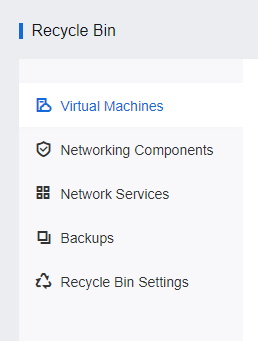
Step 2.Select the corresponding virtual machine, network element, NFV device, or backup file and click Restore to restore the deleted virtual machine, NFV device, or backup file. Click Delete to permanently delete the deleted virtual machine, network element, NFV device, or backup file. Click Delete to delete all files, network components, NFV devices, and virtual machines currently in the recycle bin.

Step 3.Click Delete to delete all virtual machines or network devices in the corresponding list in the recycle bin. The operation of completely deleting and emptying the recycle bin needs to be confirmed by entering the admin user's password. 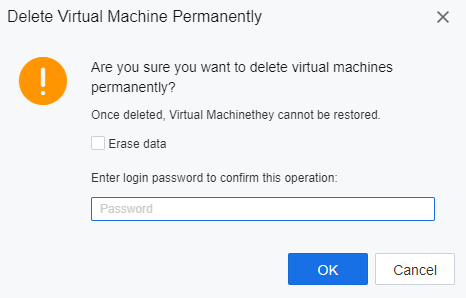

This deletes operation will completely delete the virtual machine or network device data. Please operate with caution.


 {{ $t('index.defaultHeader.chromeBrowserTip') }}