


{{ secondMenu.name }}






Function Description
Sangfor SCP's hardware health detection can help managers clearly perceive the platform's hardware status. Managers do not need to check the hardware detection information of each server one by one. Still, they only need to use Sangfor SCP's reliable hardware services to monitor the entire platform at any time. The hardware health check mainly detects hardware such as CPU, memory, SSD, HDD, network card, RAID card, and external storage of each node. Any alarm or exception will be displayed on the interface.
Function Description:
This function is used to check the health status of hardware CPU, memory, SSD, HDD, network card, RAID card, and external storage and to discover possible availability problems in advance.
Precautions:
None.
Prerequisite
None.
Steps:
Step 1.Log in to the SCP platform, select Reliability > Hardware Health Check, or click Reliability > Holistic View > Any Hardware > View Details to view the hardware status.
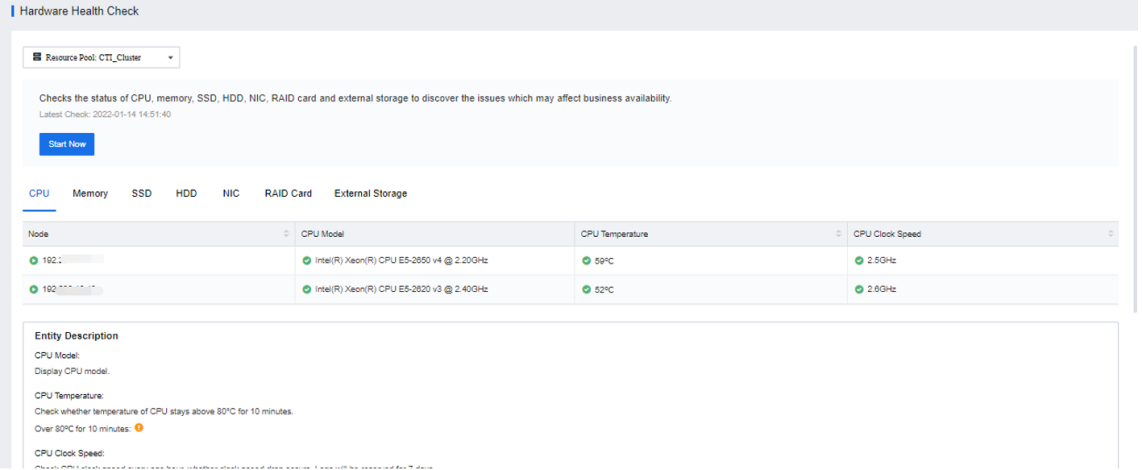
Step 2.You can click the Start Now button to get the latest status, click Entity Description to view the detection threshold of the corresponding detection item, or click Suggestion to view the corresponding suggested solution.


 {{ $t('index.defaultHeader.chromeBrowserTip') }}