


{{ secondMenu.name }}






Function Description:
Generally, the operating status of equipment is often overlooked, and it is only discovered by managers when it causes an accident. Sangfor SCP can conduct holistic operation and maintenance of cluster operation status and hardware by building a reliability center platform. The operation and maintenance personnel do not need to check each device's hardware status and platform operation status one by one, but only through the SCP reliability center. The holistic view is the entry point, and you can intuitively view the overall running status and hardware status of the cluster, helping managers to find problems in time and issues in advance.
The following mainly introduces how to view the platform resource overload status, network configuration status, storage volume status, and data rebuilding status and briefly describes the key parameters.
Function Description:
This function checks the resource usage of hardware CPU, memory, storage, and interface traffic status and whether there is overload.
Precautions:
None.
Prerequisite
None.
Steps:
Step 1.Log in to the SCP platform and select Reliability > SCP Status Check > Overload Check. You can view the resource usage of CPU, Memory, Storage, and Interface traffic status.
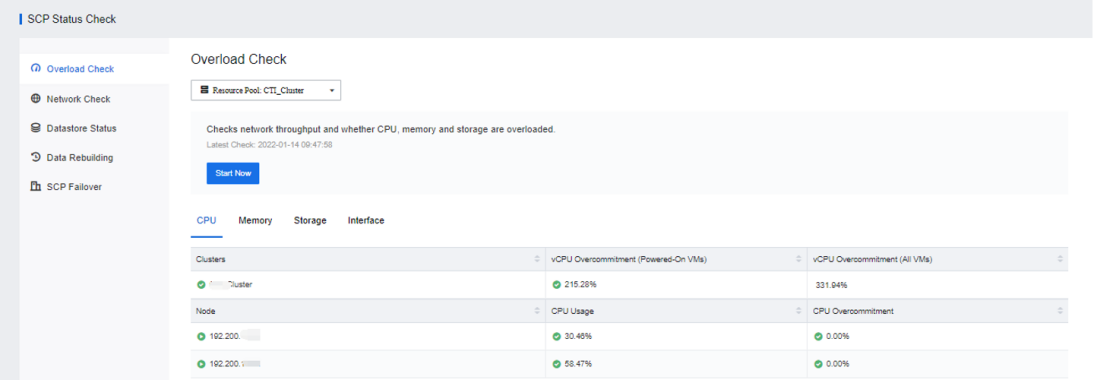

CPU overcommitment is the ratio of the CPU resources configured by the powered-on virtual machine to the total CPU resources of the server. The memory occupied by virtual network devices and platforms is not calculated here.
Memory over commitment ratio refers to the ratio of the actual configured memory resources of the powered-on virtual machine to the total server memory resources. The memory occupied by virtual network devices and platforms will not be calculated here.
Storage overcommitment ratio refers to the ratio of the actual configured virtual machine storage resources to the total virtual storage resources of the server.
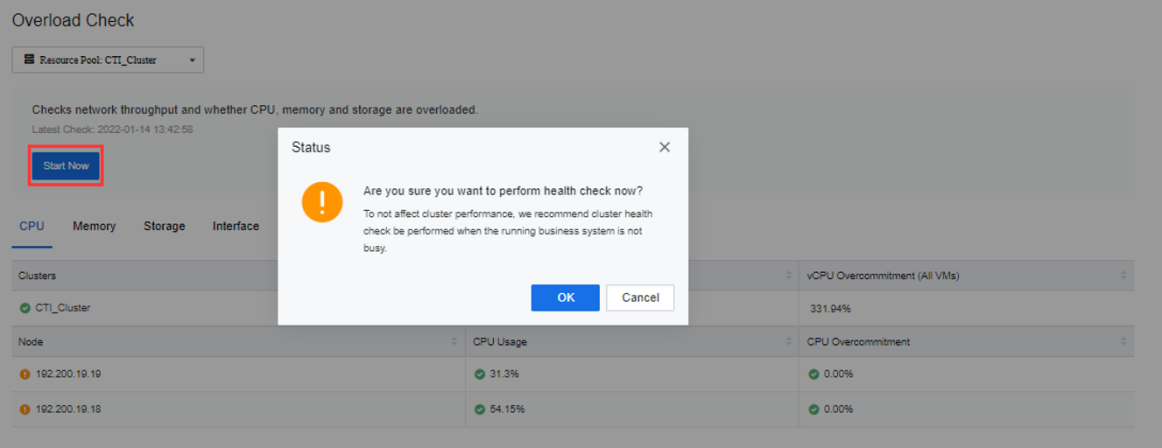
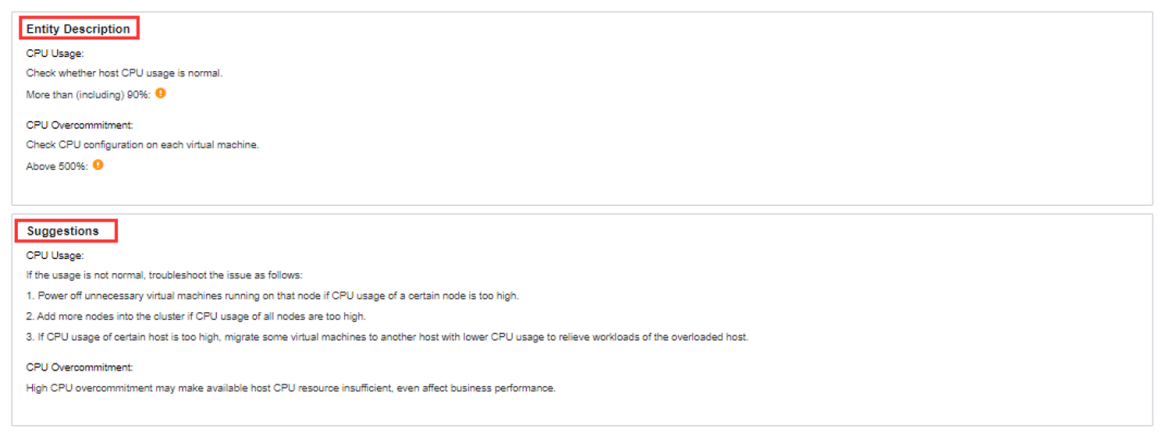
Step 2.You can click the Start Now button to get the latest status, click Entity Description to view the detection threshold of the corresponding detection item, or click Suggestions to view the corresponding suggested solution.
Function Description:
This function checks the redundancy and connectivity status of the node management interface, overlay interface, and virtual storage interface.
Precautions:
None.
Prerequisite
None.
Steps:
Step 1.Log in to the SCP platform, select Reliability > SCP Status Check > Network Check, or click Reliability > Holistic View to enter the Network Check page. You can view the detected nodes' connectivity status of Management Interfaces, Overlay Network Interface, and Storage Network Interface.
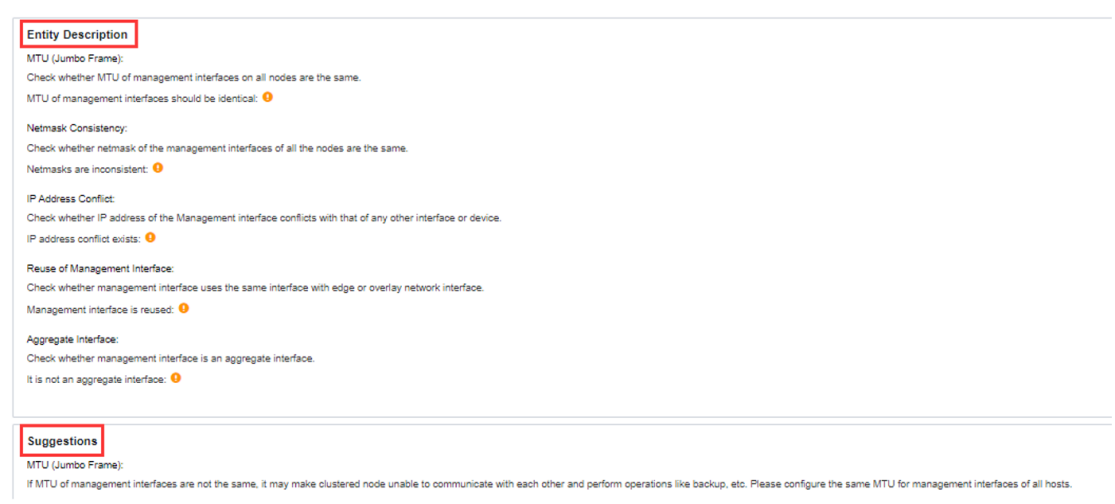
Interface multiplexing detection detects the multiplexing state of the edge port and the management interface, and multiplexing is not recommended here.
Reuse interface detection detects whether the corresponding interface has redundant configurations such as aggregation.
Step 2.You can click the Start Now button to get the latest status, click Entity Description to view the detection threshold of the corresponding detection item, or click Suggestions to view the corresponding suggested solution.
Function Description:
Multiple copies across nodes ensure that the data in the cluster will not have a single point of failure of the node. Check the health status of multiple copies to ensure the reliability of platform data.
Precautions:
None.
Prerequisite
None.
Steps:
Log in to the SCP platform, select Reliability > SCP Status Check > Datastore Status, or click Reliability > Holistic view > Datastore Status > View Details. You can view virtual storage Replicas, the virtual datastore Status, Cache Disks, Data Disks, etc.
Function Description:
When a node or hard disk fails and not responding, if the remaining storage space is sufficient, no spare disk or manual intervention is required to replace the disk/node, and the replicas are automatically rebuilt to the remaining hard disks/nodes in the cluster to restore the validity of the data copy.
Precautions:
None.
Prerequisite
None.
Steps:
Log in to the SCP platform, select Reliability > SCP Status Check > Data Rebuilding, or click Reliability > Holistic View > Data Rebuilding > View Details to enter the data rebuilding status viewing interface to view the data rebuilding status.


 {{ $t('index.defaultHeader.chromeBrowserTip') }}