


{{ secondMenu.name }}






The VM scheduling policy supports the configuration of mutual exclusion or aggregation policies for multiple virtual machines and clusters. Through the scheduling policy, the running location of the virtual machine can be precisely controlled to meet the needs of virtual machine business tuning.
Function Description:
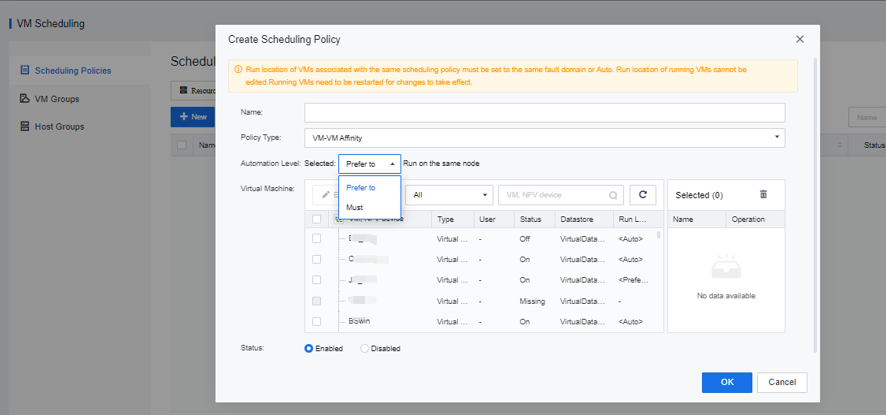
Aggregated VM allows multiple VM to be bound and run on a physical node. For example, VM with frequent business visits or virtual machine in the same business group is bound to the same server to improve business access performance.
Precautions:
• The running virtual machine does not support modifying the Running Location configuration.
• After the scheduling policy is created on the running virtual machine, the virtual machine needs to restart to take effect.
Prerequisite
None.
Steps:
Enter the Reliability > VM Scheduling > Scheduling Policies, and click New to configure an aggregation policy for the virtual machines in the same Run Location.
Function Description:
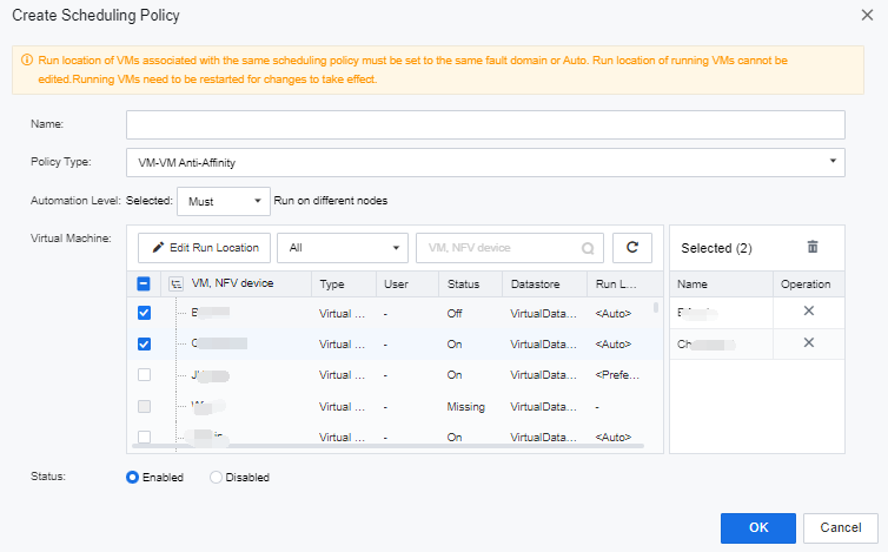
Mutually exclusive virtual machines run the selected virtual machine on different physical nodes. For example, cluster systems such as Oracle RAC are mutually exclusive on different physical servers to ensure business reliability.
Precautions:
• The running virtual machine does not support modifying the Running Location configuration.
• After the scheduling policy is created on the running virtual machine, the virtual machine needs to restart to take effect.
Prerequisite
None.
Steps:
Go to Reliability > VM Scheduling, and add the virtual machine whose run locations are mutually exclusive to the mutual exclusion policy.
Function Description:
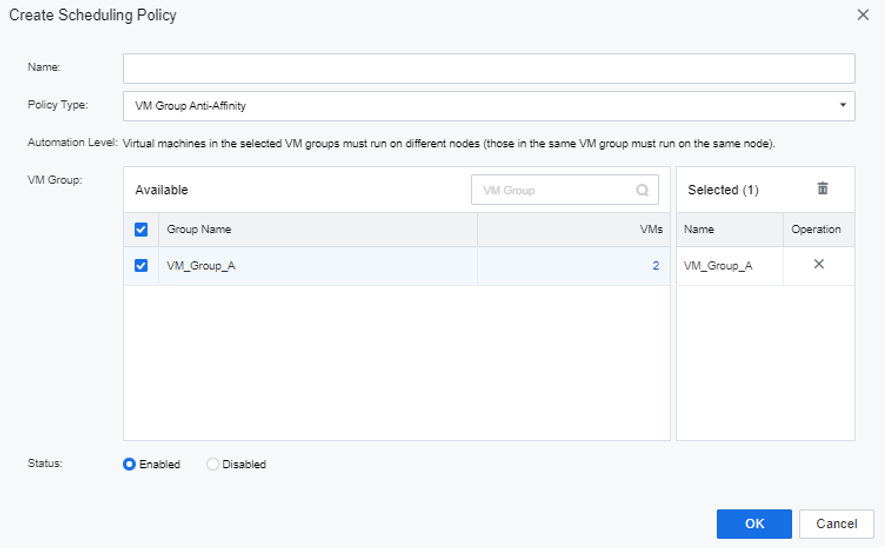
Virtual machine group mutual exclusion supports running multiple selected VM groups on different physical nodes. For example, suppose the three VM of business A and the three VM of business B are configured to be mutually exclusive in VM groups when the physical node running business A fails. In that case, business B will not be affected, improving business availability.
Precautions:
• The run location must be configured in the same fault domain or automatically selected for the same virtual machine group.
• The running virtual machine does not support modifying the Running Location configuration.
• After the scheduling policy is created on the running virtual machine, you need to restart the virtual machine for it to take effect.
• The virtual machine in the same virtual machine group will not be aggregated by default, and the aggregation policy needs to be manually configured.
Prerequisite
None.
Steps:
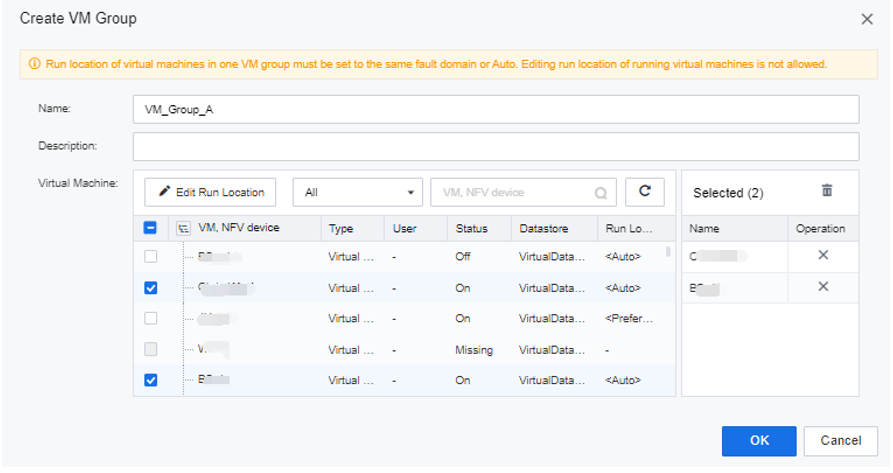
Step 1.Go to the Reliability > VM Scheduling Policy > VM Groups interface and add the VM planned to run at the same location to the virtual machine group.
Step 2.Enter the Reliability > VM Scheduling, click New, select VM Group Anti-Affinity for the policy type, select the mutually exclusive virtual machine group, and click OK.
Function Description:
VM group to host group supports running selected virtual machine groups on different physical host groups. For example, run service group A of the active-active service in the main fault domain of the extended cluster and run service group B of the active-active service in the standby fault domain of the extended cluster. It is to ensure that data and services are active-active simultaneously.
Precautions:
Prerequisite
None.
Steps:
Step 1.Go to the Reliability > VM Scheduling Policy > VM Groups interface and add the VM planned to run at the same location to the virtual machine group.
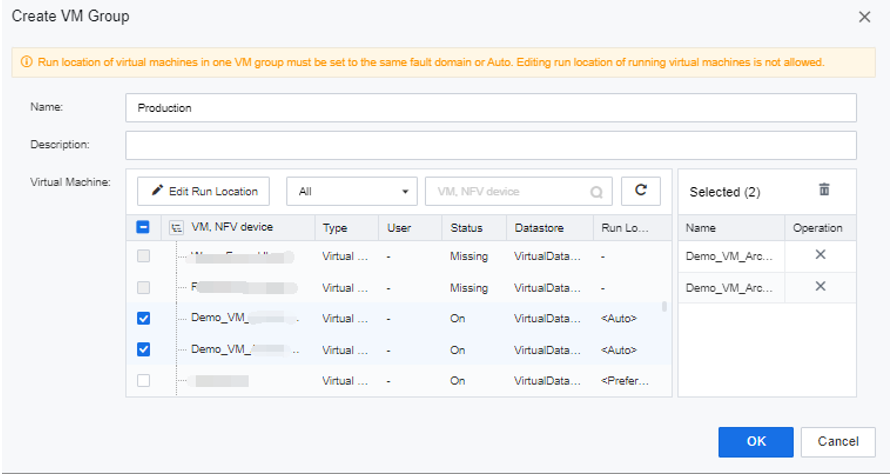
Step 2.Go to the Reliability > VM Scheduling Policy > Host Groups. Add the hosts in the primary and secondary fault domains to their respective host groups.
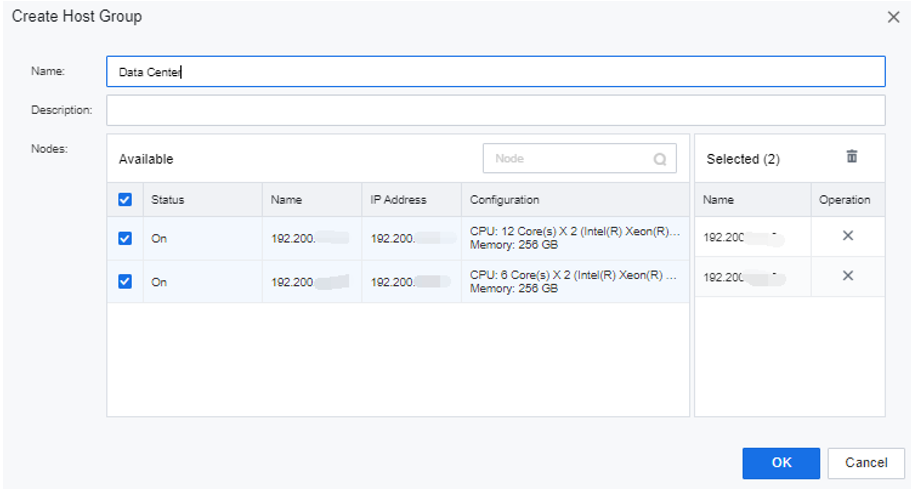
Step 3.Select VM-Host Affinity for Policy Type.
• If you select Must for Automation Level, VMs in VM group A will always run in the primary fault domain, and those in VM group B will always run in the secondary fault domain.
• If you select Prefer to for Automation Level, you can set a standby host group. In this case, if no host is available in the selected host group, VMs will be scheduled to hosts in the selected standby host group.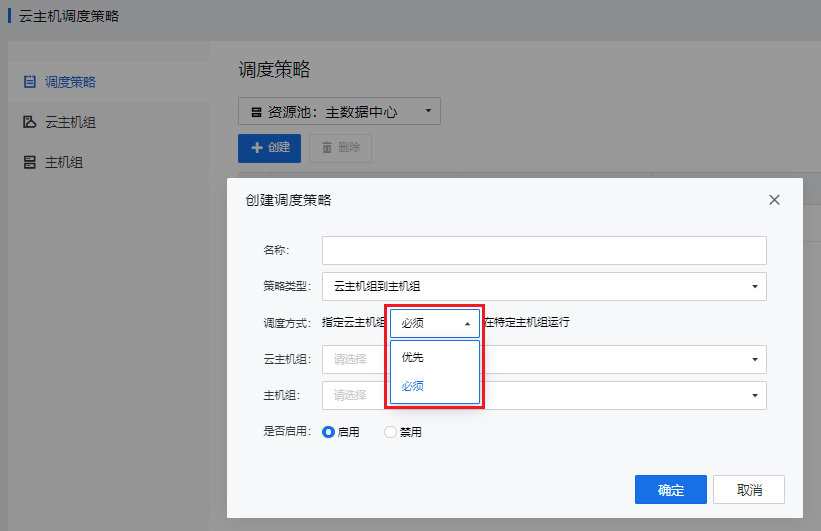 [10]
[10]


 {{ $t('index.defaultHeader.chromeBrowserTip') }}