


{{ secondMenu.name }}






Precautions:
Steps:
Step 1.Go to the Security Services > aSecurity page, and check the Install the security agent when installing vmTools is complete on a VM checkbox. After checking the box, the Cloud Security Center module will automatically discover new assets online and automatically update the cloud via vmTools. . At the same time, the virtual machine security protection platform also supports the automatic update of security components through vmTools. The operating system compatibility whitelist can be viewed by clicking the OSes Supported button on the interface.
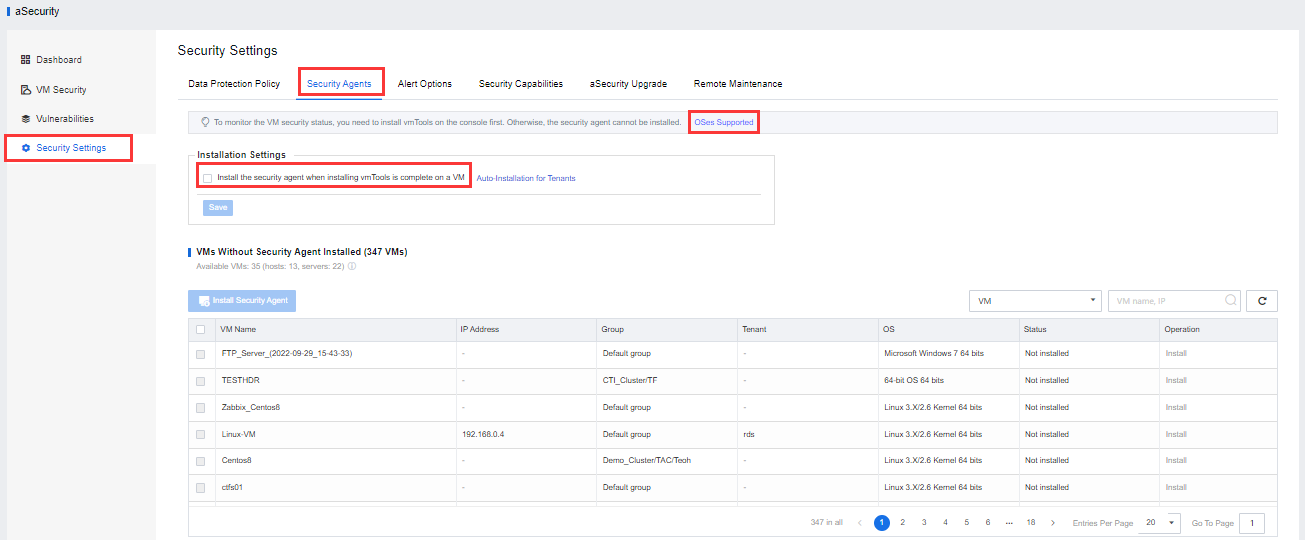
Step 2.Installation of the original virtual machine security agent of the Sangfor cloud computing platform.
• Suppose the automatic installation of security components is selected. In that case, the installation of the security agent will be automatically triggered for the virtual machines that have the vmTools installed and are powered on. 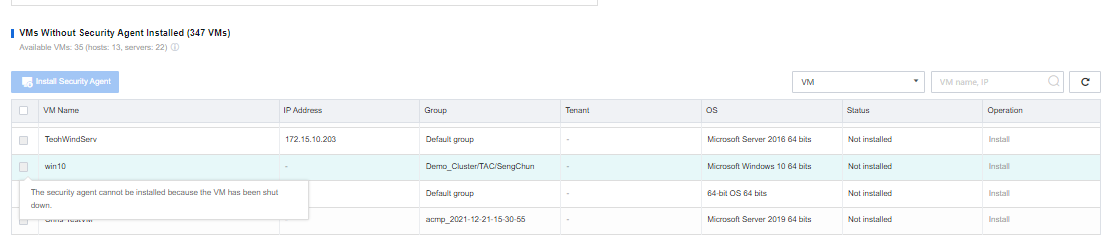
• If the automatic installation of security components is not selected, that is, the customer has a business in progress and only needs to monitor the security protection of some virtual machines temporarily, you can choose the virtual machine that needs to install security components in the list of virtual machines without security components. Then, click the Install Security Agent button to perform the batch installation.


 {{ $t('index.defaultHeader.chromeBrowserTip') }}