


{{ secondMenu.name }}






Function Description:
The VPC of the SCP tenant can configure the enterprise private line on the operation page to communicate with the environment outside the VPC at Layer 2 and Layer 3. To use the enterprise private line function, you need to specify a fixed private line gateway for each resource pool.
Precautions:
Prerequisite
To avoid IP address conflicts, it is recommended to configure different VLAN IDs for the enterprise private line of each subnet.
Steps:
Step 1.Select Networking > Direct Connect and click New.
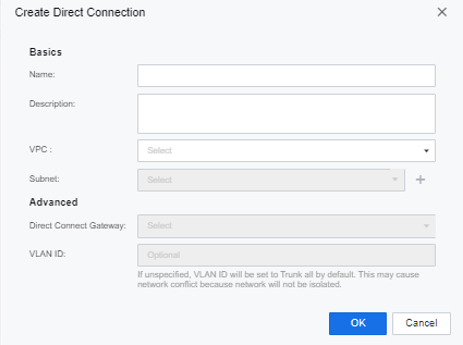
Step 2.Configure the name and description, select the VPC, subnet, and Direct Connect Gateway, and configure the VLAN ID.


 {{ $t('index.defaultHeader.chromeBrowserTip') }}