Function Description
In the operation and maintenance scenario, the network traffic of the production virtual machine needs to be mirrored to the security review device to realize traffic filtering and monitoring. Sangfor SCP supports copying and forwarding the NIC traffic of the virtual machine/network device to the SCP egress. You need to configure traffic mirroring on the intermediate switch to mirror it to an external device.
Precautions
- A mirror rule source object can select up to 1024 interfaces.
- The target object can only select one virtual machine interface or network device interface.
- If a Virtual machine/network device interface or physical host service port is used as a source object, it can only belong to one traffic mirroring policy. It can belong to multiple traffic mirroring policies if it is used as a destination object.
- The mirroring function of the physical network to the virtual network is not supported.
- As the number of rules increases, the delay of service traffic increases, and the throughput decrease. It is recommended to configure less than 100 rules.
- The virtual machine referenced by the traffic mirror supports migration within the same resource pool, and the traffic mirror still takes effect after the migration.
- Support separate physical egress configuration for traffic mirroring. In the scenario where virtual network traffic is mirrored to an external device, the mirrored traffic occupies the service communication interface. When mirroring across nodes in a cluster, the mirrored traffic occupies the data communication interface. To prevent the mirrored traffic from occupying bandwidth with the service interface or data communication interface in a high-load scenario, it is recommended to plan a separate physical NIC for traffic mirroring and forwarding.
- When mirroring to a physical service port, a VLAN must be configured, and the VLAN must be consistent with the VLAN allowed on the physical switch (truck port) connected to the physical port. Therefore, the mirrored traffic cannot include the traffic of this VLAN.
- When the service port connected to the physical egress is modified, the corresponding physical service port in the traffic mirroring rule also changes accordingly.
- Mirroring across resource pools is supported only in connected areas.
- The traffic captured by DFW and the traffic restricted by QoS will be captured and forwarded by traffic mirroring.
- Only business traffic is captured when the multi-network integration network port is the mirroring source.
Prerequisite
None.
Steps:
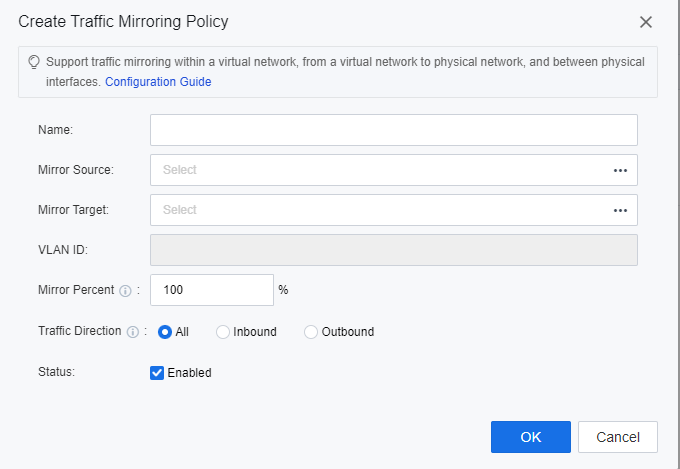
- Go to the Networking > Traffic Mirroring page, select the resource pool for traffic mirroring, and click the New button to configure the traffic mirroring policy.

- The platform supports the configuration of 3 traffic mirroring: traffic mirroring within the virtual network, traffic mirroring from the virtual network to the physical network, and traffic mirroring between physical network ports.
• Specify the mirror source:
Internal traffic mirroring of virtual network: specify the interface of the virtual machine/network device.
Mirror virtual network traffic to physical network: specify the interface of the virtual machine/network device.
Traffic mirroring between physical network ports: Specify the service port of the physical node.
• Specify the mirroring target:
Internal traffic mirroring of virtual network: specify the interface of the virtual machine/network device.
Mirror virtual network traffic to the physical network: specify the service port of the physical node.
Traffic mirroring between physical network ports: Specify the service port of the physical node.
• VLAN ID:
Internal Traffic Mirroring of Virtual Network: No need to fill in.
Mirror virtual network traffic to physical network: Specify the VLAN ID carried in mirrored packets.
Traffic mirroring between physical network ports: Specify the VLAN ID carried by mirrored packets.
• Mirror Percent:
The ratio of the source object traffic to be mirrored, the default is 100%, which means that the traffic is completely mirrored.
• Traffic direction:
The traffic direction of the source object is to be mirrored.
All means the traffic received and sent by the mirror source object at the same time.
Inbound means only mirroring the traffic received by the source object.
Outbound means only mirroring the traffic sent by the source object.
• Status:
Check Enable checkbox to make the policy take effect.
- After the policy configuration is complete, the network traffic to the source can be monitored on the destination device.










 {{ $t('index.defaultHeader.chromeBrowserTip') }}