


{{ secondMenu.name }}






Function Description:
Some applications with extremely high-performance requirements are generally deployed on physical servers, such as core databases and high-performance computing applications. Sangfor Cloud Platform (SCP) provides the function of managing physical machines and provides dedicated physical servers for applications to ensure the high performance of core applications and stability. By setting the IPMI port of the physical server, SCP can realize the management, monitoring, alarming and other operations of the physical server.
Precautions:
None.
Prerequisite
The SCP needs to communicate with the IPMI port of the physical server.
Steps:
Step 1.Log in to the SCP platform as the admin administrator, select Resource > Physical Machine, and enter the physical machines management interface.
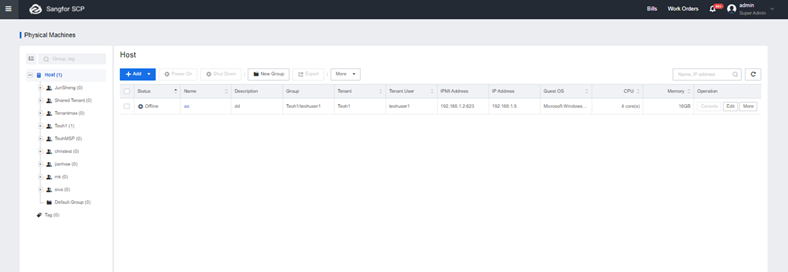
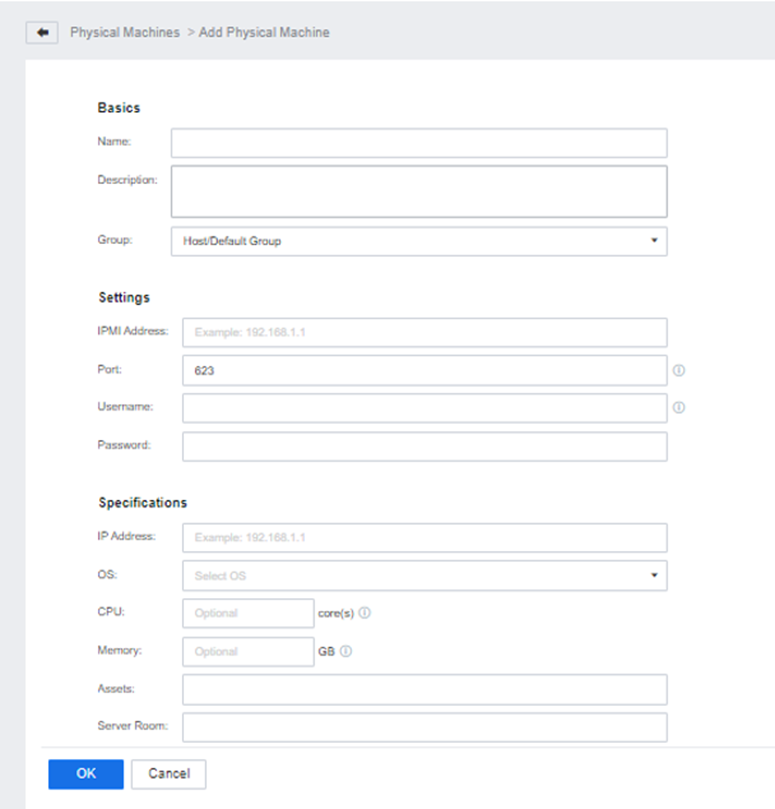
Step 2.Click Add to add physical machines, which support single addition and batch addition.
Step 3.After completing the addition, you can view the added physical machines in the physical machine list.
Step 4.Click Console to redirect to the server BMC login page.
Step 5.Click More to power on, shut down the physical machine, and assign the physical machine to the tenant.


 {{ $t('index.defaultHeader.chromeBrowserTip') }}