


{{ secondMenu.name }}






Function Description:
Instruct users to license nodes that have not yet formed a cluster, as shown in the figure below: SCP has managed cluster 1 and licensed cluster 1. At this time, cluster 2 has not yet formed a cluster.
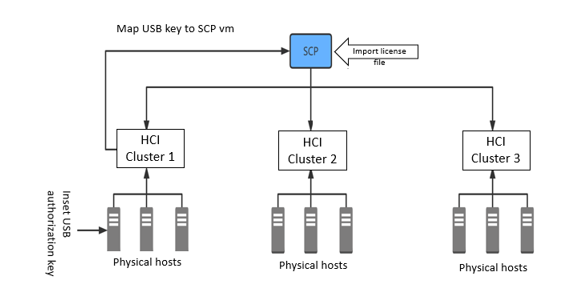
Precautions:
None.
Prerequisite
SCP has been activated by importing the license key, and licensed resources are sufficient to license all clusters.
Steps:
Step 1.Set the cluster IP on node 1 of cluster 2 to ensure that this cluster IP can communicate with SCP to form a single-node cluster.
Step 2.The platform administrator logs in to the SCP platform, manages the single-node cluster established in Step 1, and selects Centralized mode after associating the resource pool and licensing the single-node cluster.
Step 3.Log in to a single-node cluster. The cluster has been licensed, and you can add nodes to form a multi-node cluster.
Step 4.Cluster 3 can be licensed as well.


 {{ $t('index.defaultHeader.chromeBrowserTip') }}