


{{ secondMenu.name }}






Function Description:
SCP supports KEY-less licensing. In case of hardware KEY loss and failure, it will not affect cluster usage. By using vKEY, the user does not need to send back and re-apply for the USB KEY in the license change scenario, improving the work efficiency.
Precautions:
Prerequisite:
None.
Steps:
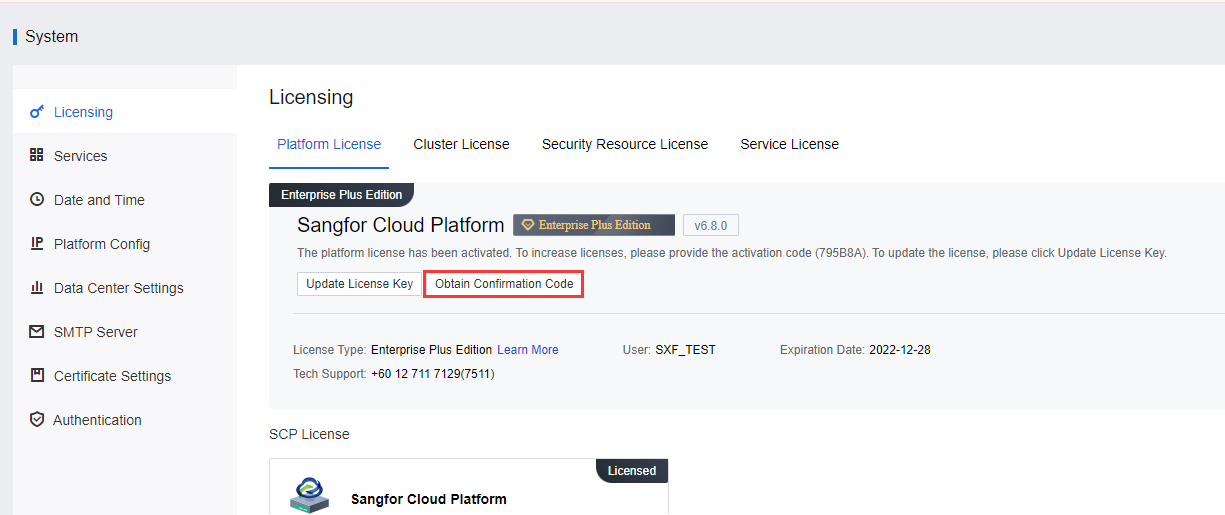
Step 1.Go to System > Licensing > Platform License, and click Update License Key to get the Confirmation Code.
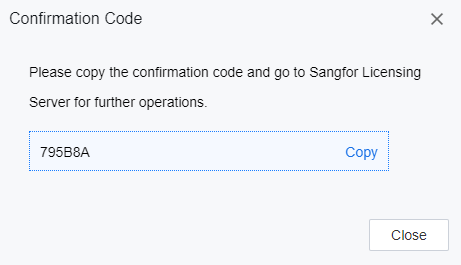
Step 2.Copy the confirmation code.
Step 3.Go to the Sangfor Licensing Server, log in to the platform to import device information, and obtain the licensing file. You can click Help Information in the upper right corner to obtain detailed operation instructions for the licensing file.
Step 4.Import the obtained licensing file into the platform to complete the licensing activation.


 {{ $t('index.defaultHeader.chromeBrowserTip') }}