


{{ secondMenu.name }}






Sangfor cloud computing platform SCP supports the deployment of the Cloud Security Center(aSEC) by importing virtual machines. This chapter mainly introduces the installation and deployment of the Cloud Security Center, including the installation of the virtual machine aSEC of the Cloud Security Center and the deployment of the security protection management platform.
• The installation and deployment process of aSEC Cloud Security Center is shown in the following figure. 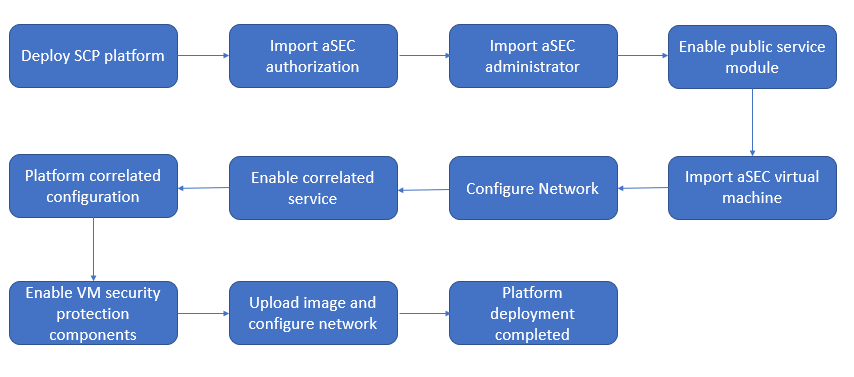
• The deployment network topology plan of the aSEC cloud security center is shown in the following figure. The cloud security center platform needs to communicate with the management network of HCI and SCP (recommended to be on the same network segment as the HCI and SCP management network). It is mainly used for the cloud security center platform to call HCI and SCP. The API interface of SCP implements policies such as taking snapshots or creating distributed firewalls, the management port of the virtual machine security protection platform is configured to connect to the physical outlet of the management port (it is recommended to plan the same network segment as the HCI and SCP management network). The virtual machine security protection platform service communication port configuration (optional) is connected to the physical edge of the service network, which is used to connect security servers such as the virus database and cloud search service to realize automatic virus database updates. 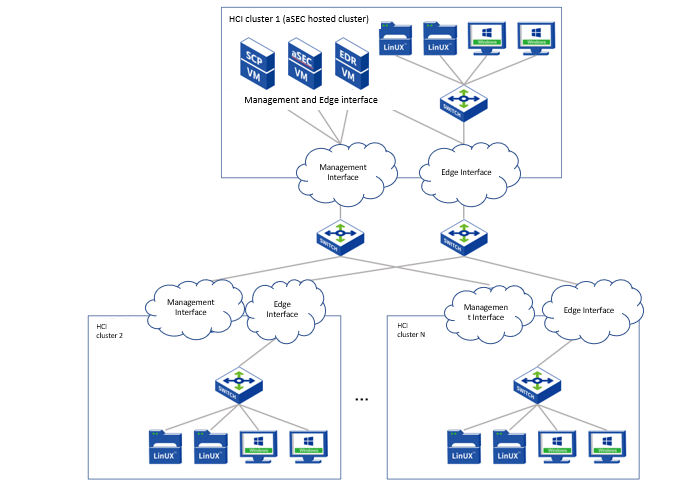
• Refer to the following table for the recommended configuration instructions for aSEC Cloud Security Center.
| aSEC virtual machine server recommended configuration |
|||
| Number of access terminals |
CPU |
Memory |
Disk |
| 1 – 300 (Default Specifications) |
4 Cores |
8 GB |
300GB |
| 300-1000 |
4 Cores |
16 GB |
300 GB |
| 1000 – 2000 |
8 Cores |
32 GB |
300 GB |
| Recommended configuration of the virtual machine of the security protection management platform |
|||
| Number of access terminals |
CPU |
Memory |
Disk |
| 1 – 300 (Default Specifications) |
2 Cores |
2 GB |
300GB |
| 300-1000 |
2 Cores |
4 GB |
300 GB |
| 1000 – 2000 |
4 Cores |
8 GB |
300 GB |
Precautions


 {{ $t('index.defaultHeader.chromeBrowserTip') }}