


{{ secondMenu.name }}






Function Description:
The VPC of tenants can communicate with the external environment of the VPC through the enterprise's private line at the second and third layers. If you need to use the corporate's private line function, you need to specify a direct connect gateway for each resource pool.
Prerequisite
Precautions:
After the direct connect gateway is set, please delete all the dedicated direct lines under the direct line gateway if you need to modify it.
Steps:
Step 1.Select Network > Direct Connect and click Direct Connect Gateway.
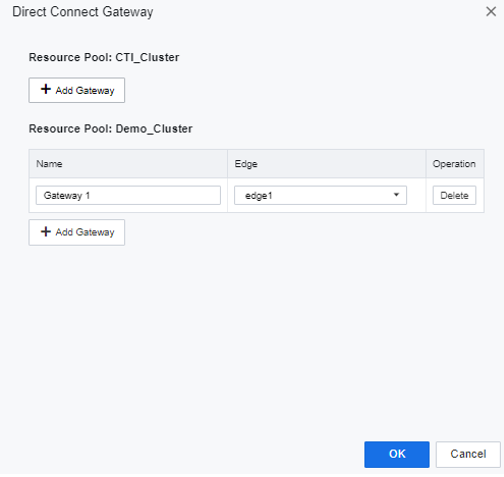
Step 2.Configure the dedicated line outlet name and associated physical gateway of each resource pool, and each resource pool can create multiple dedicated line gateways.


 {{ $t('index.defaultHeader.chromeBrowserTip') }}