


{{ secondMenu.name }}






Function Description:
After the HCI cluster is managed by the SCP and associated with the resource pool, the NFV equipment can only be deployed on the SCP. At the same time, the NFV equipment needs to be licensed on the SCP before the NFV equipment can be used.
Precautions:

Prerequisite
Sangfor SCP has imported licensing activation, and authorization resources are sufficient to license NFV equipment.
Steps:
Step 1.Log in to the SCP platform and select System > Licensing > Security Resource License.
Step 2.Select the NFV device that needs to be licensed, click Licensing on the right, and click the OK button after assigning the corresponding licensing.
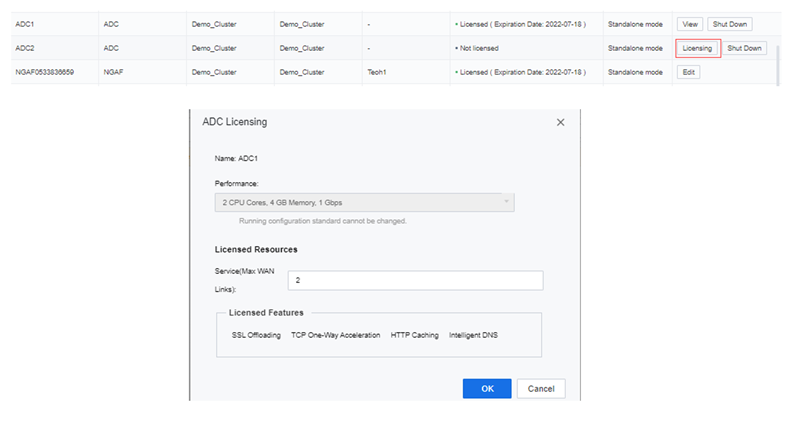
Step 3.After the licensing is successful, you can view and edit the licensing of the NFV device on the licensing interface.


 {{ $t('index.defaultHeader.chromeBrowserTip') }}