


{{ secondMenu.name }}






Product Description:
After managing the cluster, you need to associate the cluster with the resource pool. The resource pool is a collection of computing, storage, network, and other resources and is the basic unit of SCP cloud computing platform management. The managed cluster can only be licensed and used after it is associated with the resource pool.
Prerequisite
SCP has successfully added clusters.
Precautions:
Steps:
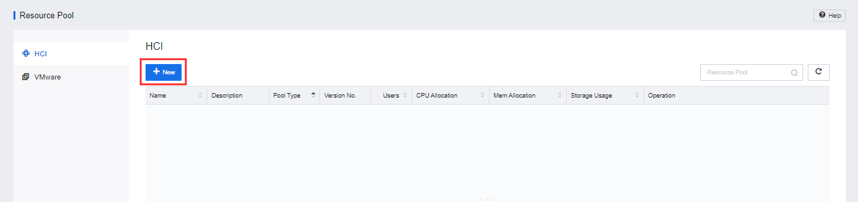
Step 1.The platform administrator logs in to the SCP platform clicks Resource Pool, and clicks New to enter the Create Resource Pool page.
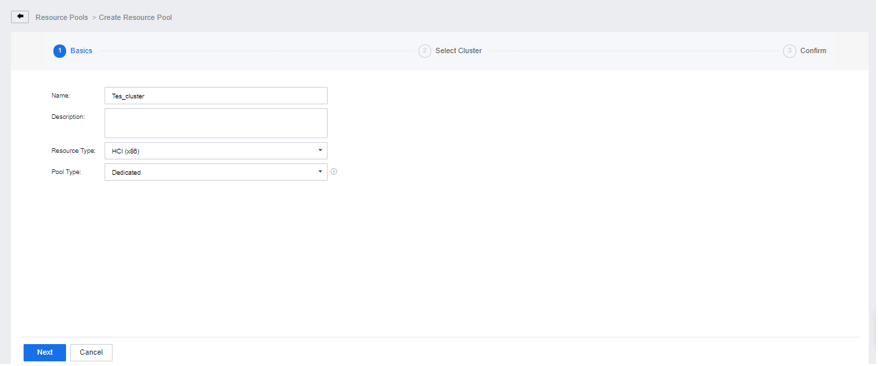
Step 2.Fill in the name and description of the resource pool, select the resource type and attributes, and click the Next button.
Step 3.Select the cluster that needs to be associated. You can click the Add Cluster button if the target cluster is not found. Please refer to chapter 3.2 Add Physical Resources, for the detailed operation process. After the configuration is complete, click the Next button.
Step 4.Confirm that the information is correct and click the Confirm button.
Step 5.Upon completion, you can view the created resource pool.



 {{ $t('index.defaultHeader.chromeBrowserTip') }}