Sangfor SCP supports the management of multiple HCI clusters and VMware clusters and realizes unified management of multiple resource pools through the SCP platform.
This section will Instruct the administrator to add the prepared physical resources to the SCP platform in a cluster and tag the storage resources.
Prerequisite
Sangfor SCP and HCI resource pools or VMware resource pool networks are reachable.
According to the management and authorization plan, prepare sufficient license keys and licensing documents.
Precautions:
The SCP cloud computing platform supports managing different versions of hyper-converged resource pools. For details of the hyper-converged versions that support management, please log in to Sangfor Community for inquiries.
The SCP cloud computing platform supports ARM's hyper-converged clusters and resource management.
Disaster recovery between X86 and ARM resource pools is not supported.
Only one security center (ARM or X86 architecture) is supported on SCP, and NFV access security centers with different architectures are not supported.
The SCP cloud computing platform supports managing different versions of VMware clusters. The supported VMware versions are as follows: VMware 5.0 、VMware 5.1、VMware 5.5、VMware 6.0、VMware 6.5. Versions after aCloud 5.8.7 R1 support VMware 6.7.
Some functions of the SCP rely on the underlying HCI resource pool. When the underlying hyper-converged resource pool does not support a function, the corresponding function button on the SCP platform will be grayed out.
The NFV version supported by the SCP cloud platform depends on whether the underlying hyper-converged resource pool supports it. When the hyper-converged resource pool does not support a certain NFV version, it cannot be used in SCP. (Please refer to the specific support list: HCI and NFV version correspondence table)
When the versions of multiple managed resource pools are inconsistent, virtual machine migration between resource pools of different versions is not supported.
When the versions of multiple resource pools managed are inconsistent, the Sangfor aDR (Cross-Site Disaster Recovery solution between resource pools of different versions is temporarily not supported.
Steps:
Step 1.The platform administrator logs in to the SCP, navigate toResources Overview > Clusters and clicks the Add Cluster.

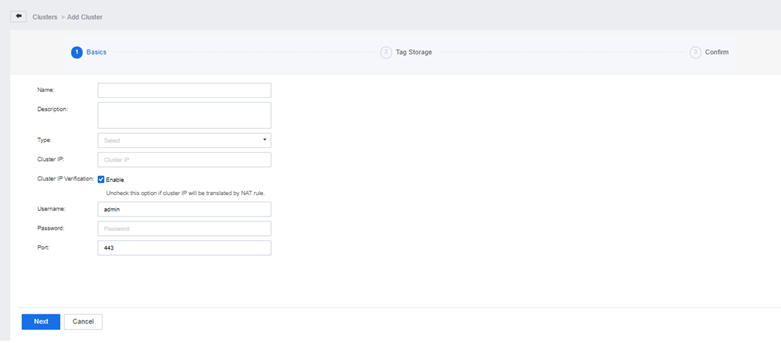
Step 2.Enter the cluster Name and Description, and after selecting the cluster Type, enter the Cluster IP and admin Password. If the port has not been changed, keep the default setting (if the cluster IP has been mapped by NAT, please uncheck Cluster IP verification), select the appropriate licensing mode, and click the Next button.
Step 3.According to the actual situation of the cluster, different tags can be set for different storage volumes. The default includes high performance, performance, and capacity.
• High-performance storage: Strong read and write performance, used to create high-performance virtual machines, generally gives this tag to the SSD storage category.
• Performance storage: Strong read and write performance, but relatively aging, generally old storage.
• Capacity storage: Average read and write performance, but large capacity, high security, and high-cost performance.
Step 4.After confirming that the information is correct, click the Confirm button.


