


{{ secondMenu.name }}






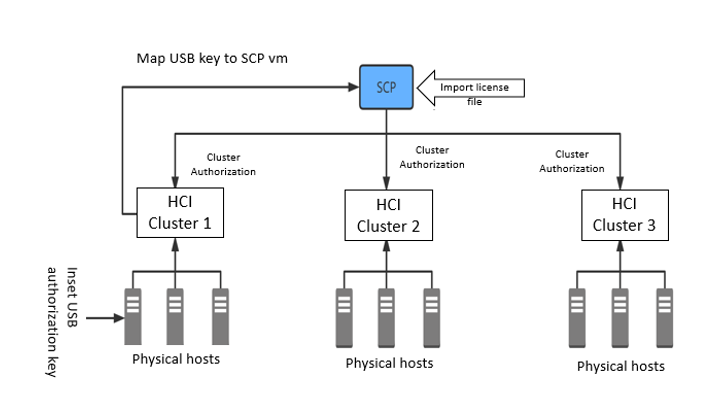
• Centralized mode: Through the SCP, the clusters associated with the resource pool are licensed, and the clusters occupy the centralized mode. (This licensing mode requires a license key and license file. For example, the SCP platform is deployed on hyper-converged cluster 1, and hyper-converged cluster 2 and cluster 3 need to be managed. Both clusters 2 and 3 are licensed through cloud management authorization. Only one license key and matching authorization file are required).
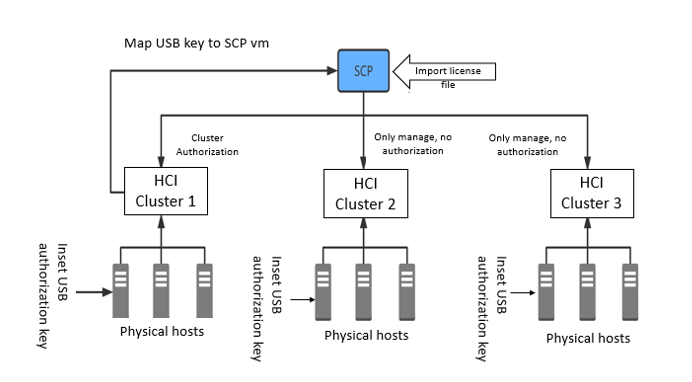
• Standalone mode: After the HCI cluster uses its license key authorization, it is managed by the cloud platform, and the cluster does not occupy the centralized mode license. At this time, the SCP platform only manages independently licensed clusters and does not issue authorizations. (This licensing mode requires 1+n keys, and n is the number of independently licensed clusters. For example, if the SCP platform is deployed on hyper-converged cluster 1, hyper-converged cluster 2 and cluster 3 need to be managed, and clusters 2 and 3 are standalone mode Authorization. At this time, 1+2 license keys are required, and each key has a matching license file).



 {{ $t('index.defaultHeader.chromeBrowserTip') }}