


{{ secondMenu.name }}






To define the required file types. The file types can be applied to file filtering in Objects/Security Policy Template/Content Security to restrict file upload/download through HTTP and FTP, or set the traffic control for file type upload/download in Policies/Bandwidth Management/Channel Configuration/Bandwidth Allocation.
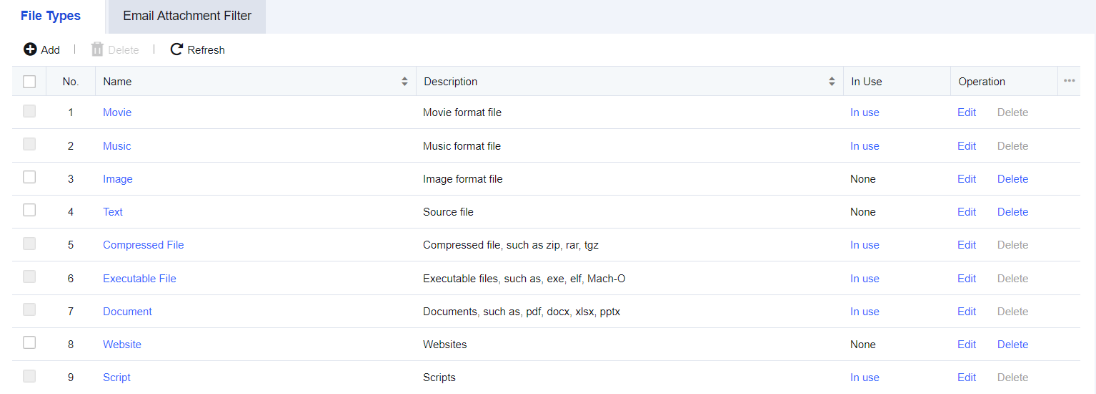
On the Navigation Menu page, choose Objects/Content Signature Database/App Signature Database. The File Types tab appears on the right. See the figure below.
On the File Types tab, click Add. The Add File Type dialog box appears, as shown in the following figure.
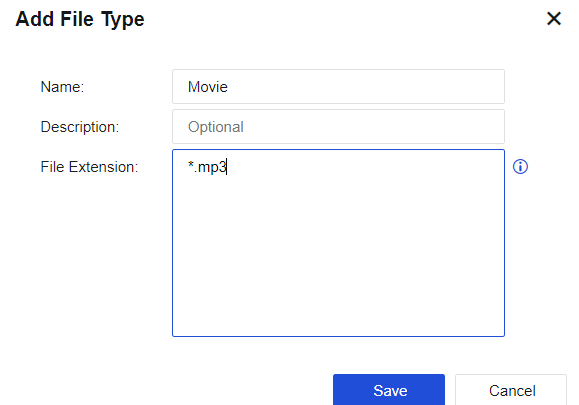
Name: Specify the name of the file type.
Description: Specify the description of the file type.
File Extension: Enter the suffixes of files in the text box, such as "*.mp3" or "mp3".

The device provides most file types, including movies, music, pictures, text, compressed files, and applications by default. If they cannot meet the requirements, manually add other types.
To define a filter type for email attachments. After the filter type is set, some email attachments with threat behaviors can be filtered, thus keeping the information of recipients secure. See the figure below.

Click Add to create a filter type for email attachments, as shown in the following figure.
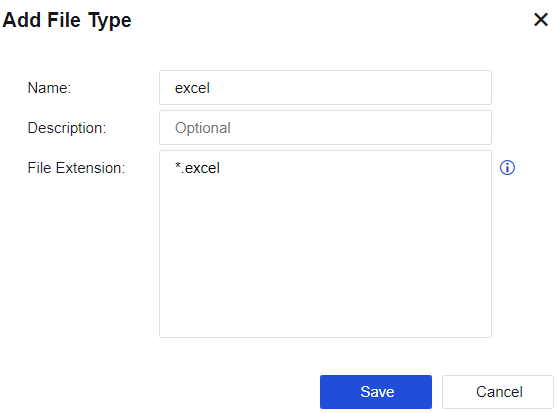
Name: Specify the name of the file type.
Description: Specify the description of the attachments.
File Extension: Enter the suffixes of files in the text box, such as "*.mp3" or "mp3".


 {{ $t('index.defaultHeader.chromeBrowserTip') }}