


{{ secondMenu.name }}






According to the manual custom rule database, the undiscovered attack behavior can be protected in time. At present, it supports a custom Web app protection rule database, custom vulnerability attack rule database, custom botnet rule database, and custom sensitive information protection rule database.
Custom Web App Protection Rule Database includes the custom WAF rules and CC prevention rules. The interface is shown below.

On the Custom Web App Protection Rule Database page, click Add:
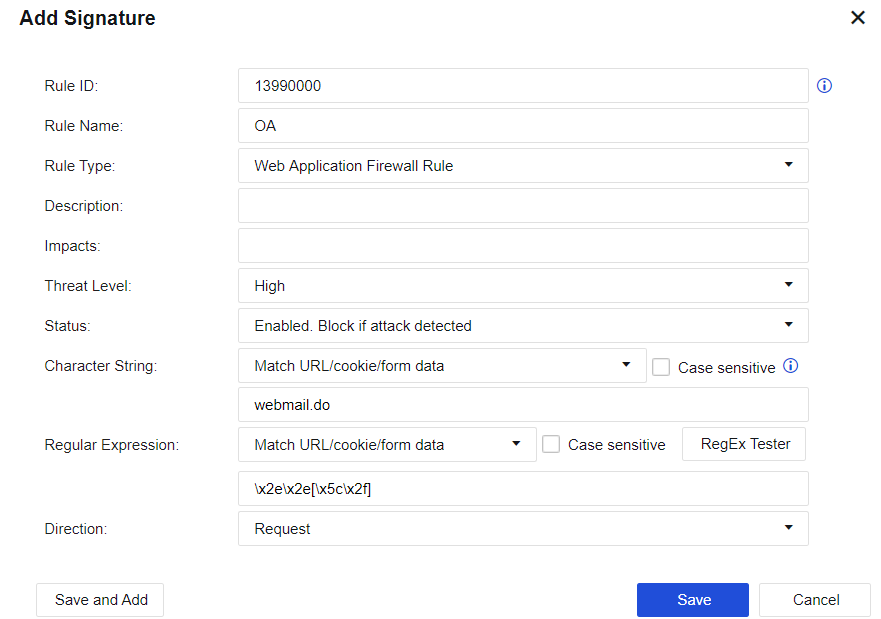
Rule Name, Description, and Attack Effect can be customized based on the situation.
Rule Type: Custom Web App Protection Rule, CC Protection Rule, and Custom Password Protection Rule can be selected.
Threat Level: Provides three levels: high, medium, and low; defining the rule level.
Status: Provides three types: Enable, block after detection, Enable, pass after detection, and Disable.
Enable, block after detection: Indicates that the current rule is enabled; when an attack is detected, the corresponding packet is blocked.
Enable, pass after detection: Indicates that the current rule is enabled; when an attack is detected, the packet is logged but not blocked.
Disabled: Indicates that the current rule is disabled. When the rule is disabled, the device does not detect the rule.
Character String, Regular Expression, and Matching Direction are used to set the rule content. The previous two options can be empty, indicating that they are not used for matching.
On the Custom Vulnerability Attack Rule Database page, click Add.
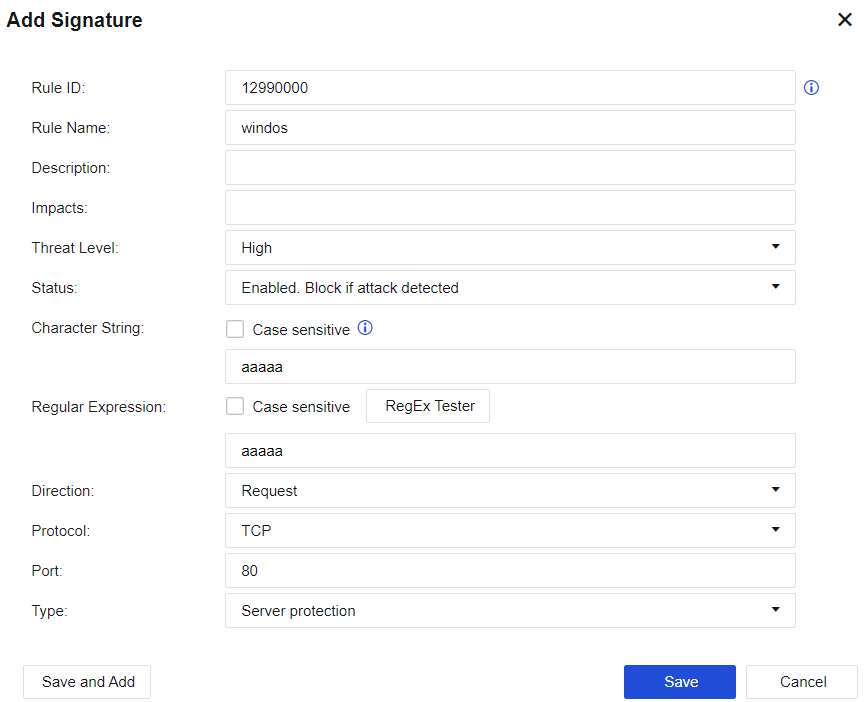
Rule Name, Description, and Attack Effect can be customized based on the situation.
Threat Level: Provides three levels: high, medium, and low; defining the rule level.
Status: Provides three types: Enable, block after detection, Enable, pass after detection, and Disable.
Enable, block after detection: Indicates that the current rule is enabled; when an attack is detected, the corresponding packet is blocked.
Enable, pass after detection: Indicates that the current rule is enabled; when an attack is detected, the packet is logged but not blocked.
Disabled: Indicates that the current rule is disabled. When the rule is disabled, the device does not detect the rule.
Character String, Regular Expression, Matching Direction, Protocol, and Port are used to set the rule content and data matching conditions. The previous two options can be empty, indicating that they are not used for matching.
Protection Type: Select the types of objects protected by the intrusion prevention rules.
Custom Data Leakage Rule Database allows you to define sensitive information, as shown in the figure below.

Click Add. The New Sensitive Information dialog box is displayed. You can customize the sensitive information by entering the regular expression of such information, as shown below.
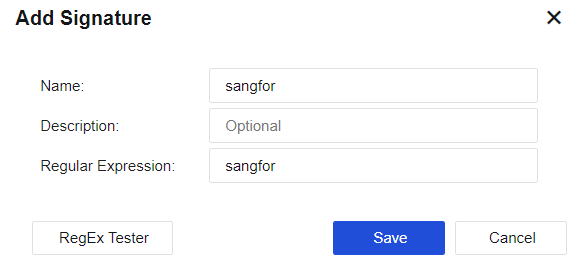
Click White List Settings to set the IP addresses and URLs not protected by the DLP function. It provides the same function as Data Leakage Prevention Rule Database.
Custom Botnet Rule Database allows you to customize the URLs that need to be detected and protected against the botnet, as shown in the figure below.

Click Add. The Custom Rules for New Botnet dialog box is displayed, as shown below.
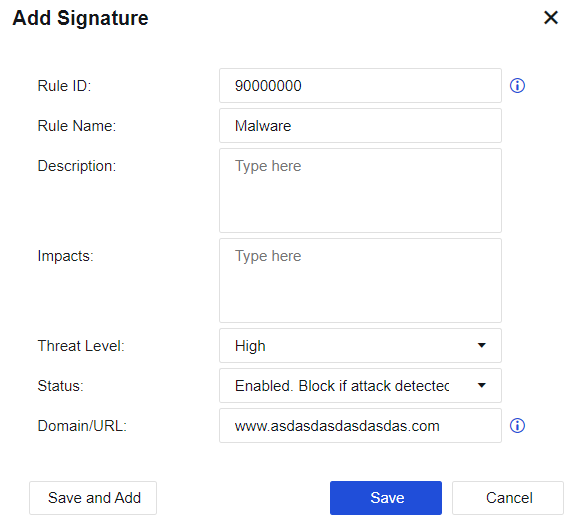
Rule ID: custom rule ID.
Rule Name, Rule Description, and Effect can be customized based on the situation.
Threat Level: Provides three levels: high, medium, and low; defining the rule level.
Status: Provides two types: Enable, block after detection, and Disable.
Domain Name/URL: Define the domain name/URL that the rule needs to match.
It provides the same function as Data Leakage Prevention Rule Database.


 {{ $t('index.defaultHeader.chromeBrowserTip') }}