


{{ secondMenu.name }}






The content security policy includes Email Protection, URL Filter, and File Protection. Email Protection is to detect email content, filter attachments, and verify emails with Engine Zero. URL Filter is to filter the URL addresses of web pages meeting the preset conditions. File Protection is to filter files and verify files with Engine Zero. See the figure below.
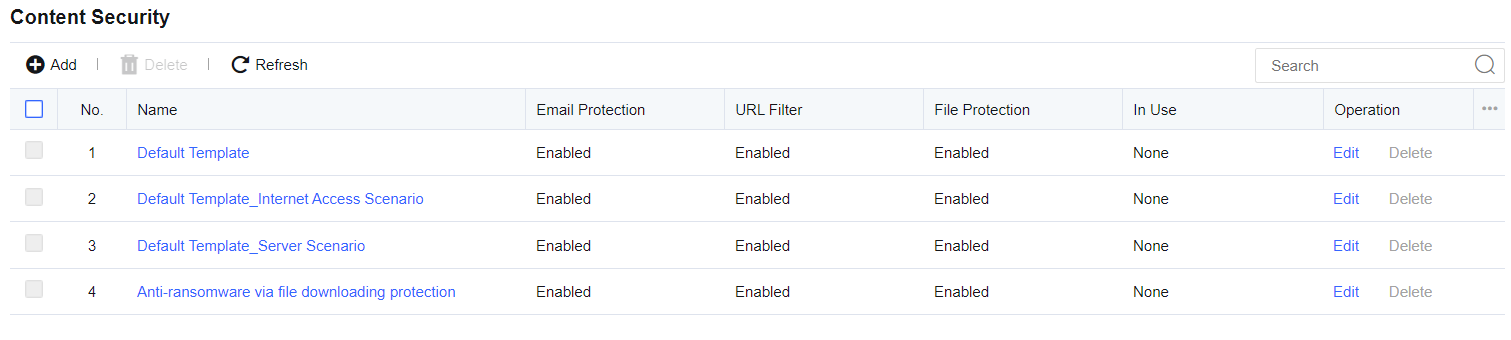
Click Security Policy Template/Content Security to go to the template settings page and add or delete content security policy templates. Click Add. The Add Template page pops up, as shown below.
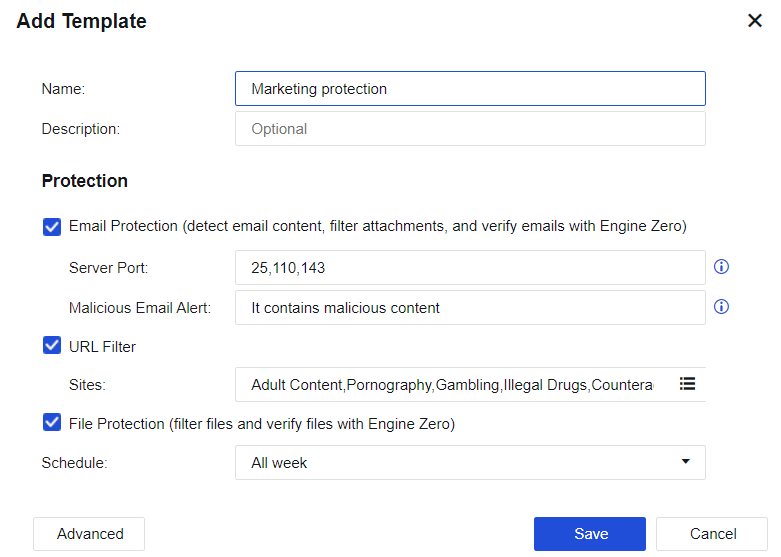
Name: Define the name of the template.
Description: Define the description of the template.
Email Protection: Detects email content, filters attachments, and verifies emails with Engine Zero.
Server Port: There are three ports (25, 110, and 143) by default. For an encrypted email protocol, enable decryption for Internet access.
Malicious Email Alert: When the user receives a malicious email, this alert will be added to the email subject.
URL Filter: Filters the URL addresses of web pages meeting the preset conditions.
File Protection: Filters files and verifies files with Engine Zero.
Schedule: Indicates a filter condition. The policy can take effect only if filtering is performed within a specified point in time. It will call the defined time object on the Objects Schedule page.
Advanced: Set relevant filter conditions, filter types, and thresholds for Email Protection, URL Filter, and File Protection.
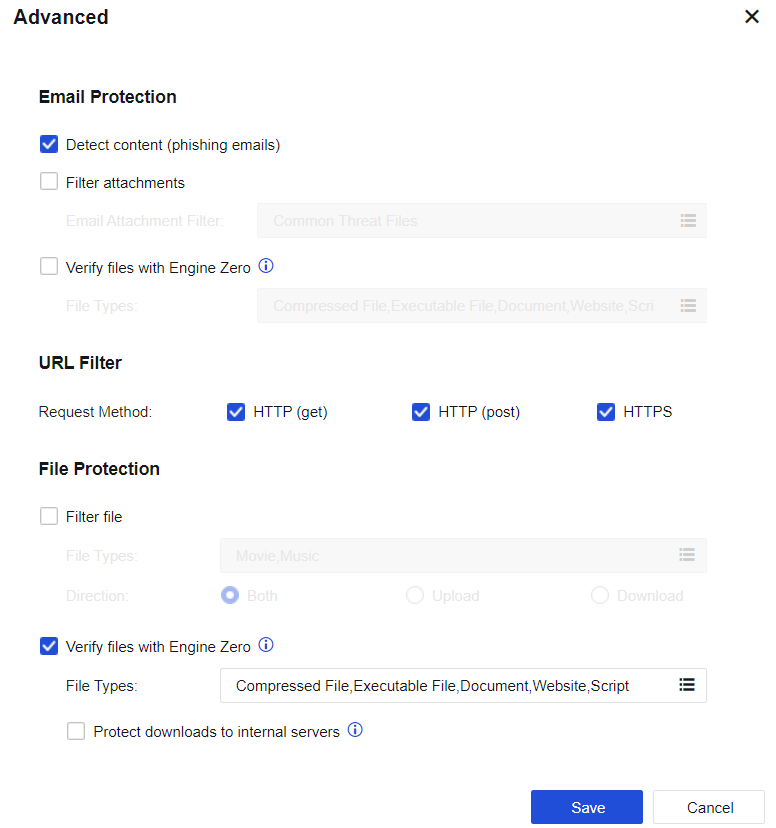
Email Protection
Detect content: If consecutive detection failures of an abnormal account exceed the threshold, the account will be identified as a threat. If Reject is selected, e-mails from the abnormal account will be rejected.
Filter attachments: Set the types of email attachments to be filtered. If Reject is selected, e-mails with attachments containing file types specified in this list will be rejected.
Verify files with Engine Zero: Define the types of attachments requiring antivirus treatment. Only the attachment types in this list are subject to antivirus treatment.
URL Filter
Request Method: Select HTTP (get), HTTP (post), or HTTPS filter for specified URL categories. For example, to prevent LAN users from browsing certain types of web pages, select HTTP (get); to allow LAN users to browse web pages but ban file upload (BBS posting), select HTTP (post).
Select HTTPS and HTTP (get), or HTTPS and HTTP (post) to restrict access to the HTTPS website or only allow to browse, while file uploading is not allowed.
File Protection
Filter file: Filters files of certain formats uploaded or downloaded through HTTP.
Verify files with Engine Zero: Define the extensions of files requiring antivirus treatment. Only the file types in this list are subject to antivirus treatment.
Protect downloads to internal servers: If the server-protected attempts to connect to an external HTTP server, the download behavior will be subject to Engine Zero Based File Verification.


 {{ $t('index.defaultHeader.chromeBrowserTip') }}