


{{ secondMenu.name }}






To set the maximum sessions for a single IP address. It includes Max Concurrent Connections Per Src IP, Max Concurrent Connections Per Dst IP, and Max Concurrent Connections.
Max Concurrent Connections Per Src IP: When LAN users are downloading applications such as P2P and when their PCs are infected with a virus, many connections will be sent in a short period, thus affecting the performance of the network device. In that case, you can select Max Concurrent Connections Per Src IP to set the maximum sessions of a single LAN IP address to reduce network loss.
Max Concurrent Connections Per Dst IP: Controls the number of concurrent connections of destination IP addresses.
Max Concurrent Connections: Controls the number of concurrent connections of bidirectional IP addresses.
An enterprise administrator wants to limit the maximum number of sessions for LAN users, and the maximum number of concurrent sessions for a single user is 500.
Step 1.Click Add and select Max Concurrent Connections Per Src IP for configuration.
Step 2.Enter the name, select LAN for the Zone parameter in the Source section, and select Internal for the Network Objects parameter. For more information about how to define the network object, see Section 8.1 Network Object. Enter 500 for the Max Concurrent Connections Per IP parameter. See the figure below.
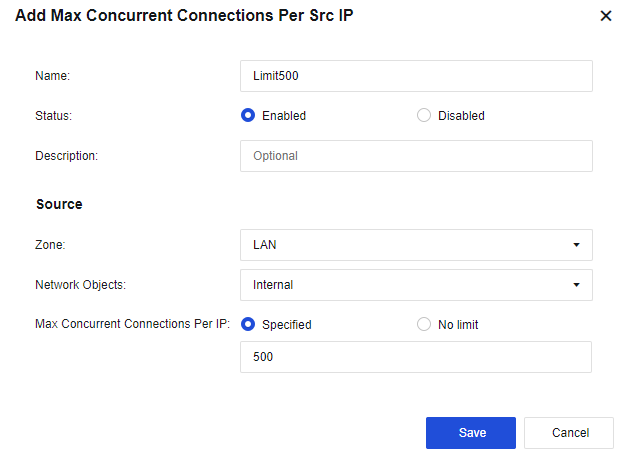
Step 3.Click Save to validate the configuration.
Step 4.When the number of new TCP concurrent connections on the LAN exceeds 500, new TCP connections cannot be established.

The connections control is only valid for TCP connections.


 {{ $t('index.defaultHeader.chromeBrowserTip') }}