


{{ secondMenu.name }}






To set the access control over data accessing the local unit. By default, this module contains two policies: one with a lower priority that blocks all access activities and the other with a higher priority that allows access to part of service ports enabled by the device, as shown in the following figure.

An enterprise deploys NGAF as a gateway to enable the DNS proxy function. For security purposes, you need to disable the permission of port 53 of accessing the DNS service in the WAN zone.
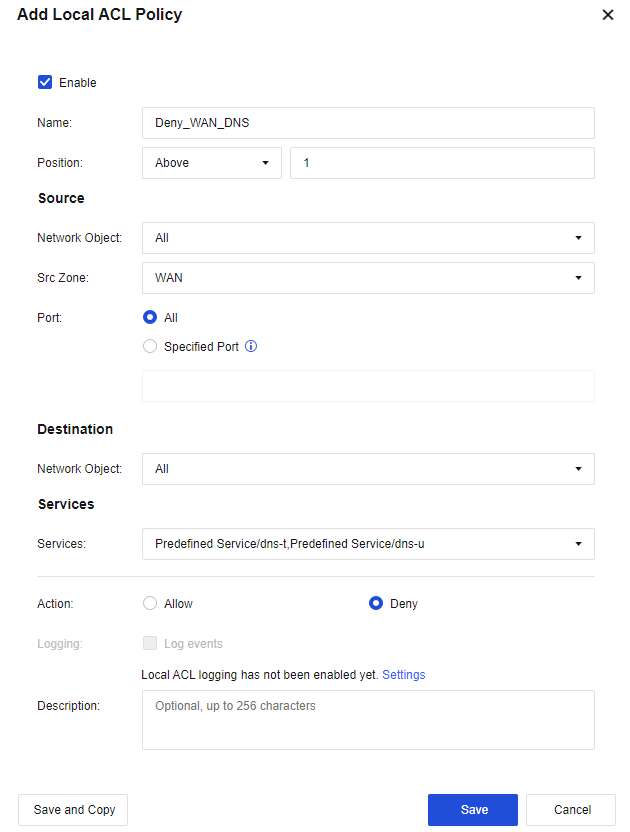
Step 1.Click Add. Then, the Add Local ACL Policy dialog box appears.
Name: Enter Deny_WAN_DNS.
Network Object in the Source section: Select All.
Src Zone: Select WAN.
Port: Select All.
Network Object in the Destination section: Select All.
Services: Select built-in related DNS services.
Action: Select Deny.
Step 2.Click Save. Then, the configuration is complete.
Step 3.PCs in the LAN segment can use NGAF to perform DNS resolution. After the WAN IP address telnet test, it is verified that port 53 for NGAF's WAN interface DNS service is not available.


 {{ $t('index.defaultHeader.chromeBrowserTip') }}