


{{ secondMenu.name }}






To perform SNAT or DNAT specific to the type of an IPv6 address. To enable this function, navigate to System > General Configuration > Network, select Enable IPV4 and IPV6 support, click Save, and then restart the device. Currently, IPv6 NAT only supports one-to-one NAT.
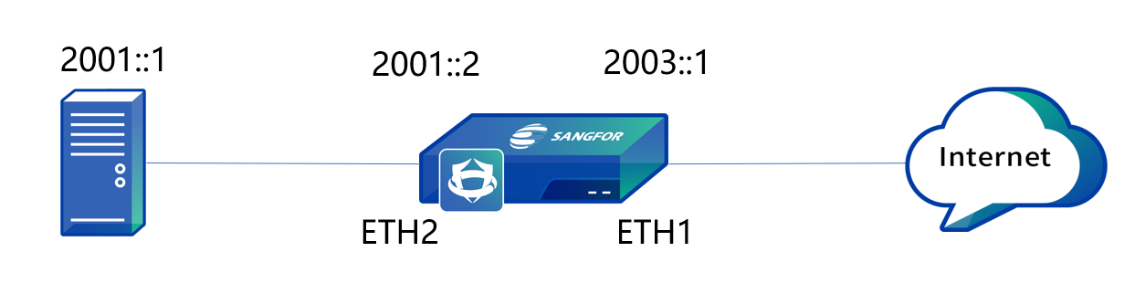
The following topology is used in all examples in this section: Both LAN and WAN segments are IPv6 network segments, the IP address of the LAN server is 2001::1/128, NGAF is deployed at the internet egress as a gateway, the IP address of ETH1 interface is 2003::1/128, and the IP address of ETH2 interface is 2001::2/128, as shown in the following figure.
| Operation |
Note |
| Delete |
Deletes the checked policy |
| Enable/Disable |
Enables or disable the checked policy |
| Move |
Moves positions of policies to adjust the priority. The policy that topped the list has the highest priority |
| Refresh |
Refreshes the page to display the latest data |
Table 11:Description of IPv6 NAT Parameters
To translate the source IP address of data that meets translation conditions. In the most common scenarios, when the device is deployed at the internet egress and acts as a proxy for LAN users to access the internet, you must add a SNAT policy to translate the source IP addresses.
IPv6 SNAT supports both LAN and WAN zones, and you can select multiple LAN and WAN zones for a source IPv6 address. You can configure the source IPv6 address and its prefix. The prefix value ranges from 4 to 128.
Both LAN and WAN segments of an enterprise are IPv6 network segments, the IP address of the LAN server is 2001::1/128, NGAF is deployed at the internet egress as a gateway, the IP address of ETH1 interface is 2003::1/128, and the IP address of ETH2 interface is 2001::2/128. If you need to hide the LAN IP address, SNAT should be used to translate the LAN IP address to the IP address of the ETH1 interface in NGAF for internet access.
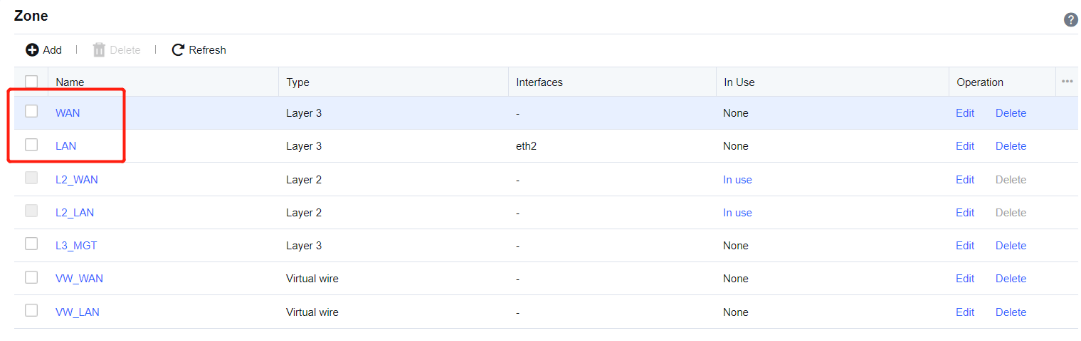
Step 1.Define LAN and WAN zones. Before you add a SNAT policy, navigate to Network > Interfaces > Zone and select the zone to which the interface belongs on the Zone page. In this example, select WAN for the ETH1 interface and LAN for the ETH2 interface. See the figure below.
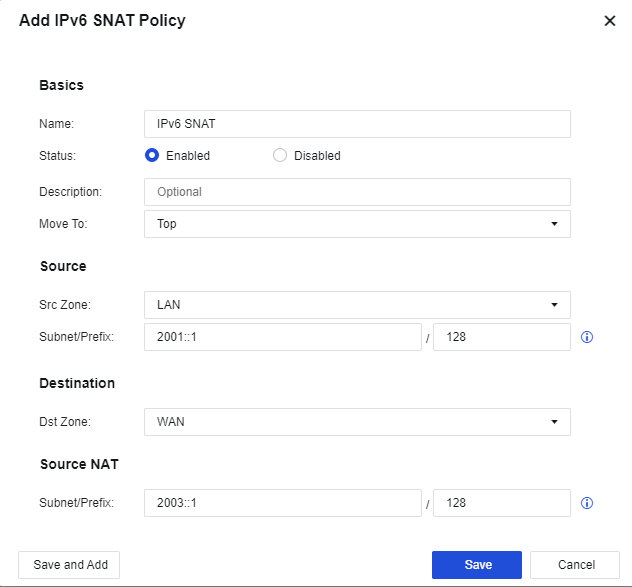
Step 2.Add a SNAT policy. Navigate to NAT > IPv6 NAT, click Add, select Source NAT, and then enter the name in the dialog box that appears.
Src Zone: Select LAN.
Subnet/Prefix: Enter 2001::1/128 for the IP address of the LAN server.
Dst Zone: Select WAN.
Subnet/Prefix: Enter 2003::1/128 for the IP address of the ETH1 interface.
Step 3.Save the configuration. Finally, click Save. Then, the configuration of the SNAT policy is complete. See the figure below.

Step 4.After the application control strategy from the LAN to the WAN is allowed, use the server to access the internet by translating the source IP address to the IP address of the ETH1 interface in NGAF.

Attention: The prefix length must remain unchanged for the source IP address and translated IP address.
To translate the destination IP address of data passing through the device. Destination NAT is often used to publish servers by mapping the services of LAN servers to the internet so that internet users can access internal servers through the public IP address.
IPv6 DNAT supports the LAN zone and enables you to configure the destination IPv6 address and its prefix. The prefix value ranges from 4 to 128.
Both LAN and WAN segments of an enterprise are IPv6 network segments, the IP address of the LAN server is 2001::1/128, NGAF is deployed at the internet egress as a gateway, the IP address of ETH1 interface is 2003::1/128, and the IP address of ETH2 interface is 2001::2/128. If you need to use the LAN server to publish web services to the internet, internet users can access the LAN server through the IP address of the ETH1 interface in NGAF for internet access.
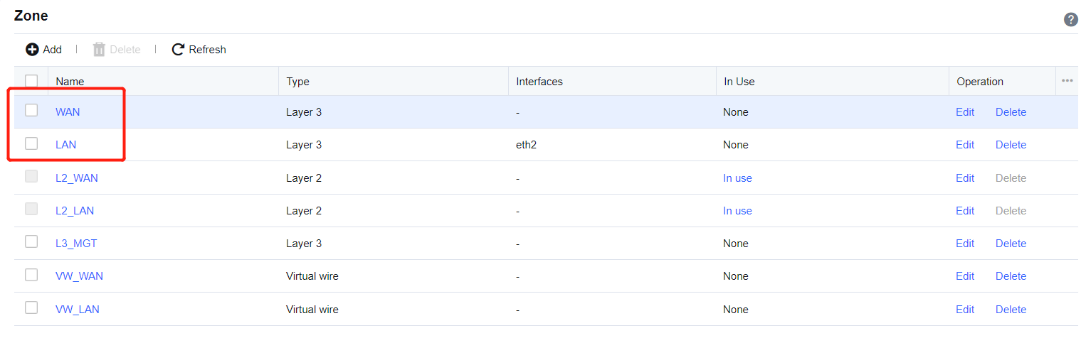
Step 1.Define LAN and WAN zones. Before you add a SNAT policy, navigate to Network > Interfaces > Zone and select the zone to which the interface belongs on the Zone page. The following figure shows the specific configuration. In this example, select WAN for the ETH1 interface and LAN for the ETH2 interface. See the figure below.
Step 2.Add a DNAT policy. Navigate to NAT > IPv6 NAT, click Add, select Destination NAT, and then enter the name in the dialog box that appears.
Src Zone: Select WAN.
Subnet/Prefix: Enter 2003::1/128 for the IP address of the ETH1 interface.
Subnet/Prefix: Enter 2002:222:1/128 for the IP address of the LAN server.
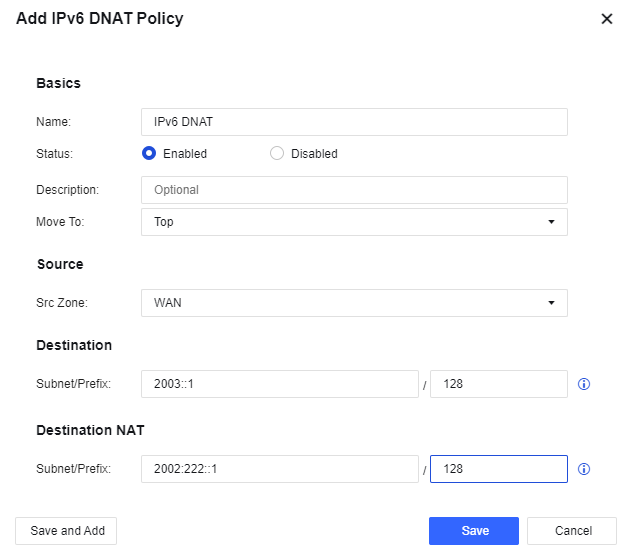
Step 3.Save the configuration. Finally, click Save. Then, the configuration of the SNAT policy is complete. See the figure below.

Step 4.After the application control policy for web services from the WAN to the LAN is allowed, access the LAN server by visiting http:// [2003::1] through WAN.
The prefix length must remain unchanged for the destination IP address and translated IP address.


 {{ $t('index.defaultHeader.chromeBrowserTip') }}