


{{ secondMenu.name }}






ARP proxy is also called routing proxy ARP. When a host is not configured with a default gateway address (that is, it does not know how to connect to the intermediary system of the network), it can send an ARP request (requesting the MAC address of the destination host). After receiving such a request, the device of which the proxy ARP function is enabled offers its own MAC address as a response to the ARP request. In this way, internal hosts on different physical networks but with the same network number can communicate with each other normally.
Check Enable to enable the ARP proxy function. Click Add to create an ARP proxy, as shown in the following figure.
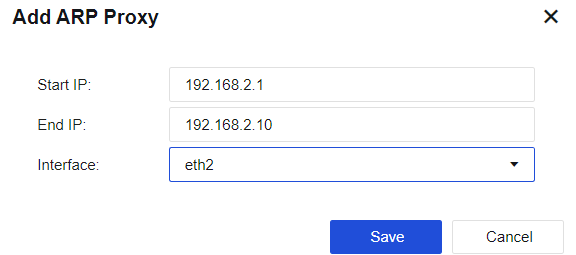
Start/End IP: Enter the IP addresses for which proxy is required.
Interface: Response to the ARP requests received via this interface.

1.The specified interface on which the ARP proxy should be enabled must be a routing interface.
2.The configured IP network segment should not conflict with other network segments for the NGAF.
3.Configuration errors will cause ARP conflicts between the corresponding IP addresses, resulting in network turbulence.


 {{ $t('index.defaultHeader.chromeBrowserTip') }}