


{{ secondMenu.name }}






The RIP uses a distance-vector algorithm. By default, RIP uses a very simple metric system: the distance is defined as the number of links to reach the destination site, taking values from 0 to 16. Infinity is defined as 16. The RIP process uses UDP port 520 to send and receive RIP packets. RIP packets are sent as broadcast packets every 30 seconds, and subsequent packets are sent after a random delay to prevent "broadcast storms". In RIP, if a route does not update within 180 seconds, its metric is set to infinity and the corresponding entry is deleted from the routing table.
RIP is used to enable and set up the RIP dynamic route protocol for NGAF devices, including network, interface, neighbor, and parameter configurations. Check Enable RIP, the figure is shown below.
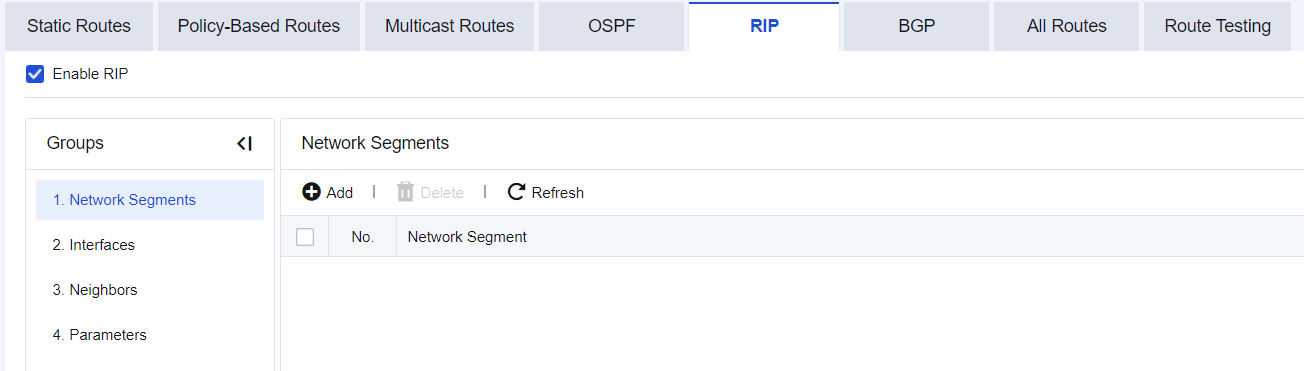
Set the network segment as the RIP segment at the specified interface. Click Add.
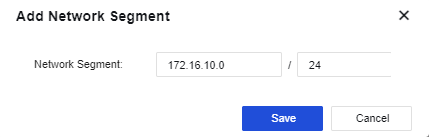
Network Segment: set the network segment that the device needs to be published. The format is "IP/netmask".
The Interfaces page shows the interface mapping to the network segment (in RIP → Network) where the device is deployed. These interfaces can transmit and receive RIP messages. If network segment information is added under the RIP network, the interface configuration is automatically generated as shown below.

Click an interface under Name to display the following page.
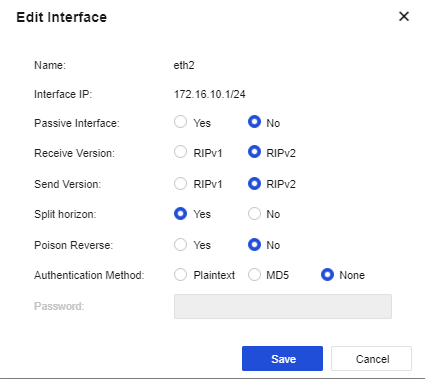
Name: Name of the interface mapping to the network segment (in RIP → Network) where the device is deployed.
Interface IP: IP address of the interface.
Passive Interface: Specify the working state of RIP on the interface. It is set to "No" by default.
Receive Version: Specify the version of RIP messages received from the interface. When the Receive Version is selected as RIPv2, both RIPv1 and RIPv2 messages can be received.
Send Version: Specify the version of RIP messages sent from the interface. RIPv1 messages are transmitted in broadcast mode; while RIPv2 messages are transmitted in broadcast or multicast (default) mode. When the Send Version is selected as RIPv2, both RIPv1 and RIPv2 messages can be transmitted.
Split horizon: Route learned from an interface must not be transmitted from the same interface. This avoids the route loop to some extent. Split horizon is allowed by default.
Poison Reverse: After poison reverse is enabled, the route received from an interface will flood out from this interface. However, the metric of this route is infinite. Poison reverse is not enabled by default.
Authentication Method: Plaintext, MD5, and None are available for selection. RIPv1 does not support message authentication, while RIPv2 supports plaintext authentication and MD5 authentication.
Password: Set the password for plaintext authentication or MD5 authentication.
To set the IP address of the neighboring device running the RIP, as shown in the following figure.
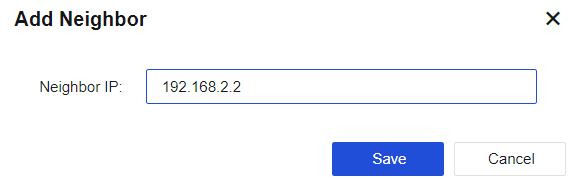
Click RIP > Parameters. The following page is displayed.
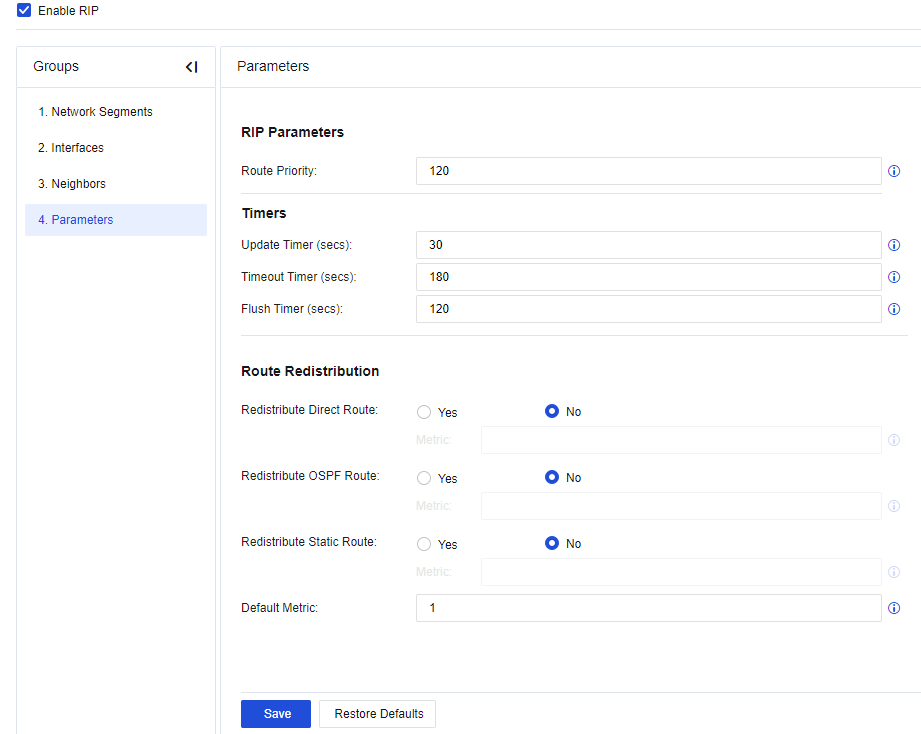
Basic RIP Parameters is to set the Route Priority and Timers.
Route Priority: Affects which route obtained through the routing protocol under the routing policy serves as the optimal route. The higher the priority value, the lower the actual priority. The RIP priority can be configured manually, and the default value is 120.
Update Timer: Set the interval of regular route update. The default value is the 30s.
Timeout Timer: If a particular route does not respond within this time, the hop count of the route is set to 16, that is, unreachable. The default value is 180s.
Flush Timer: RIP keeps announcing the unreachable route information to external servers before the flush timer times out. If the flush timer also times out, this route will be deleted from the routing table.
Configure the Route Redistribution to introduce other routes (direct route, OSPF route, and static route) into RIP and set the introduced route's metric value.
Redistribute Direct Route: Select whether to introduce direct routes into the RIP route as external route information and set the metric value after such routes are introduced. The default metric value is 10.
Redistribute OSPF Route: Select whether to introduce direct routes into the RIP route as external route information and set the metric value after such routes are introduced. The default metric value is 20.
Redistribute Static Route: Select whether to introduce static routes into the RIP route as external route information and set the metric value after such routes are introduced. The default metric value is 20.
Default Metric: Default number of hops for the introduced route. During the route introduction, if metric parameters of each type of route are not specified separately, this metric value is used as the number of hops after route introduction. The default metric value is 10.


 {{ $t('index.defaultHeader.chromeBrowserTip') }}