


{{ secondMenu.name }}






When a host on a VLAN needs to communicate with a device operated at the network layer, a VLAN-based logical interface (i.e., a VLAN interface) can be created on the device. The function of the VLAN interface is the same as that of an ordinary Layer 3 physical interface, which can implement various Layer 3 features such as IPv4/IPv6 address configuration. It is used in Layer 2 transparent deployment scenarios to implement communication between VLANs.
To create a new VLAN interface, click Add on the Network > Interfaces > VLAN Interface page, as shown in the following figure.
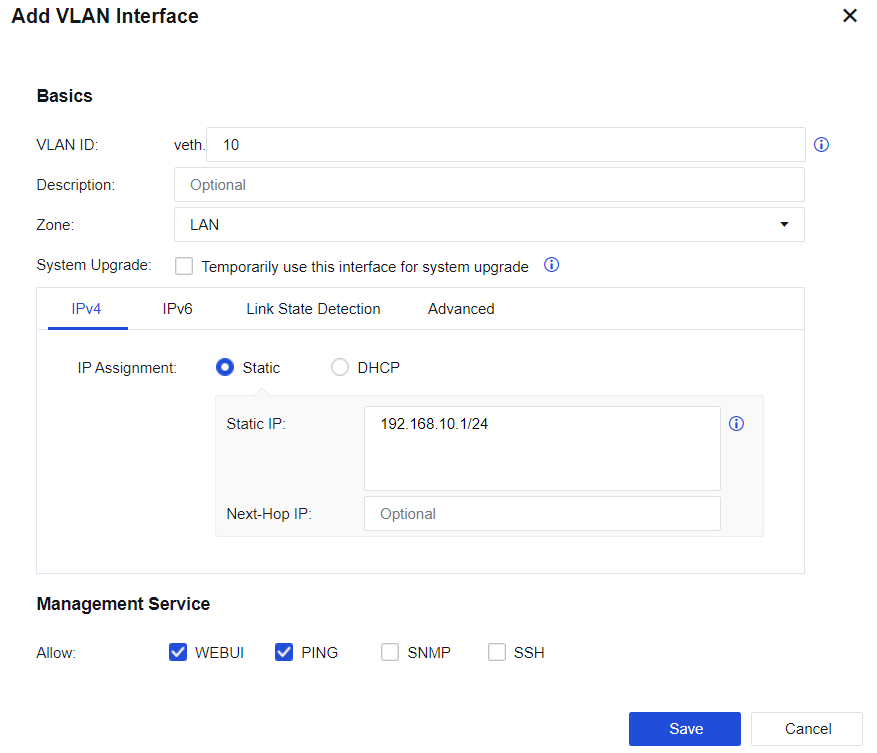
VLAN ID: Create a virtual interface for a VLAN to achieve Layer 3 intercommunication.
Description: Briefly describe the interface.
Zone: Select the network zone to which the VLAN interface belongs.
System Upgrade: After enabling this function, the client can be upgraded through the interface. The function will be automatically disabled after 8 hours.
Specify how to obtain an IPv4 address.
Selecting Static IP means that the IPv4 address and next-hop IP address of the interface are specified by manual configuration.
Selecting DHCP means that the IPv4 IP address and next-hop IP address of the interface are automatically obtained using DHCP.
If IPv6 addresses are required to use, it is necessary to enable the global IPv6 function under System > General Settings > Network, so that the device can forward IPv6 messages.
Selecting Static IP means that the IPv6 address and next-hop IP address of the interface are specified by manual configuration.
Link State Detection: Detect the availability of external lines. If there is more than one external line, the traffic can be automatically switched over to other normal lines when one line fails. Detection can be performed by using DNS lookup, PING, or ARP probe.
MTU (under Advanced): Display the MTU information of the network interface. MTU can be configured. MTU range: 68 - 1796.


 {{ $t('index.defaultHeader.chromeBrowserTip') }}