


{{ secondMenu.name }}






Subinterfaces are multiple logical virtual interfaces configured on one main interface. Subinterfaces depend on the physical interface, share physical layer parameters of their main interface, or be configured with their respective link-layer parameters and network layer parameters. Main interface status change affects the status of subinterfaces. Subinterfaces can work only when the main interface is connected. The device supports creating subinterfaces on a Layer 3 Ethernet interface and a Layer 3 VLAN-Trunk interface. When a Layer 3 Ethernet interface or VLAN-Trunk interface needs to identify VLAN packets, it can be solved by configuring subinterfaces. In this way, packets from different VLANs can be forwarded from different subinterfaces, providing users with high flexibility.
Configure on the Network > Interfaces > Subinterface, click Add to create subinterfaces, as shown in the following figure.
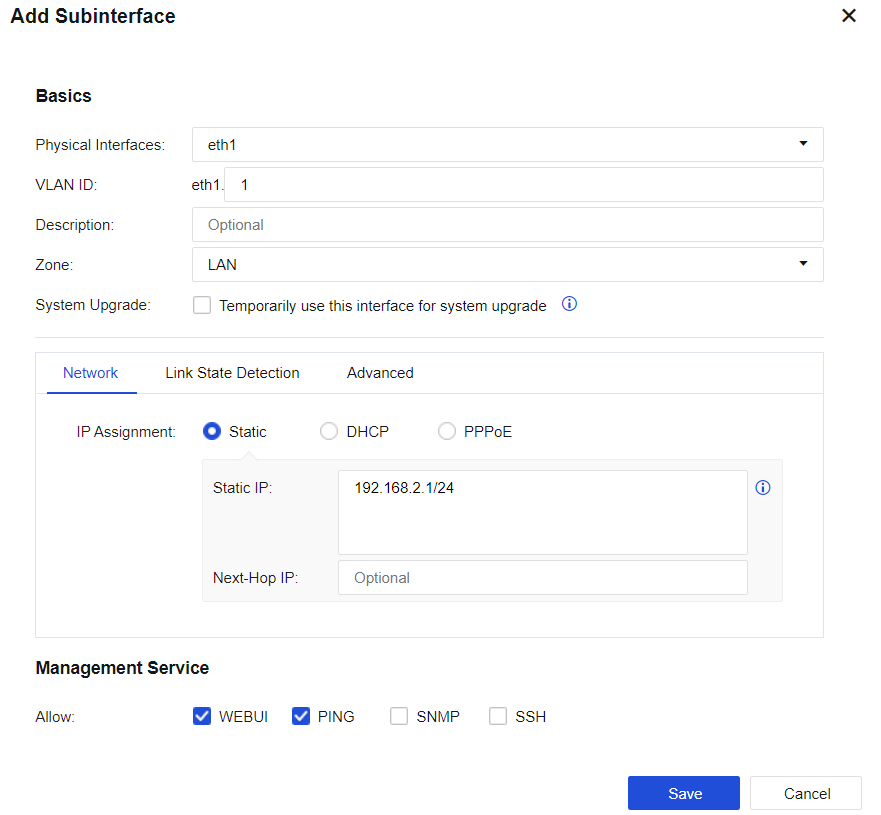
Physical Interfaces: Select the subinterface created on the physical interface.
VLAN ID: The VLAN ID created indicates that the interface supports receiving and sending messages corresponding to the VLAN ID.
Description: Enter the description of the subinterface.
Zone: Select the zone defined for the subinterface.
Link State Detection: Detect the availability of external lines. If there is more than one external line, the traffic can be automatically switched over to other normal lines when one line fails. Detection can be performed by using DNS lookup, PING, or ARP probe.
• ARP probe: Determines the link status by sending ARP to the designated network device. Each group can consist of two destination IP addresses, separated by a comma. ARP packets are sent to all IP addresses in the group.
• DNS lookup: Determines the link status by resolving the domain name on the designated DNS server. You can configure a maximum of two groups of DNS servers. If any group of servers fails to resolve the domain name, it will be judged as a link failure.
• PING: Ping the designated server to determine the link status.
You can configure a maximum of two groups of destination IP, and each group can consist of two destination IP addresses, separated by a comma. When all the IPs in any group fail to PING, it is judged as a link failure.
MTU (under Advanced): Display the MTU information of the network interface.
MTU can be configured. MTU range: 68 – 1796.


 {{ $t('index.defaultHeader.chromeBrowserTip') }}