


{{ secondMenu.name }}






High availability is an effective solution that adopts a dual-mode to guarantee business continuity, to avoid single-point failures. This solution can prevent network services from being interrupted to a large extent and mainly applies to scenarios in which the network reliability is high and the business continuity is strong.
Basic Settings: Specify the heartbeat IP addresses of the local and peer devices. The local device IP address can only be an interface that is configured to carry a HA tag. Also, this interface can only communicate with other high available NGAF device interfaces to send and receive heartbeat information and interaction configuration information. See the figure below.
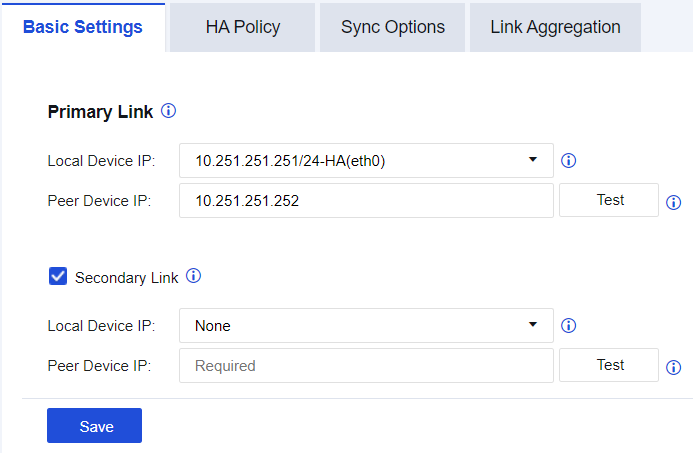
Primary Link: Specify the primary heartbeat IP address. Select the -HA IP address configured for the interface and enter the -HA IP address of the peer device. The primary link is responsible for heartbeat persistence of active and standby devices, configuration synchronization, and session synchronization. At present, only an aggregate interface can serve as a heartbeat interface, whereas the aggregate interface mode only supports "Active-Standby mode".
Secondary Link: Specify the secondary heartbeat IP address which serves as heartbeat redundancy. Select the -HA IP address configured for the interface and enter the -HA IP address of the peer device. The secondary link is only responsible for synchronizing heartbeat information and also supports aggregating active and standby interfaces. Note: The secondary heartbeat IP address does not support configuration synchronization. Therefore, if there are some failures in the primary heartbeat IP address, handle them immediately. Otherwise, the business risks may be caused.
HA Policy
HA Policy: This function is used in active-standby deployment mode. Select Enable and click Add. Then, the following page appears.
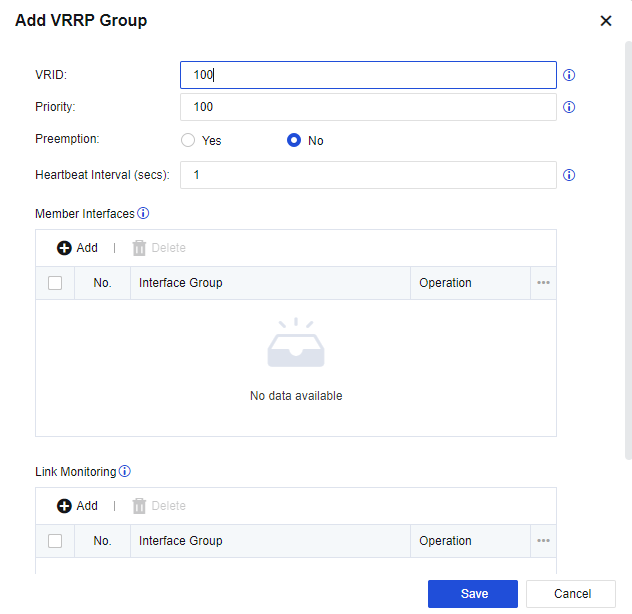
Virtual Group: Specify the group to which the interface belongs when the VRRP is working. The different interfaces of two devices can be defined as an identical virtual group. Multiple interfaces of a device can also be defined as a virtual group. The identical virtual groups of two devices serve as the active and standby groups for each other.
Priority: Specify the priority of interfaces selected in the network interface list. The higher the value, the higher the priority. Set preemption to Yes to validate the priority setting. If the two devices work in dual-device hot standby mode (that is, one device works while the other serves as the standby device and does not work), the priority of device A can be set to 90 with preemption set to Yes while the priority of the device B to 80 (with preemption set to either Yes or No). When the device with priority 90 fails, the one with priority 80 fills in. When the former recovers, it will preempt the role as the active device, and the latter will become the standby device.
Preemption: Specify whether the device will preempt the role as the active device. This option is used along with Priority.
Heartbeat Time: Specify the time for the two devices to exchange data. During this interval, the devices communicate by sending packets to inform the other network interface status and link monitoring status of the local device. If one of the devices is abnormal, a switchover is implemented. If both devices cannot receive heartbeats, they set themselves as active devices so that both devices work simultaneously.
Network Interface Monitoring: Specify the network interfaces to be monitored. You can set multiple network interface groups, each of which can be equipped with multiple network interfaces. A network interface group is considered faulty only when all of its network interfaces are disconnected. Dual-device switchover can only be implemented on this occasion.
Interface Link Monitoring: This relies on the interface detection method (i.e., the interface link fault detection function) defined in the Interface/Zone setting. Detection to check the condition of the interfaces and links is performed for interfaces selected here. If link monitoring is not selected, while the two devices are working, detection is only performed to check whether the interfaces set in Network Interface Monitoring are down. A switchover is implemented only when the physical network interfaces are down. You can set multiple monitoring groups, each of which can be equipped with multiple network interfaces for link monitoring. Each category of link monitoring can have different fault determination methods. A link monitoring group will be considered faulty only when the links of all network interfaces are faulty. A dual-device switchover will be implemented only on this occasion.
Active/Standby Device Switchover: Supports switching the active device to the standby device but not the opposite.
Click Manage Peer Device. Then, you can access the console page of the standby device from the active device through a heartbeat proxy.
Synch Options
To synchronize the configurations of two devices and include active and standby control statuses. It is a method for controlling the synchronization of device configurations. See the figure below.
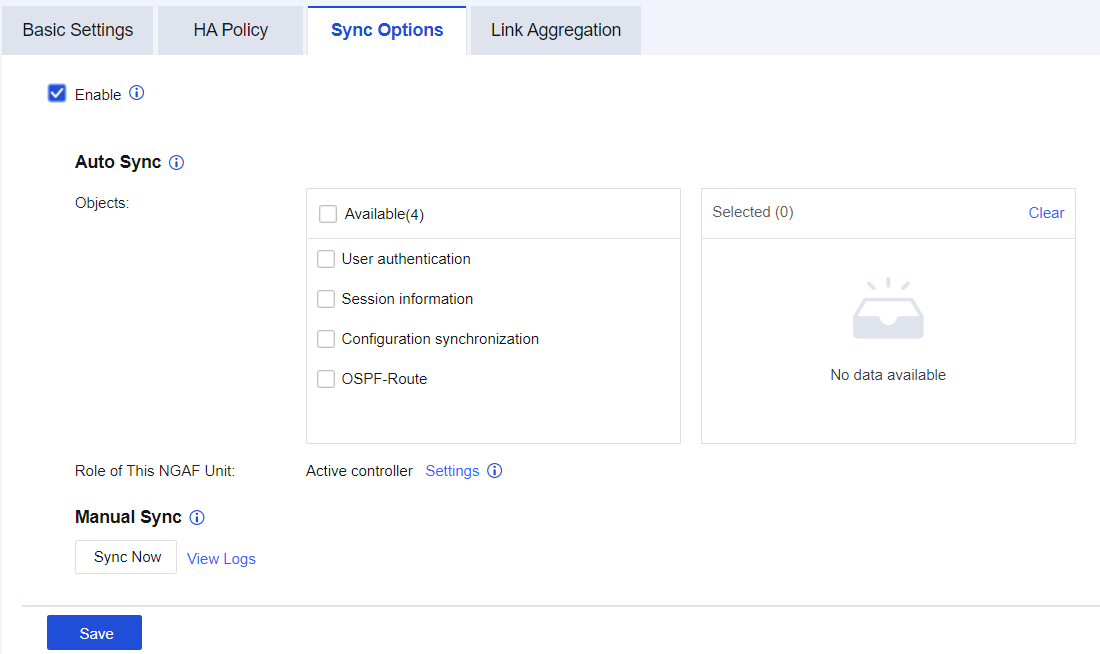
Objects: Specify the synchronization objects of the two devices. The available options include User authentication, Session information, Configuration synchronization, and OSPF-Route. The devices detect whether any configuration changes every 10 seconds.
Role of This NGAF Unit: Specify the configuration synchronization roles, including Active controller and Standby controller.

The configuration of the active controller role will be synchronized to the standby controller role. The configuration of the standby controller role cannot be modified.
Link Aggregation
This function applies to scenarios in which link aggregation is performed on NGAF's uplink and downlink in active-active deployment mode of NGAF transparent mode and the inbound and outbound paths of packets are inconsistent. If the sent data passes through the firewall A and the returned data passes through the firewall B, the sent and returned NGAF will discard packets due to inconsistent connection tracks on NGAF. The dual-device aggregation function makes the packets with inconsistent inbound and outbound paths be normally forwarded when passing through NGAF. The configuration is shown in the figure below.
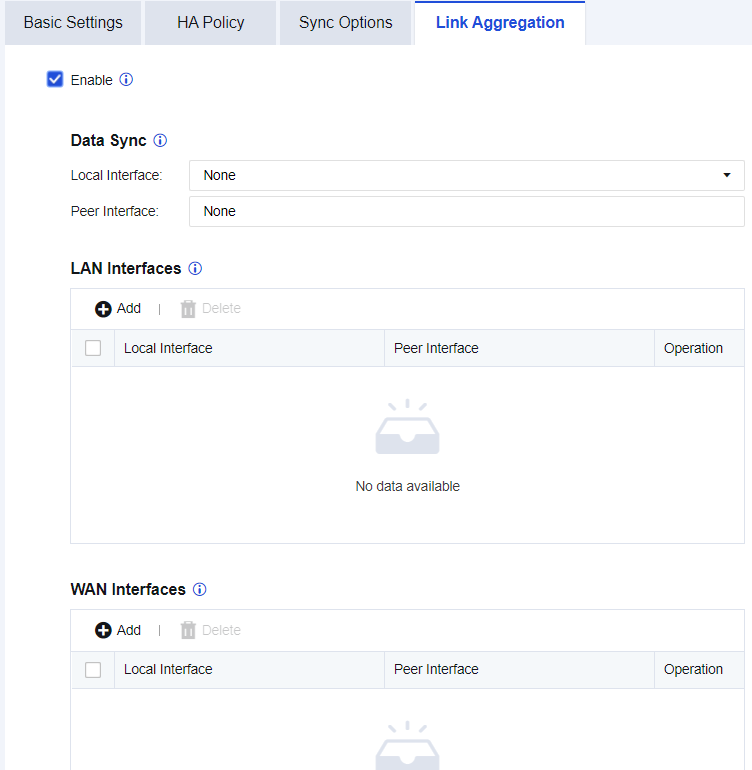
Data Sync: Select an idle interface of the local and peer devices, respectively, for passthrough in order to synchronize packets with inconsistent inbound and outbound paths. The interfaces require no IP address configuration.
LAN Interfaces: Select the interfaces on the local and peer devices to access the LAN through downlinks.
WAN Interfaces: Select the interfaces on the local and peer devices to access the WAN through uplinks.
1. The monitoring network interfaces on the active and standby devices must be consistent. Consistent HA interfaces are recommended.
2. If virtual groups are set to have identical priorities, preemption will not be implemented, regardless of whether this function is enabled.
3. In route mode, if link monitoring is set, there are three rules for an active/standby switchover: no heartbeats are received, physical interfaces are down, and link detection shows that the links have failed. An active/standby switchover is implemented if any one of these rules is met.
4. Configuration synchronization includes two types: batch and incremental synchronization. Only the active controller will send the configuration synchronization request to the peer device, requesting synchronization of the peer device configuration to the local device. In this case, batch synchronization is implemented. When batch synchronization of the active controller is complete, the device checks for any configuration change every 10 seconds. If any change occurs, the configuration change of the active controller is synchronized to the standby controller. In this case, incremental synchronization is implemented. The standby controller has no permission to modify the configuration. For the device to do so, modify the synchronization role first. Otherwise, the modification will not be submitted.
5. If the serial number of the rule database on device A not expired, but expired on device B, after a rule database update of device A, the rule database of device A will fail to synchronize to the peer device. However, this does not affect the synchronization of other configurations.
6. The two devices for dual-machine hot standby must be of the same model. Devices of different models have different numbers of network interfaces. If serving as active and standby devices, such devices will also synchronize network interface configuration during configuration synchronization. It will make active and standby devices work abnormally.
7. Configuration synchronization does not synchronize IP addresses of HA interfaces and High Availability configuration.
8. When the devices serve as active and standby devices, you can view their statuses on the Home page.


 {{ $t('index.defaultHeader.chromeBrowserTip') }}