


{{ secondMenu.name }}






To manage and view the relevant information (such as the interface status, interface traffic, and route) of Sangfor devices in SNMP mode with other network management devices or software. It helps users centrally manage, maintain, and monitor the network with ease. The interface is shown below.
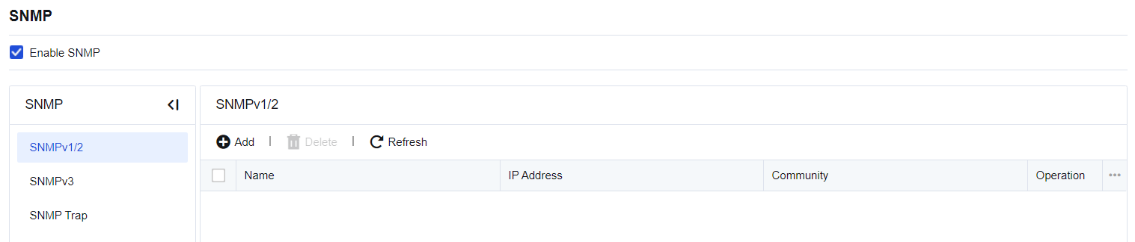
If you select Enable SNMP, other devices and management software can read the device information through SNMP.
Export MIB: This allows you to export MIB databases supported by the NGAG device. You can import the SNMP client for use.
SNMPv1/2 allows other devices to connect the device through the SNMP V1/V2 protocol, and defines connection parameters. Click Add and configure the parameters on the following page.
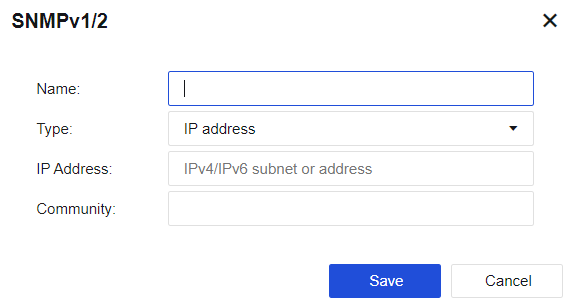
Name: Specify the name of the management host.
Type: Specify the type of the management host. You can select Host or Subnet from the drop-down list. If you select Host, the SNMP management host is set as a host. If you select Subnet, the SNMP management host is set as a subnet. All hosts in the subnet can manage the device through SNMP.
IP Address: Specify the IP address or address range of the SNMP management host. If you select Host for the Type parameter, this parameter specifies the IP address of the SNMP management host. If you select Subnet for the Type parameter, this parameter specifies the subnet address and its mask of the SNMP management subnet. An IPv6 address is supported.
Community: Specify the community name for the SNMP management host that accesses the device.
Click Save. Then, the configuration is saved.
SNMPv3 allows you to configure some advanced expansion options necessary for communication in SNMP V3.
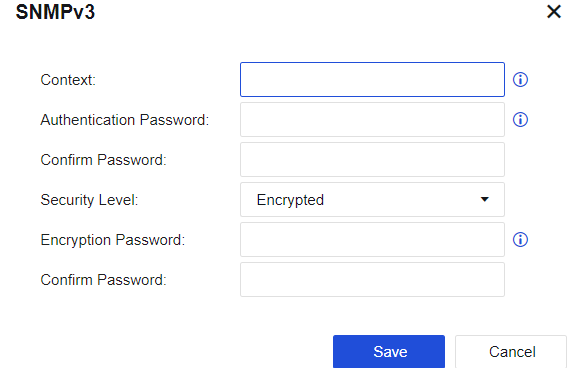
Context: Specify the name of the user.
Authentication Password and Confirm Password: Specify the password used for authenticating SNMPV3 users. The authentication password contains more than 8 characters and spaces are not allowed. It is encrypted with the MD5 algorithm.
Encryption Password and Confirm Password: Specify the password for message encryption. The encryption password contains more than 8 characters and spaces are not allowed. It is encrypted with the DES algorithm.
Security Level: Specify whether to encrypt SNMP authentication and management information. You can select Encrypted or Not Encrypted from the drop-down list. If you select Encrypted, the system applies the encryption and authentication simultaneously by first encrypting the data and then conducting the message digest calculation with the authentication technology. If you select Not Encrypted, only the authentication technology is applied.
Click Save. Then, the configuration is saved.
SNMP Trap: Actively sends an SNMP message to the administrator to monitor the status of NGAF in real-time.
Click Add and configure the parameters on the following page.
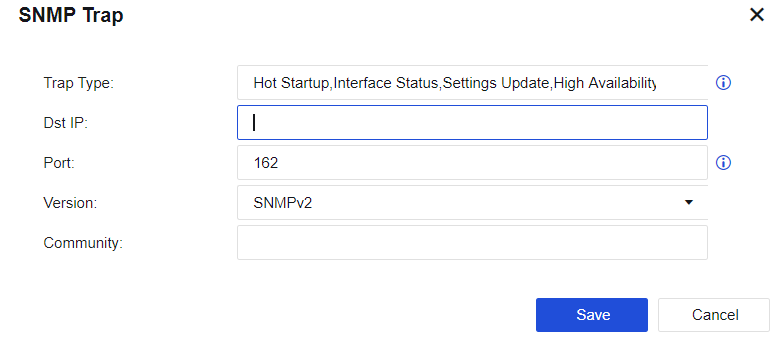
Trap Type: Specify the type of messages actively sent by NGAF, including hot startup, network interface status, configuration update, dual-machine switching, internal database update, link detection (the OID corresponding to each message type can be viewed by clicking SNMP OID).
Dst IP: Specify the destination host IP address for sending SNMP Trap messages, namely the IP address of the SNMP client. Both IPv4 and IPv6 addresses are supported.
Port: Specify the port number used by the target host for listening.
Version: You can select SNMPv1, SNMPv2, or SNMPv3 from the drop-down list.
Community: Specify the name of the community sending SNMP Trap messages.
If you select SNMPv3 for the Version parameter, the Community parameter is unavailable. You must set the following parameters:
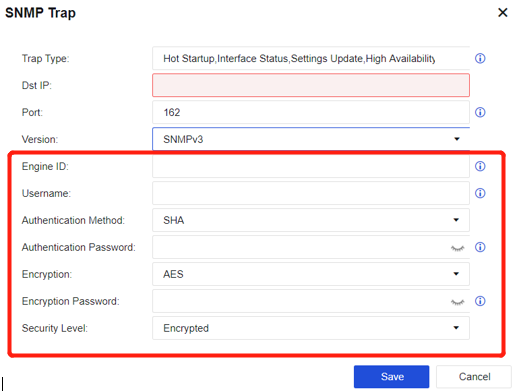
Engine ID: Specify the Engine ID of the target host (snmpEngineID), in hexadecimal string form, excluding prefix 0x.
Username: Specify the name of the SNMPv3 user existing on the SNMP client.
Authentication Method: Specify the authentication method of the SNMPv3 user. You can select MD5 and SHA from the drop-down list. By default, SHA is selected.
Authentication Password: Specify the authentication password of the SNMPv3 user.
Security Level: Specify the security level of SNMPv3 Trap messages. You can select Encrypted or Not Encrypted from the drop-down list. If you select Encrypted, specify the Encryption and Encryption Password parameters.
Encryption: Specify the encryption method of the SNMPv3 Trap message. You can select DES and AES from the drop-down list. By default, AES is selected.
Encryption Password: Specify the encryption password of SNMPv3 Trap messages.


 {{ $t('index.defaultHeader.chromeBrowserTip') }}