


{{ secondMenu.name }}






To update internal databases of the device before the authorization validity period, which cover Unknown Threat Intelligence, Sangfor Engine Zero File Verification Model, URL, Exploit Protection, Application Ident, WAF signature, data leakage prevention, Anti-Virus, Vulnerability Analysis, Security Event, Malicious Connection, and Threat Intelligence. The following table describes the rule databases.
| Name |
Note |
| Unknown Threat Intelligence |
This database will update automatically after five minutes. You are not allowed to click Update Now. |
| Sangfor Engine Zero File Verification Model Database |
This database can identify the most mainstream active viruses and detect unknown new viruses by analyzing and learning via virus signature identification. |
| URL Database |
This database helps the device identify various websites and manages part of URLs. |
| Exploit Protection |
This database provides a set of all attack features including system vulnerabilities and app vulnerabilities to the intrusion prevention template. |
| Application Ident Database |
This database provides a set of applications with different app signatures to the application control policy for calling. |
| WAF Signature Database |
This database provides a set of Web application attack features to the web application protection template for calling. |
| Data leakage prevention database |
This database is a rule database related to identification data, such as ID number and mobile number. |
| Vulnerability Analysis Rule |
This database is used to analyze traffic passing NGAF, to find existing vulnerabilities. |
| Anti-Virus Database |
This database is a rule set of botnet and virus files. |
| Security Events |
This database is a set of hot events in the recent period and is used to remind customers of finding existing risks in time. |
| Malicious Connection Database |
This database is a set of malicious connection IP addresses. |
| Threat Intelligence Database |
This database is a set of hot security events in the recent period and provides these events to NGAF for scanning. |
Table 22:Rule Databases
First, check the box in front of the sequence number. Click Enable (or Disable) to enable (or disable) the automatic update of internal databases. Click Refresh to view the real-time information of the versions of the internal databases.
Rule Database Update
If the NGAF device cannot access the Internet, click Offline Update to manually update the rule database within the validity period of the update service.
If the NGAF device is already networked, click Update Now to update the selected rule database within the validity period online.
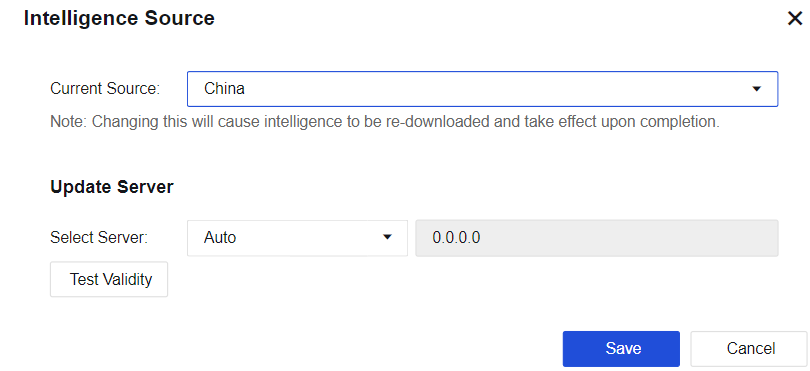
Intelligence Source
This function is used to configure an intelligence source of the device and an update server to be connected. After the intelligence source is changed, a corresponding threat intelligence database will be downloaded.
Click Intelligence Source to go to the Intelligence Source page. The intelligence sources include an intelligence database in China and an overseas intelligence database. You can select an update server based on actual WAN lines or select Auto so that the device can automatically detect an accessible update server.
Proxy Settings
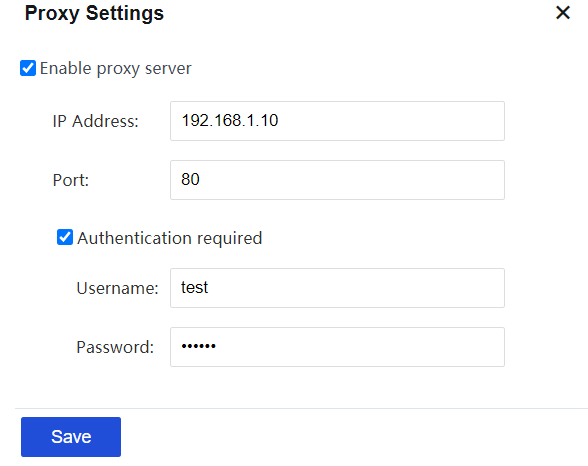
When an HTTP proxy server exists in the network, configure it. Then the device is allowed to update the internal database by using the proxy server. When you use the proxy server to configure the update of the internal database, make sure that the device must be in online status.
Click Proxy Settings to go to the Proxy Settings page. Select Enable proxy server. Enter the IP address and port of the proxy server. Select Authentication Required. Enter the username and password to be verified by the proxy server. The interface is shown below.
Cloud-based URL Category Detection
To check the categories of URL databases in the cloud if the categories cannot be searched in the local URL database.
Click Cloud-Based URL Category Detection to go to the URL Cloud-based Detection Settings page. By default, this option is enabled.


 {{ $t('index.defaultHeader.chromeBrowserTip') }}