


{{ secondMenu.name }}






To set a group of physical interfaces (e.g. Interface A and Interface B) on the NGAF device to form a virtual wire group. When packets enter the device from Interface A, all data (except the data whose destination IP address is in the NGAF device itself) are forwarded from Interface B. The data are sent directly without being searched for in the L2 MAC address table or being checked by the L3 router.
However, the data is still controlled by various security policies. Through this function, the efficiency of data forwarding by NGAF is enhanced and data forwarding error caused by a messy MAC table is prevented.
The configuration of virtual wires is shown in the following figure.

Click Add to add a virtual wire, as shown in the following figure.
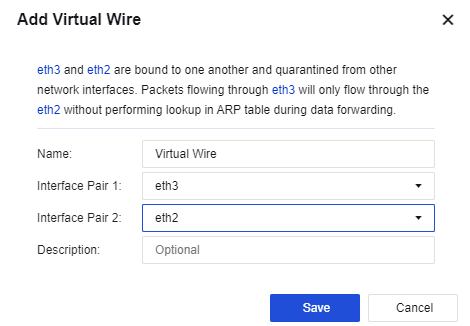
Name: Enter the name of the virtual wire.
Description: Enter the description of the virtual wire.
Interface Pair 1: Select a physical interface or aggregate interface with the virtual interface attribute.
Interface Pair 2: Select a physical interface or aggregate interface with the virtual interface attribute.

Only the virtual wire type’s physical interface or aggregate interface can be configured as a virtual wire. The virtual interface and virtual wire do not take effect unless being configured simultaneously.


 {{ $t('index.defaultHeader.chromeBrowserTip') }}