Athena NGFW (previously known as Network Secure) provides comprehensive protection for every network perimeter, ensuring the safety of your valuable assets, data, and users from emerging threats.
Replace a network cable and check whether the interface can work normally.
Change the rate and duplex mode of the failed interface and check whether compatibility issues exist when the networking interface is used.
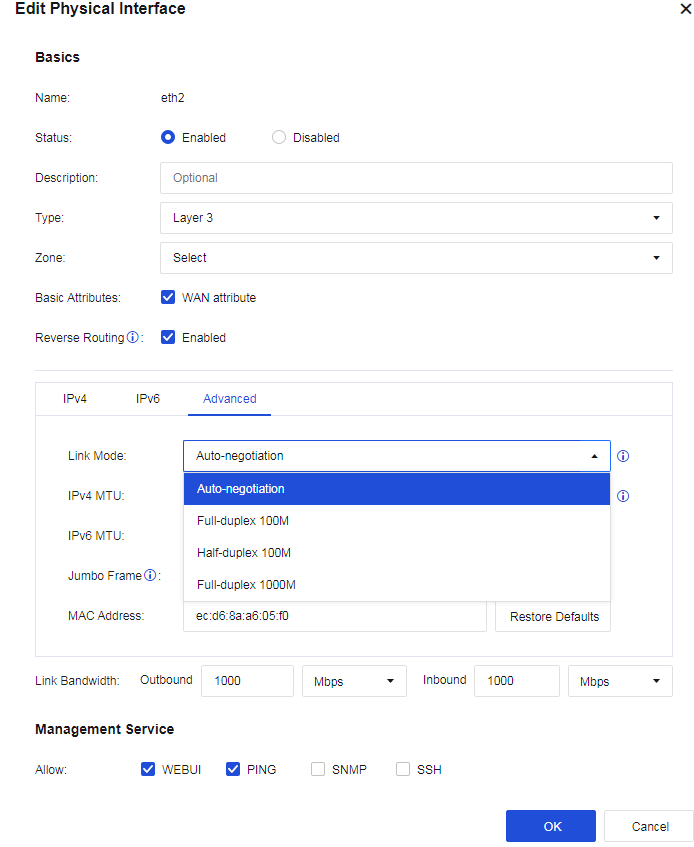
Go to Network > Interfaces > Physical Interfaces and click the interface you want to edit. Click Advanced and select different rates and duplex modes to check whether the interface can work normally.
Connect the failed interface to other interfaces of a switch or other network devices and check whether the interface can work normally.
Disconnect the device from the network. Contact Sangfor Technical Support to confirm whether hardware failures exist. If so, return the device to the factory for repair.










 {{ $t('index.defaultHeader.chromeBrowserTip') }}