


{{ secondMenu.name }}






Send a TCP Reset message to deny a request: Specify whether to send the TCP reset message and disconnect data connections denied by the device policy.
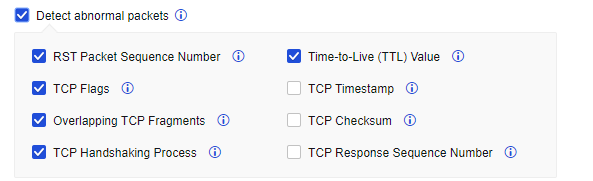
Detect abnormal packets: When this feature is selected, drop abnormal TCP messages. To prevent losing normal TCP messages, do not enable this feature for deployment (e.g., asymmetric routing) requiring no special attention to the TCP status.
Send a TCP Reset message in mirror mode to deny request: Specify whether to allow the device to send the TCP reset message in mirror mode.
Enable Base64 decoding: Specify whether Web App Protection performs a security check on base64 data.
Check Base64 error: Specify whether Web App Protection performs security checks on non-compliant Base64-encoded data.
Enable IPv4/IPv6 support: Enable Network Secure to support IPv4/IPv6 dual protocol stack. To enable this function, you must restart the device.
Enable high performance for internet access: Only available for users in the Internet access scenario. Enabling this function in the case of performance bottlenecks can promote system throughput.
Respond to MAC address change of network neighborhood: Speed up the response to the changes in the MAC address of the network neighborhood. It is recommended to enable this function in the case of such changes.
Visible to Linux with traceroute command: Already supported in the Windows system by default. This function is only available in the Linux system. When it is enabled, the gateway is visible to the tracing route in the Linux system. For gateway security reasons, this function is disabled by default.
Enable network load balancing on network adapter: Can perform software load distribution to improve performance of the whole device, when the traffic contains a large amount of identical quintuple data including source IP address, source port, destination IP address, destination port, and transmission-layer protocol.
Enable inbound DoS protection: When checked, the Inbound Attack Protection option is available on Policies > Network Security > Anti-DoS/DDoS.
Allow associating policy-based routes with applications: Specify whether to allow associating policy-based routes with applications.
Bypass application layer detection: When business traffic reaches the device's performance limit, checking this option allows certain traffic to bypass security checks to ensure network stability. This function is enabled by default.
Enable body identification: Determine the data type according to the body content.
Enable smart scan for internet access scenarios: If enabled, Engine Zero will perform a smart scan to speed up the scan process and offload traffic more efficiently.
Enable application control based on domain name: When you select this option, the system supports domain name-based control of the application control policy.
Enable body identification: Judge the data type according to the body content.
Allow associating policy-based routes with applications: Specify whether to associate the policy-based routing with applications.
Allow modifying interface count in HA mode: If the number of interfaces on HA nodes is inconsistent, you can enable this feature and go to System > High Availability > Physical Interfaces to change the number of interfaces. Please disable this feature after you complete the change.
Disable TCP connection reuse: A new connection will be opened for subsequent sessions that have the same 5-tuple (source/destination IP address, source/destination port, and protocol). TCP connection reuse is enabled by default.


 {{ $t('index.defaultHeader.chromeBrowserTip') }}