


{{ secondMenu.name }}






The Basics page contains three sections, namely Address & Secret Key, Local Subnet, and Advanced.
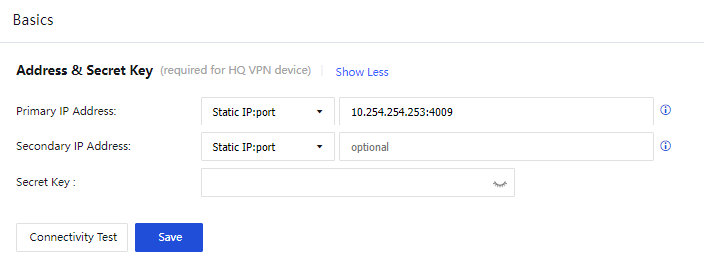
Parameters in the Address & Secret Key section:
Primary IP Address: Set a primary IP address in one of the following three formats:
Static IP:port: You can set up to four static IP addresses. Separate multiple IP addresses with pound signs (#). For example, 202.96.137.75#60.28.239.21:4009. The IP addresses are outbound IP addresses of the VPN HQ device.
Dynamic domain:port: This format is applicable when the VPN HQ device has a dynamic domain name pointing to its outbound IP address. Example: www.sangfor.com:4009.
WebAgent Server: This format is applicable when the VPN HQ device has no static IP address. For example, when Asymmetric Digital Subscriber Line (ADSL) is used, such as www.sangfor.com/NG4.0/test.php and 202.96.137.75/test.php. If you select WebAgent Server, you can set a WebAgent password that is the same as that of the WebAgent server to be accessed. Click Change Password and set a WebAgent password to prevent unauthorized users from using the WebAgent to configure fake IP addresses. The WebAgent password is optional.
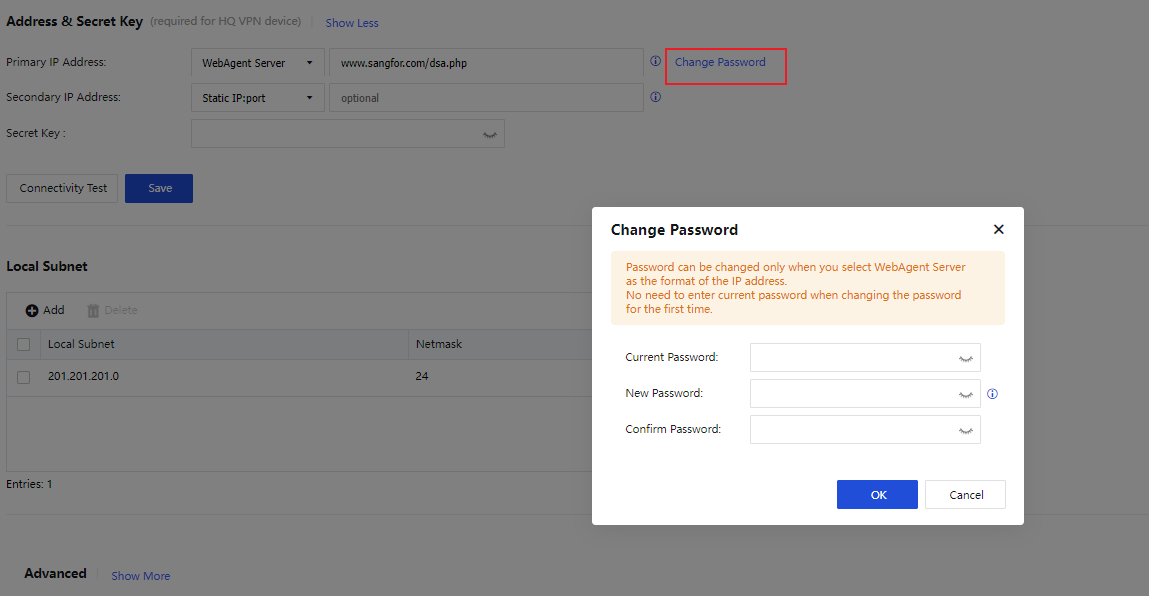
Secondary IP Address: Set a secondary IP address in the same format as the primary IP address. The matching rules are as follows:
The priority of the primary IP address is higher than that of the secondary IP address. The secondary IP address takes effect only when the primary IP address is unavailable. If you want to connect a branch device to the local device, either the primary or secondary IP address of the branch device must be the same as that of the local device.
Secret Key (Optional): The authentication password for a branch device to access the VPN HQ device. If this field is specified, you must enter the same password on the branch device to establish a VPN connection.
Connectivity Test: Check whether the format of the primary IP address is valid and whether the TCP port is accessible.
Click Save.

1. The WebAgent password cannot be restored if it is lost. You can only contact Sangfor Technical Support to generate a file without a WebAgent password and replace the original file.
2. In case of multiple paths with static IP addresses, you can set WebAgent Server in the IP address 1#IP address 2:port number format.
If the LAN where the device resides contains a Layer 3 switch or router and the LAN is divided into multiple subnets, you must add all the subnets other than the subnet to which the intranet interface belongs.
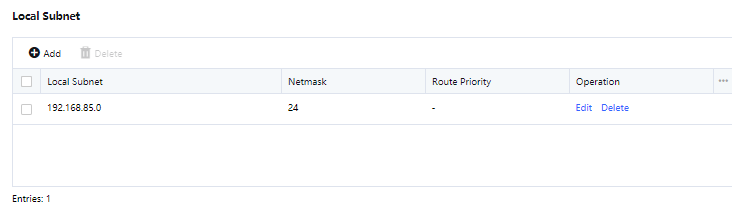
In the Local Subnet section, click Add. In the Add Local Subnet dialog box, enter other local subnets in IP/netmask(/priority) format, as shown in the following figure.
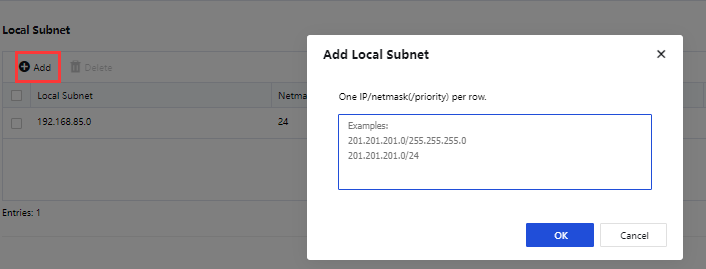
Click OK.
The subnet to which the intranet interface belongs does not need to be added as a local subnet. You need to add other subnets as local subnets only when the LAN is divided into multiple subnets.
In the Advanced section, the Intranet Interface, VPN Interface, and Listening Port parameters need to be configured, as shown in the following figure.
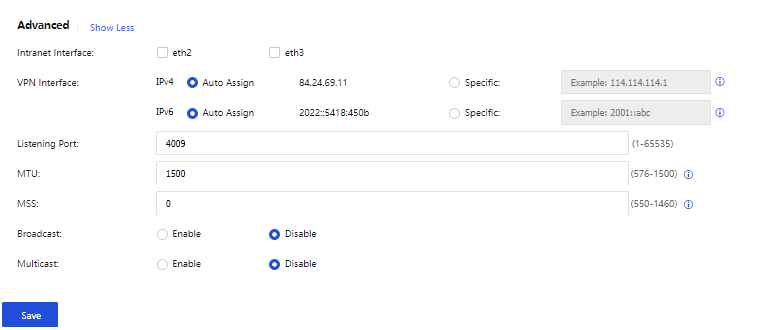
The parameters are described as follows:
Intranet Interface: Interfaces with the LAN attribute, which are used to set VPN subnets. IP addresses within the subnets of the LAN interfaces are defined as VPN data, and IP addresses in other subnets are defined as non-VPN data.
Options for Intranet Interface include interfaces on the Network > Interfaces page that are not configured with the WAN attribute or default gateways. Interfaces with the WAN attribute will not be displayed in the Intranet Interface field.
VPN Interface: Set an IP address for the VPN interface of the local device. Two modes are available: Auto Assign and Specific.
Listening Port: Set a listening port for the VPN service as required. The default value is 4009.
MTU: Set the MTU for VPN data. The default value is 1500.
MSS: Set the MSS for VPN data in UDP mode.
Retain the default values of MTU and MSS. If you want to modify them, contact Sangfor Technical Support representatives for instructions.
Broadcast: Specify whether to enable broadcast. If you enable broadcast, you must enter a port range for broadcast packets.
Multicast: Specify whether to enable multicast. If you enable multicast, multicast packets received from the branch LAN can be transparently transmitted to the HQ device through the Sangfor VPN tunnel. This feature takes effect only when it is enabled on both the HQ and branch devices.
Click Save for the configurations to take effect.


 {{ $t('index.defaultHeader.chromeBrowserTip') }}