


{{ secondMenu.name }}






The Interfaces page shows the interface mapping to the network segment where the device is deployed. These interfaces can transmit and receive RIP messages. If network segment information is added under the RIP network, the interface configuration is automatically generated, as shown below.

Click an interface under Name to display the following page.
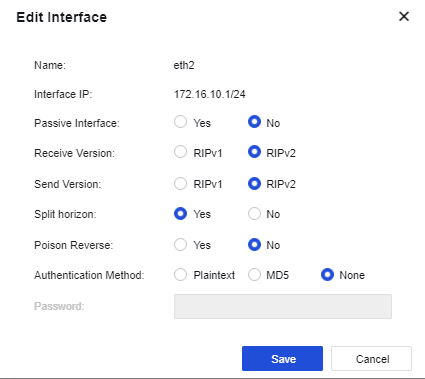
Name: Name of the interface mapping to the network segment where the device is deployed.
Interface IP: IP address of the interface.
Passive Interface: Specify the working state of RIP on the interface. It is set to No by default.
Receive Version: Specify the version of RIP messages received from the interface. When the Receive Version is selected as RIPv2, both RIPv1 and RIPv2 messages can be received.
Send Version: Specify the version of RIP messages sent from the interface. RIPv1 messages are transmitted in broadcast mode; while RIPv2 messages are transmitted in broadcast or multicast (default) mode. When the Send Version is selected as RIPv2, both RIPv1 and RIPv2 messages can be transmitted.
Split horizon: The route learned from an interface must not be transmitted from the same interface. This avoids the route loop to some extent. Split horizon is allowed by default.
Poison Reverse: After Poison Reverse is enabled, the route received from an interface will flood out of this interface. However, the metric of this route is infinite. Poison Reverse is not enabled by default.
Authentication Method: Plaintext, MD5, and None are available for selection. RIPv1 does not support message authentication, while RIPv2 supports plaintext authentication and MD5 authentication.
Password: Set the password for plaintext authentication or MD5 authentication.


 {{ $t('index.defaultHeader.chromeBrowserTip') }}