


{{ secondMenu.name }}






Advanced App Signatures database is used to identify various app categories of Internet data. It has a different judgment method from the Application Signatures database, which can identify some encrypted data, such as plaintext or ciphertext of P2P apps, Skype, SSL, Sangfor VPN data identification, and data of proxy tools. The configuration is shown in the figure below.
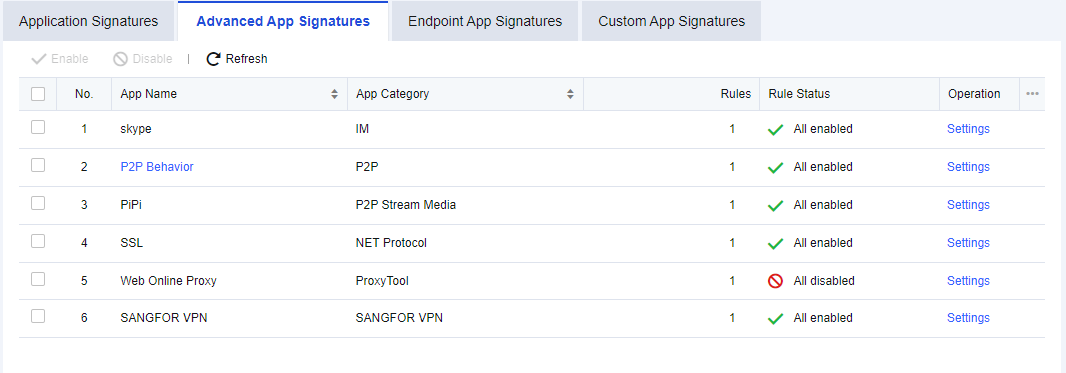
Enabling/Disabling advanced app signature rules
Navigation to Objects > Content Identification Database > Application Signatures, click the Advanced App Signatures tab, as shown below.
Select the specific app, for example, "skype" and click Disable or Enable. You can disable or enable the intelligent identification rules of Skype.
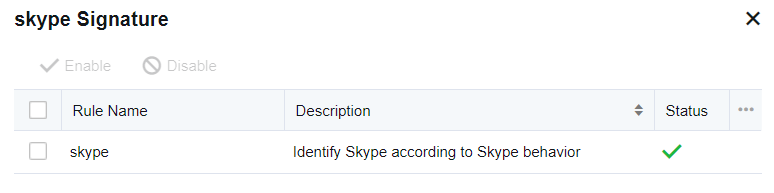
If you want to disable or enable a rule in a specific app, such as disabling a rule in the "skype", click Settings. The signature rules editing box will appear, listing all relevant rules of "skype". Select a rule and click Enable or Disable to disable or enable the rule.
Editing P2P behavior identification rules
P2P behavior identification rules supplement app feature identification and intelligently identify P2P data that cannot be recognized in the app signatures database. P2P behavior rules can be edited. Click P2P Behavior, and the Advanced App Signatures dialog box appears.
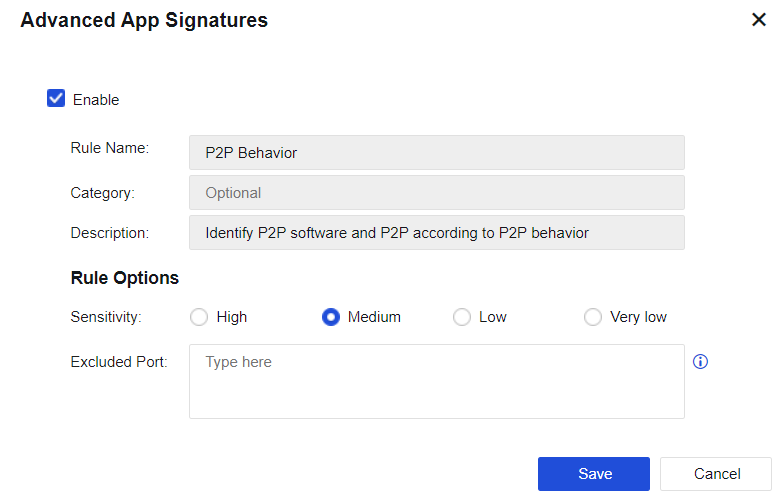
Enable: You can select this option to enable the current rule.
Rule Name, Category, and Description cannot be edited.
Sensitivity: Set the sensitivity of the rule. Four options are provided: High, Medium, Low, and Very low. You can adjust the detection sensitivity as needed. Intelligent P2P identification may lead to misjudgment, so sensitivity is used to set the judgment standard. The sensitivity decreases from high to extra-low. You can adjust the sensitivity level according to the identification of specific data. For example, if there is much data, and the ports for data connection are random high-end ports with uncertain target addresses, these data may be unidentified P2P data. In this case, you may use higher sensitivity. If some apps do not contain P2P data but are identified as P2P, the sensitivity level may be set higher. In this case, you can lower the sensitivity level properly.
Excluded Port: Specify the excluded port. If the target data port is excluded, the device does not perform P2P intelligent identification on such data. It can avoid misjudgment to some extent.


 {{ $t('index.defaultHeader.chromeBrowserTip') }}