


{{ secondMenu.name }}






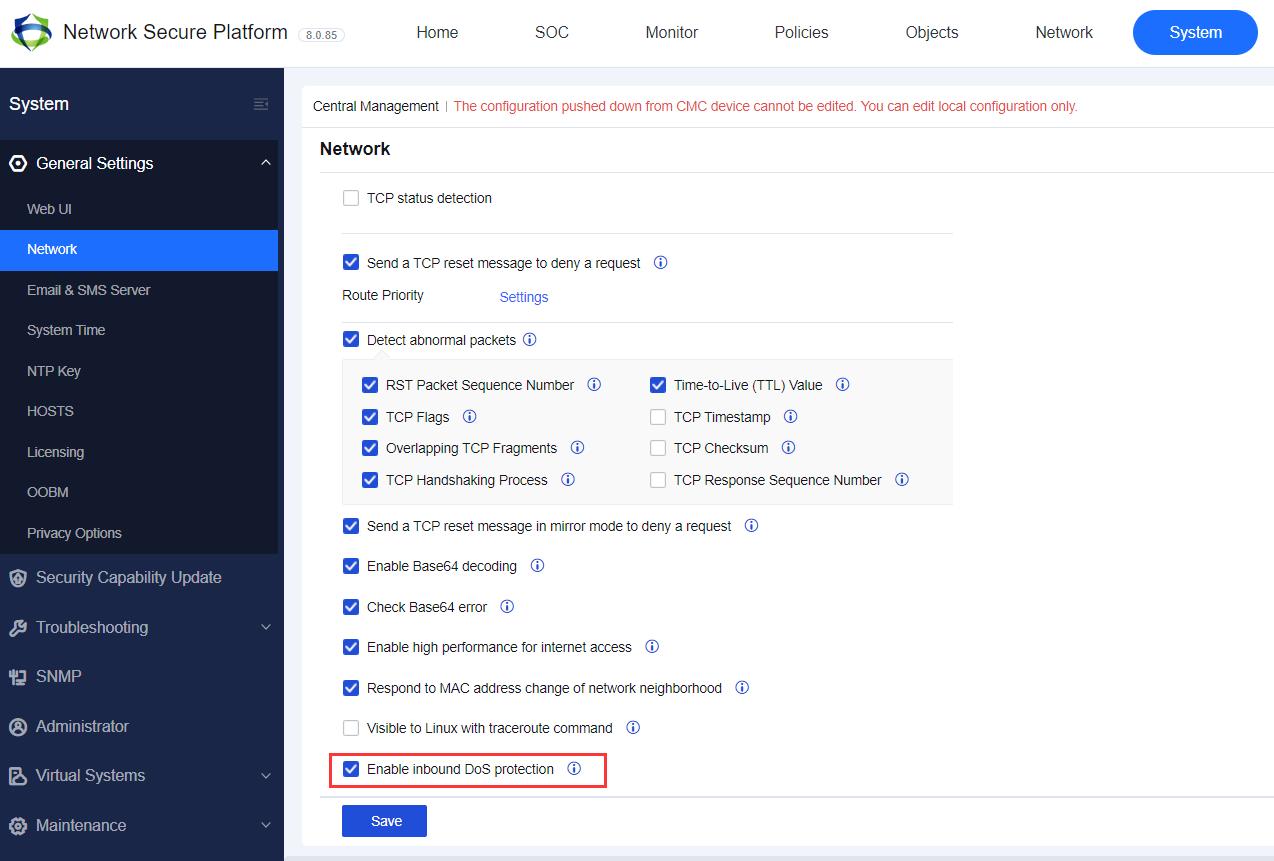
The WAN initiates DoS attacks on the LAN, which consume server resources and seriously affect business continuity. Therefore, DoS attacks on the WAN have become mainstream DoS attack means. By default, the inbound attack protection policy is disabled. To enable it, navigate to System > General Settings > Network, as shown in the following figure.
On the Anti-DoS/DDoS page, click Add, and select Inbound Attack Protection. Then, the Add Inbound Attack Protection Policy dialog box appears, as shown in the following figure.
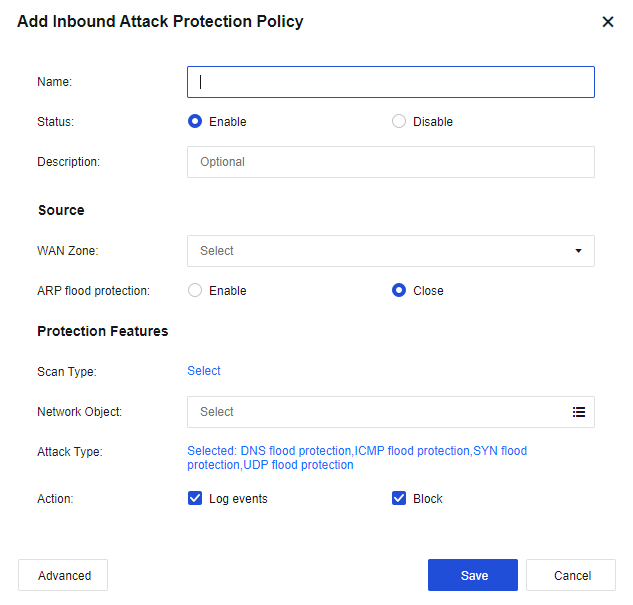
Name: Enter the name of the protection policy.
Description: Enter the description of the policy.
Source
WAN Zone: Select the source zone to be protected. The source zone of WAN protection is usually an external one.
ARP flood protection: Select this option to enable protection against ARP flood attacks. You can set the Per-Src-Zone Packets Threshold (packets/sec) parameter. If the interface of the zone receives more ARP packets per second than the threshold, it indicates that an attack has occurred. If you select Block for the Action parameter in the lower part of the page, the ARP packets exceeding the threshold will be dropped after an attack is detected.
Protection Features
Scan Type: Select IP Scan and Port Scan. See the figure below.
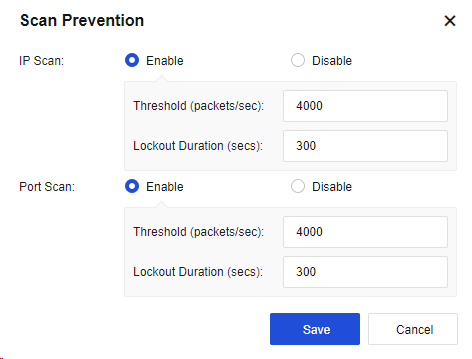
IP Scan: Enable this function and set the Threshold (packets/sec) parameter. If IP address scanning packets received from the source zone per second exceed the threshold, it indicates that an attack has occurred. If you select Block for the Action parameter in the lower part of the page, all data of the source IP address will be blocked within 5 minutes after an attack is detected. The lockout will end in 5 minutes. The number of scanning packets of the IP address will then be calculated once again.
Port Scan: Enable this function and set the Threshold (packets/sec) parameter. If port scanning packets received from the source zone per second exceed the threshold, it indicates that an attack has occurred. If you select Block for the Action parameter in the lower part of the page, all data of the source IP address will be blocked within 5 minutes after an attack is detected. The lockout will end in 5 minutes. The number of port scanning packets of the IP address will then be calculated once again.
Network Object: Indicate the object to be protected, generally the destination IP address.
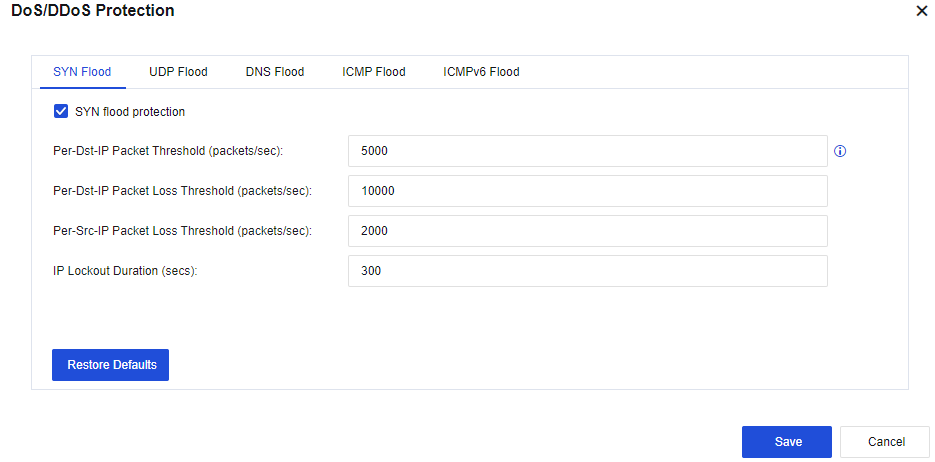
Attack Type: Click Selected: DNS flood protection,ICMP flood protection,SYN flood protection,UDP flood protection to set the respective thresholds for SYN Flood, UDP Flood, DNS Flood, and ICMP Flood, as shown in the following figure.
SYN Flood:
Per-Dst-IP Packet Threshold (packets/sec): Record the packets per second (PPS) of the SYN packets reaching each destination IP address. If the PPS exceeds the preset value, the NSF SYN proxy mechanism will be triggered to release the server's load. It is recommended to set this threshold lower than the packet loss threshold (half of the packet loss threshold is the best). Valid values: 1 to 100,000,000.
Per-Dst-IP Packet Loss Threshold (packets/sec): Record the PPS of the SYN packets reaching each destination IP address. If the PPS exceeds the preset value, the protection mechanism will be triggered. Valid values: 1 to 100,000,000.
Per-Src-IP Packet Loss Threshold (packets/sec): Record the PPS of the SYN packets reaching each source IP address. If the PPS exceeds the preset value, the protection mechanism will be triggered. Valid values: 1 to 100,000,000.
IP Lockout Duration (secs): Indicate the time after which lockout automatically starts when an event is triggered. Valid values: 0 to 1,800s. You can view attack IP addresses and lockout duration in the attacker list.
UDP Flood:
Per-Dst-IP Packet Loss Threshold (packets/sec): Record the PPS of the UDP packets reaching each destination IP address. If the PPS exceeds the preset value, the protection mechanism will be triggered. Valid values: 0 to 100,000,000.
Per-Src-IP Packet Loss Threshold (packets/sec): Record the PPS of the UDP packets reaching each source IP address. If the PPS exceeds the preset value, the protection mechanism will be triggered. Valid values: 0 to 100,000,000.
IP Lockout Duration (secs): Indicate the time after which lockout automatically starts when the PPS per destination IP address and the PPS per source IP address exceed the preset value. Valid values: 0 to 1,800s. You can view attack IP addresses and lockout duration in the attacker list.
DNS Flood:
Per-Dst-IP Packet Loss Threshold (packets/sec): Record the PPS of the DNS packets reaching each destination IP address. If the PPS exceeds the preset value, the protection mechanism will be triggered. Valid values: 0 to 100,000,000.
Per-Src-IP Packet Loss Threshold (packets/sec): Record the PPS of the DNS packets reaching each source IP address. If the PPS exceeds the preset value, the protection mechanism will be triggered. Valid values: 0 to 100,000,000.
IP Lockout Duration (secs): Indicate the time after which lockout automatically starts when the PPS per destination IP address and the PPS per source IP address exceed the preset value. Valid values: 0 to 1,800s. You can view attack IP addresses and lockout duration in the attacker list.
ICMP Flood:
Per-Dst-IP Packet Loss Threshold (packets/sec): Record the PPS of the ICMP packets reaching each destination IP address. If the PPS exceeds the preset value, the protection mechanism will be triggered. Valid values: 0 to 100,000,000.
Per-Src-IP Packet Loss Threshold (packets/sec): Record the PPS of the ICMP packets reaching each source IP address. If the PPS exceeds the preset value, the protection mechanism will be triggered. Valid values: 0 to 100,000,000.
IP Lockout Duration (secs): Indicate the time after which lockout automatically starts when the PPS per destination IP address and the PPS per source IP address exceed the preset value. Valid values: 0 to 1,800s. You can view attack IP addresses and lockout duration in the attacker list.
Action: Select Log events and Block.
Click Advanced. Then, you can select options to enable the protection on the Packet-Based Attack, Bad IP Options, and Bad TCP Options tabs. By default, the options are not selected. See the figure below.
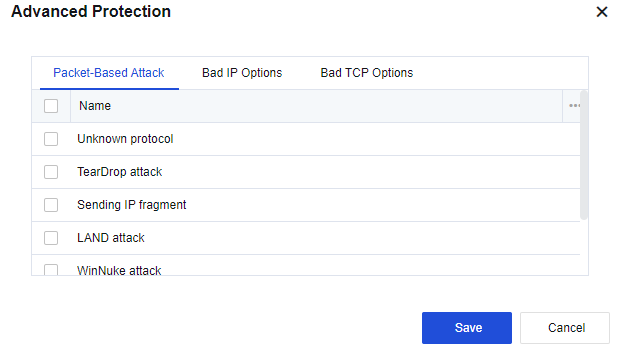
Packet-Based Attack
Unknown protocol: Select this option to enable the unknown protocol type protection. A protocol with an ID greater than 137 is considered being an unknown protocol type.
TearDrop attack: Select this option to enable TearDrop attack protection. Defense against TearDrop attacks is achieved by strict control over the fragment offset length of IP headers. If the fragment offset of an IP header does not comply with requirements, it indicates that a TearDrop attack has occurred.
Sending IP fragment: By default, the fragmented transmission of IP data blocks is not allowed. If the fragmented transmission occurs, it indicates that an attack has occurred.

Do not select this option unless it is a special case. Otherwise, the network connection may be interrupted.
LAND attack: Select this option to enable the LAND attack protection. If the device finds that the source and destination IP addresses of a packet are the same, the packet is considered a LAND attack.
WinNuke attack: Select this option to enable WinNuke attack protection. If a TCP packet header's URG flag bit is 1 and the destination port is TCP port 139 or TCP port 445, the packet is considered as a WinNuke attack.
Smurf attack: Select this option to enable the Smurf attack protection. If the device finds that the address responded by a packet is the ICMP response request packet of the network's broadcast address, the packet is considered a Smurf attack.
Large size ICMP packet(>1024B)#Ping of death : When an ICMP message is greater than 1024, it is considered an attack.
Bad IP Options
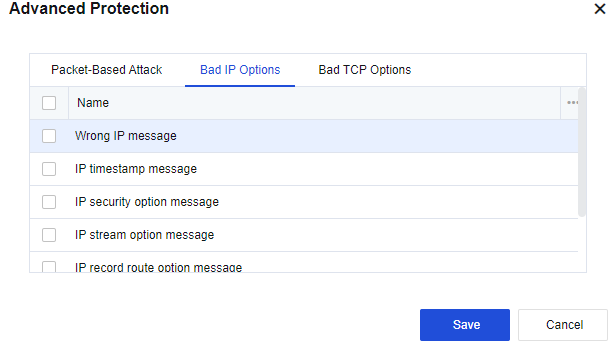
IP messages can include options such as IP timestamp message, IP security option message, IP stream option message, IP record route option message, IP loose source route option message, IP strict source route option message.
Common IP messages generally do not carry these additional options. IP messages with such options usually aim at attacking. If data messages are not allowed to carry these options, select the corresponding options for protection.
If you do not allow IP messages to carry unknown IP message options other than those listed above, select Wrong IP message.
Bad TCP Options
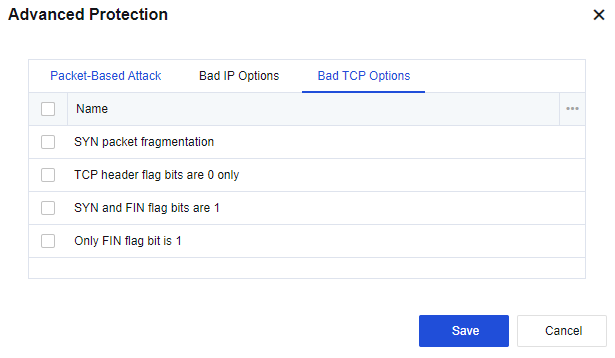
The Bad TCP Options tab includes the following options: SYN packet fragmentation, TCP header flag bits are 0 only, SYN and FIN flag bits are 1, and Only FIN flag bit is 1. Normal TCP message flags will never have these features and the target host may not be able to handle TCP messages with these features and thus become abnormal. If you select the options, the device will protect against messages with the corresponding features.
Finally, click Save to save the settings of the inbound attack protection policy.
To add more inbound attack protection policies, click Add.
To modify an existing inbound attack protection policy, click the name of the policy.
To delete a policy, select the policy and click Delete in the Operation column.
Click Enable to enable the policy.
Click Disable to disable the policy.
Click More > Move Up or Move Down to adjust the order of the policy.
For policy matching, the policy in the higher position will be matched first.
1. Data packet matching is conducted from the top down and will stop after a packet matches an attack activity and is dropped. A data packet continues to check whether it matches the set attack activities until it matches one.
2. If you have set scanning protection, it is good to set the information as well, such as ICMP Flood in the DoS/DDoS Protection dialog box.
3. The intrusion of a hacker generally begins by scanning whether the IP addresses exist. If so, the hacker continues to scan ports. The hack will proceed to the next attack activity after the IP address and port are discovered. Some hackers may already know the IP addresses and ports and directly initiate attacks without performing scanning. Therefore, it is better to set both protection options for effective protection against attack activities.


 {{ $t('index.defaultHeader.chromeBrowserTip') }}