


{{ secondMenu.name }}






To block some LAN addresses that need to be banned from accessing the WAN or block some public addresses that access attacked servers. Administrators can perform the following operations on the permanent blacklist.
| Operation |
Note |
| Edit |
Select the permanent blacklist that needs to be edited to modify the address and description. Then click Save. |
| Delete |
Select the permanent blacklist that needs to be deleted. Then click Delete. |
| Clear All |
All addresses on the permanent blacklist will be cleared. |
| Import/Export |
Import and export the permanent blacklist. |
| Refresh |
Refresh the data of the current list. |
| Search |
You can search for a specific address. |
Table 7:Permanent Blacklist Operation Options
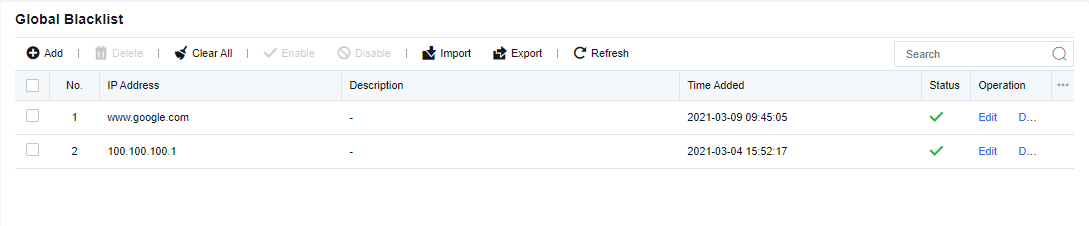
Click Add. Enter the IP addresses to be blocked and the description. Then, click Save to submit it.
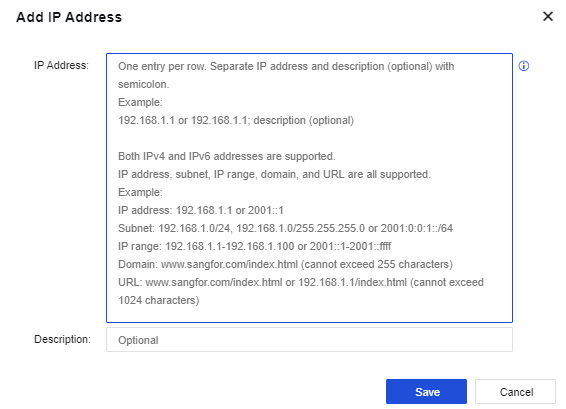
IP address: Supports IPv4, IPv6, domain name, and URL, including single address, IP network segment, and IP range.


 {{ $t('index.defaultHeader.chromeBrowserTip') }}