


{{ secondMenu.name }}






In IoT Security > Asset Discovery, select a scope for Asset Scope and check Enable active endpoint scan. Identified assets are displayed on the Assets page after the scan is complete, as shown in the following figure.
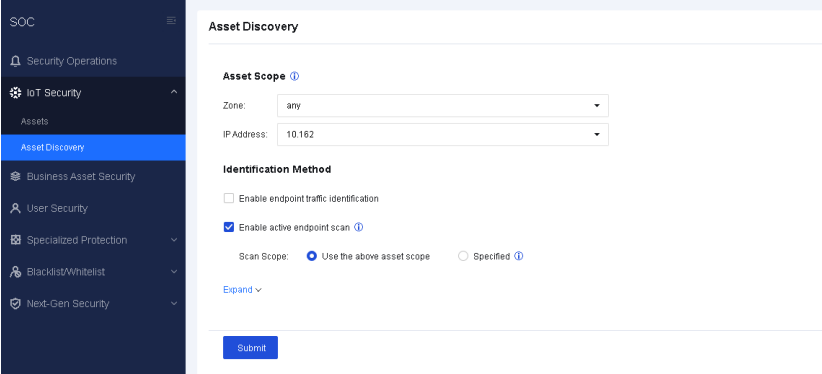

Enable active endpoint scan is not recommended for medical scenarios because unexpected risks may arise in medical devices.
On the Advanced page, you can set asset scan intervals and inactive asset deletion policies, as shown in the following figure.
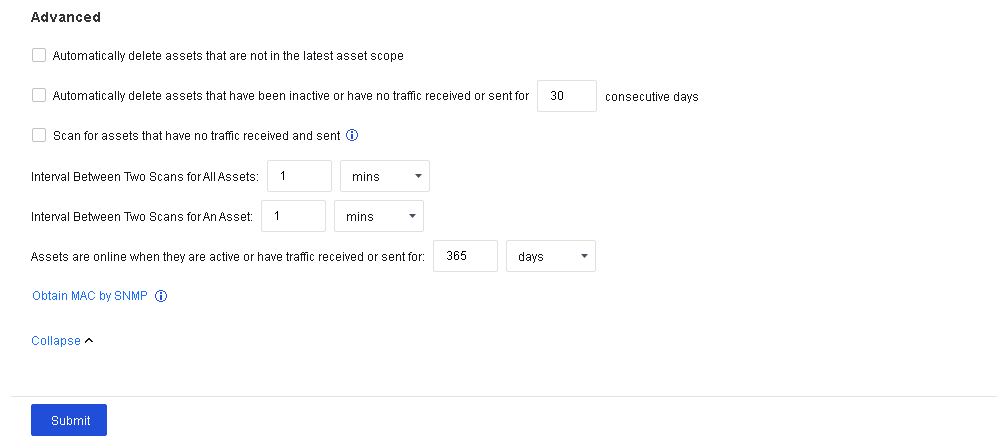
| Feature |
Description |
| Automatically delete assets that are not in the latest asset scope |
When checked, assets that are not in the IP range specified in Asset Scope are automatically deleted from Assets. |
| Automatically delete assets that have been inactive or have no traffic received or sent for 30 consecutive days |
Assets that have been inactive or have no traffic received or sent for a specified number of consecutive days are automatically deleted. When integrated with Cyber Command, this feature is not displayed, and the automatic asset deletion time is determined by the time defined by Cyber Command for moving assets to inactive. |
| Scan for assets that have no traffic received and sent |
The default concurrency for IP address scanning is 50. When this option is checked, the concurrency for IP address scanning by an individual CPU is 256, which significantly improves asset identification speed. |
| Interval between two scans for all assets |
The interval between two consecutive scans of assets within the specified scan scope. |
| Interval between two scans for an asset |
The interval between two consecutive scans of an asset. Assets identified in a scan have a cooldown period, during which the assets are not scanned until the cooldown period expires. |
| Assets are online when they are active or have traffic received or sent for a custom period of time |
When checked, assets with received or sent traffic detected by Network Secure are displayed as online. |
| Obtain MAC by SNMP |
For a cross-network segment asset scan, Network Secure can obtain the device's IP address, type, and vendor, but not the MAC address. To obtain the MAC address, click Obtain MAC by SNMP. For details, see the Obtain MAC by SNMP section under Policies > Authentication > User Authentication > Authentication Options. |
Table 5:Features


 {{ $t('index.defaultHeader.chromeBrowserTip') }}