Athena NGFW (Next-Generation Firewall)

Athena NGFW (previously known as Network Secure) provides comprehensive protection for every network perimeter, ensuring the safety of your valuable assets, data, and users from emerging threats.
{{ $t('productDocDetail.guideClickSwitch') }}
{{ $t('productDocDetail.know') }}
{{ $t('productDocDetail.dontRemind') }}
8.0.85
{{sendMatomoQuery("Athena NGFW (Next-Generation Firewall)","Check the Running Condition of the Device")}}

Check the Running Condition of the Device

{{ $t('productDocDetail.updateTime') }}: 2026-01-06

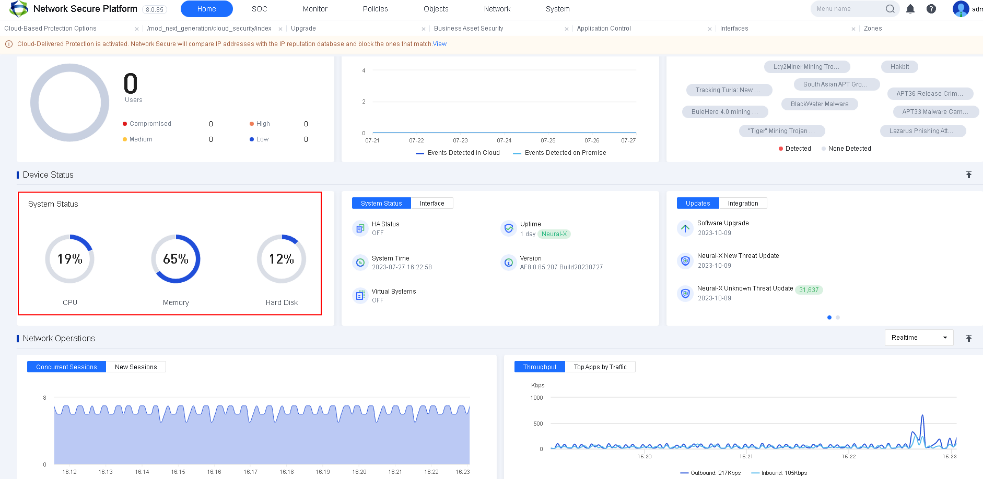
Check whether the usage ratio of the CPU, memory, and disk is high for a long time according to the system status on the device console. If so, follow the steps below:

 

A screenshot of a computer

Description automatically generated

A black and white logo

Description automatically generated

After logging in to the device, the first page will show the system status.

  1. Navigate to Home > Network Operations > Throughput and check whether the current bandwidth is in full load all the time.
  1. Navigate to Home > Network Operations > Concurrent Sessions/New Sessions and check whether the emergency concurrent sessions or new sessions are generated.
  2. Enable the Anti-DoS attack module for the device and check whether the device is suffering from DoS attacks. Go to Monitor > Logs > Security Logs to view the anti-DoS attack logs.
  3. Check whether any process runs abnormally. (Contact Sangfor Technical Support for confirmation.)


