


{{ secondMenu.name }}






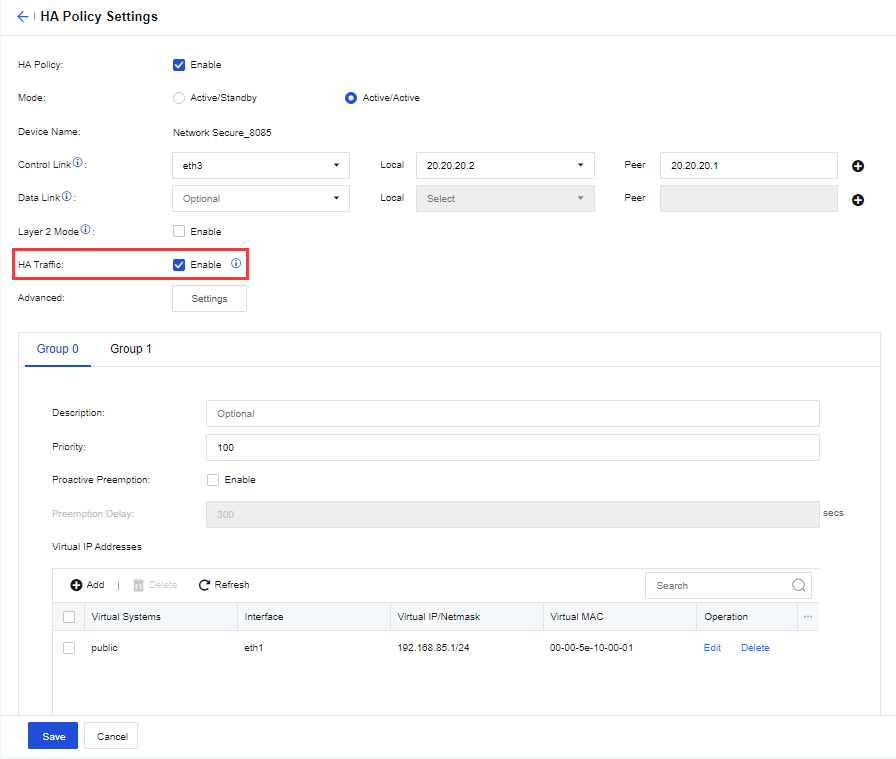
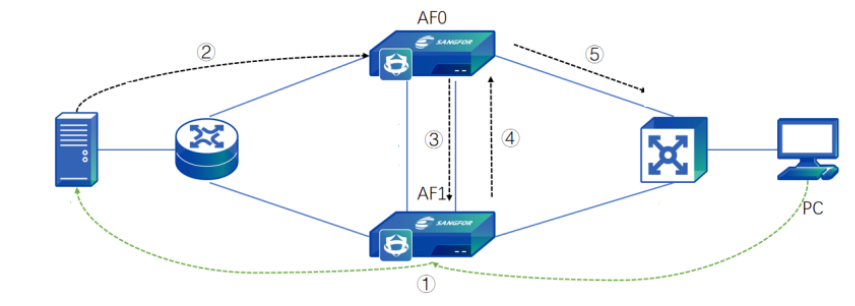
If you use Network Secure devices in the active/active or active/active Layer 2 mode, and the upstream and downstream devices of the Network Secure devices are routers, you need to enable HA Traffic to avoid traffic inconsistency. Otherwise, do not enable this option. When enabled, Network Secure determines, based on the hash algorithm, whether to send the packet received from the service interface to the peer device through the synchronization interface for a security check. This ensures that all packets from the same flow undergo security checks on the same device, avoiding network unavailability and ineffectiveness of security checks due to asymmetric routing. After the security check, the peer device sends the packet back through the synchronization interface so the local device can forward the packet. This prevents network unavailability caused by dropped packets in the downstream device's routing interface due to mismatched destination MAC addresses. The configurations are shown in the following figure.
The workflow is as follows:


 {{ $t('index.defaultHeader.chromeBrowserTip') }}