


{{ secondMenu.name }}






The Certificate is intended for establishing sessions between the Sangfor device and the client. To view the current certificate or to generate a certificate for the Sangfor device, navigate to Network > SSL VPN > Certificate, as shown in the figure below:
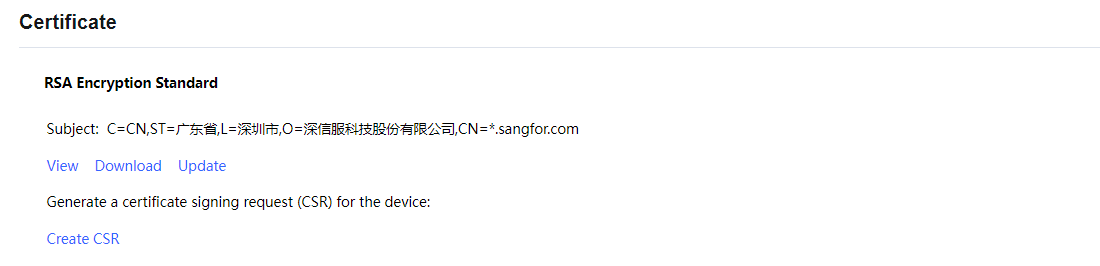
The Certificate page includes the following contents:
View: Click it to view the detailed information of the current certificate.
Download: Click it to download the current device certificate.
Update: Click it to import a new certificate to take the place of the current one.
Create CSR: Click it to enter the Create a CSR for Device page to generate a certificate signing request (CSR) sent to the external CA to generate the device certificate. The page is as shown in the figure below:
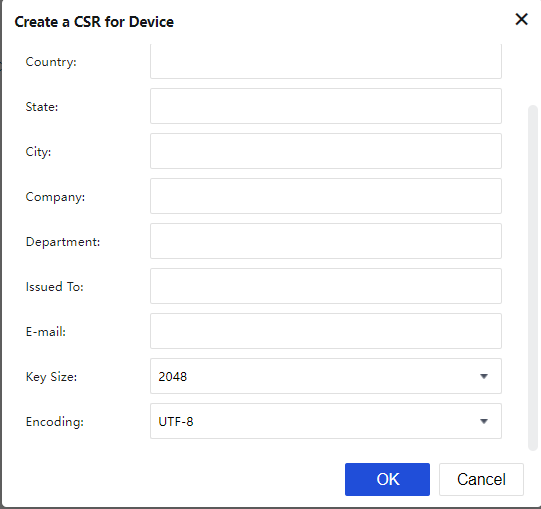
Configure the required fields and then click the OK button.
Once the certificate signing request is generated, click the Download link to download the request.


 {{ $t('index.defaultHeader.chromeBrowserTip') }}