


{{ secondMenu.name }}






Users and groups are managed in a hierarchic structure. Users with similar attributes could be classified into a group further included in another higher-level user group. This kind of management is similar to and compatible with the interior organization structure of an enterprise, facilitating the management of VPN users. The Local Users page is shown below:
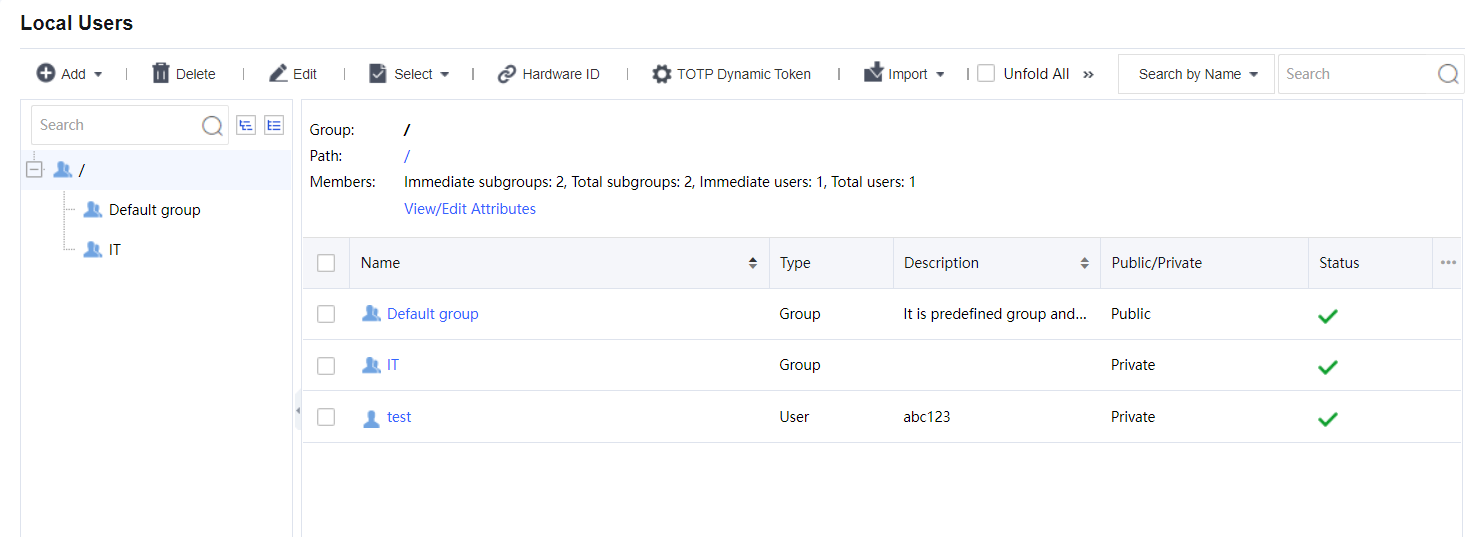
In the left pane, there is a tree of user groups. Click a group name, and that group's subgroups and direct users will be seen in the right pane, with group information (Group, Path, Members) displaying above the right pane.
To search for a group, enter the keyword of the group name into the search box in the left pane and click the magnifier icon. The group will be highlighted in bold if found.
To see all direct and indirect users of the selected group, click Unfold All.
To delete the selected user or group, click Delete.
To choose the desired entries, click Select > User or Group > On Current Page or On All Pages.
To deselect entries, click Select > Deselect.
To edit the attributes of a user or group, select the user or group and click Edit to enter the Edit User or Edit User Group page.


 {{ $t('index.defaultHeader.chromeBrowserTip') }}