


{{ secondMenu.name }}






Network Secure redistributes all routing information by default. You can filter redistributed routing information by route map. The route map consists of route matching rules and actions (allow or deny) to be taken after successful matching. If the redistributed routing information hits any route matching rule, Network Secure takes the corresponding action to allow or deny the redistributed routing information.
A route map is a local map created for OSPF and BGP routes. It allows you to adjust the priorities of routes and control their forwarding. On the Route Maps page, click Add. The Add Route Map dialog box appears, as shown in the following figure.
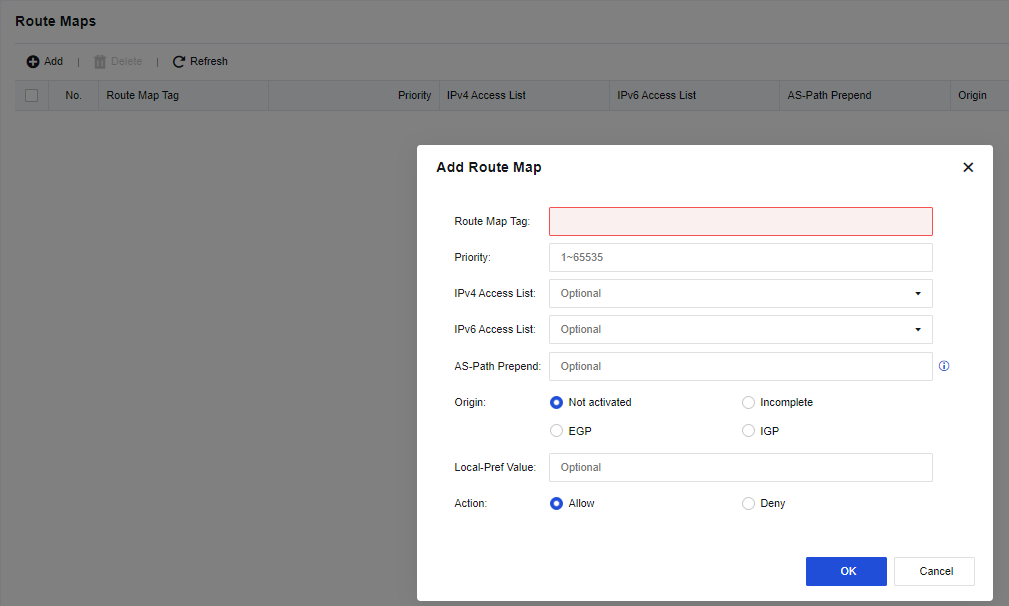
Route Map Tag: Enter a name for the map.
Priority: Enter a priority for the map.
IPv4 Access List: Enter the number of the configured IPv4 access list.
IPv6 Access List: Enter the number of the configured IPv6 access list.
AS-Path Prepend: Enter an AS number.
Origin: Select an original attribute. Not activated is selected by default. Other options include Incomplete, EGP, and IGP.
Local-Pref Value: Enter the priority of the local device.
Action: Specify whether to Allow or Deny the map.


 {{ $t('index.defaultHeader.chromeBrowserTip') }}